



Control Remoto de Brazo Robot 6 DOF con Arduino vía Interfaz Web
Componentes y Suministros
| Componente | Descripción | Cantidad |
|---|---|---|
| Arduino UNO | 1 | |
| PHPoC WiFi Shield para Arduino | 1 | |
| Brazo Robot 6DOF | 1 |
Sobre este Proyecto
Si eres principiante, recomiendo leer los siguientes tutoriales:
- Arduino - Motor
- Arduino - Servomotor
- Arduino - WiFi
1. Demostración
2. Interfaz de Usuario


El brazo robot tiene 6 motores.
- Zona A: Controla motores 2, 3, 4 (controla tres articulaciones de la mano)
- Zona B: Controla motor 1 (controla la base)
- Zona C: Controla motor 5 (controla rotación de la pinza)
- Zona D: Controla motor 6 (controla la pinza)
3. Arquitectura del Sistema

4. Flujo de Trabajo
Lado Cliente (interfaz de usuario web - escrita en JavaScript + HTML + CSS)
Cuando un usuario toca o desliza el dedo (o hace clic o mueve el ratón), podemos obtener la coordenada (x, y). El flujo de trabajo es el siguiente:

En el caso de la Zona A, para calcular los ángulos de los motores 2, 3, 4, necesitamos hacer algunos cálculos geométricos. Puedes consultarlo al final de esta página.
Lado Servidor (código Arduino):
Una vez recibido un conjunto de ángulos desde los clientes, los seis motores se mueven desde los ángulos actuales a los nuevos ángulos gradualmente. Los seis motores deben moverse y alcanzar los nuevos ángulos al mismo tiempo. Antes de entrar en detalle de cómo controlar todos los motores, veamos cómo controlar un solo motor. Supongamos que queremos mover un motor desde el ángulo actual (angle) al nuevo ángulo (new_angle). Dado que la velocidad del motor es alta, deberíamos reducirla. Para hacer eso, se repiten los dos siguientes pasos hasta que el motor alcance el nuevo ángulo:
- Mover el motor con un pequeño paso.
- Pausar un pequeño tiempo y luego mover otro paso.
El siguiente diagrama ilustra el esquema anterior en caso de que el nuevo ángulo sea mayor que el actual:

Donde step_num es el número de pasos que el motor debe dar. step y time son valores predefinidos. Estos dos últimos deciden la velocidad y suavidad. Lo anterior es solo para un robot. Para hacer que los robots comiencen a moverse y lleguen al destino al mismo tiempo, podemos hacer lo siguiente: Los seis motores toman el mismo step_num, pero el step de cada motor es diferente. Así que tenemos que elegir step_num en este proyecto como el máximo.
Generalmente, el flujo de trabajo de Arduino es el siguiente:

5. Cálculo Geométrico (Cinemática Inversa)
Convertiremos el cálculo del brazo robot en el siguiente problema geométrico:
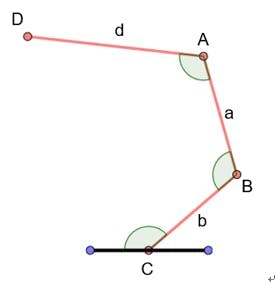
Datos Conocidos
- C es fijo
- Punto conocido - D es la entrada del usuario
- Punto conocido - CB, BA, AD (denotados por b, a, d respectivamente)
- Longitudes de cada segmento del brazo
Objetivo: Encontrar ángulos C, B, A
Solución:
- Suponemos que el ángulo B y A son iguales
- Agregamos algunos puntos y segmentos adicionales
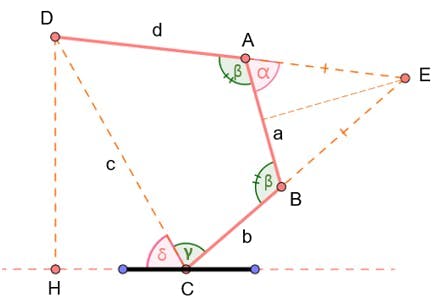
Cálculo
- Sabemos los puntos C y D ⇒ podemos calcular la longitud de DC (denotada por c)
- También podemos calcular δ
- Mirando el triángulo ABE, inferimos que AE = BE y ∠E = π - 2α.
- Así:

- Ley de Cosenos en el triángulo CDE:

- Cambiar (1) y (2) en (3), tenemos:

Simplificación
- Simplificando lo anterior:

- Como conocemos a, b, c y d, resolvemos la ecuación cuadrática anterior y calculamos el valor de α. - Y β = π – α
- Hasta ahora encontramos β, encontremos γ - Ley de Cosenos en triángulos BDC y BDA:
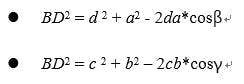
- Resolviendo este sistema de ecuaciones, calculamos γ.
- Así, sus ángulos requeridos son: (δ+γ), β y β. Estos son los ángulos de los motores 2, 3 y 4, respectivamente.
6. Código Fuente
El código fuente incluye dos archivos:
- RobotArmWeb.ino: Código Arduino
- Remote_arm.php: Código de la app web, que se sube al PHPoC WiFi Shield o PHPoC Shield. (Ver instrucciones en este artículo).
También necesitas subir el archivo de imagen flywheel.png al PHPoC Shield.

Referencias de Funciones
- Arduino - Librería Servo
- Servo.attach()
- Servo.write()
- Servo.writeMicroseconds()
- Servo.read()
- Servo.attached()
- Servo.detach()
- Serial.begin()
- Serial.println()
Código
RobotArmWeb (Arduino)
#include <Phpoc.h>
#include <Servo.h>

int angle_init[] = {90, 101, 165, 153, 90, 120}; // cuando el motor está recto. En web, el ángulo cuando el motor está recto es {0, 90, 130, 180, 0, 0};
int angle_offset[] = {0, 11, -15, -27, 0, 137}; // offset entre servo real y ángulo en web
int cur_angles[] = {90, 101, 165, 153, 90, 120}; // ángulos actuales de los seis motores (grados)
int dest_angles[] = {0, 0, 0, 0, 0, 0}; // ángulos destinados
int angle_max[] = {180, 180, 160, 120, 180, 137};
int angle_min[] = {0, 0, 0, 20, 0, 75};
int direction[] = {1, 1, 1, 1, 1, -1};
int angleSteps[] = {3, 2, 2, 2, 4, 4}; // pasos de movimiento de cada motor (grados)

Servo servo1, servo2, servo3, servo4, servo5, servo6;
Servo servo[6] = {servo1, servo2, servo3, servo4, servo5, servo6};

PhpocServer server(80);
PhpocClient client;
int stepNum = 0;

void setup() {
  Serial.begin(9600);
  Phpoc.begin(PF_LOG_SPI | PF_LOG_NET);
  server.beginWebSocket("remote_arm");

  servo1.attach(2);
  servo2.attach(3);
  servo3.attach(4);
  servo4.attach(5);
  servo5.attach(6);
  servo6.attach(7);

  for(int i = 0; i < 6; i++) servo[i].write(angle_init[i]);
}

void loop() {
  PhpocClient client = server.available();
  if(client) {
    String angleStr = client.readLine();
    if(angleStr) {
      Serial.println(angleStr);
      int commaPos1 = -1;
      int commaPos2;
      for(int i = 0; i < 5; i++) {
        commaPos2 = angleStr.indexOf(',', commaPos1 + 1);
        int angle = angleStr.substring(commaPos1 + 1, commaPos2).toInt();
        dest_angles[i] = angle * direction[i] + angle_offset[i];
        commaPos1 = commaPos2;
      }
      int angle5 = angleStr.substring(commaPos1 + 1).toInt();
      dest_angles[5] = angle5 * direction[5] + angle_offset[5];
      stepNum = 0;

      // Cálculo de pasos para movimiento suave
      for(int i = 0; i < 6; i++) {
        int dif = abs(cur_angles[i] - dest_angles[i]);
        int step = dif / angleSteps[i];
        if(stepNum < step) stepNum = step;
      }
    }
  }

  // Mover motores paso a paso
  if(stepNum > 0) {
    for(int i = 0; i < 6; i++) {
      int angleStepMove = (dest_angles[i] - cur_angles[i]) / stepNum;
      cur_angles[i] += angleStepMove;
      if(cur_angles[i] > angle_max[i]) cur_angles[i] = angle_max[i];
      else if(cur_angles[i] < angle_min[i]) cur_angles[i] = angle_min[i];
      servo[i].write(cur_angles[i]);
    }
    stepNum--;
    delay(20);
  }
}
remote_arm.php (PHP)
<!DOCTYPE html>
<html>
<head>
<title>Arduino - Arm Robot - Web</title>
<meta name="viewport" content="width=device-width, initial-scale=0.9">
<style>
  body { text-align: center; }
  canvas { background-color: #FFFFFF; }
</style>
<script>
  var MOTOR_1 = 0, MOTOR_2 = 1, MOTOR_3 = 2, MOTOR_4 = 3, MOTOR_5 = 4, MOTOR_6 = 5;
  var ARM_LENGTH_1 = 95, ARM_LENGTH_2 = 88, ARM_LENGTH_3 = 155;
  var SOLE_WIDTH = 160, SOLE_HEIGHT = 73;
  var flywheel_img = new Image();
  flywheel_img.src = "flywheel.png";

  var zone_A_radius = ARM_LENGTH_1 + ARM_LENGTH_2 + ARM_LENGTH_3;
  var pivot_x = zone_A_radius + 5;
  var pivot_y = zone_A_radius + 5;
  var zone_B_radius = 100;
  var zone_B_center_x = pivot_x / 2;
  var zone_B_center_y = -(zone_B_radius + SOLE_HEIGHT + 20);
  var zone_B_last_angle = 0;
  var zone_C_radius = 70;
  var zone_C_center_x = -pivot_x / 2;
  var zone_C_center_y = -(zone_B_radius + SOLE_HEIGHT + 20);
  var zone_C_last_angle = 0;
  var zone_D_width = 30;
  var zone_D_height = 200.0;
  var zone_D_center_x = 0;
  var zone_D_center_y = -(zone_B_radius + SOLE_HEIGHT + 110);
  var grip_height = 70;
  var grip_width = 100;
  var canvas_width = zone_A_radius * 2 + 10;
  var canvas_height = zone_A_radius + SOLE_HEIGHT + zone_B_radius * 2 + 180;
  var grip_max_angle = 62.0;
  var click_state = 0;
  var mouse_xyra = {x:0, y:0, r:0.0, a:0.0};
  var angles = [90, 90, 180, 180, 90, 17];
  var ws = null;
  var servo = null, ctx = null;
  var last_time;
  var a = 0, b = 0, c = 0;

  function init() {
    servo = document.getElementById("servo");
    servo.width = canvas_width;
    servo.height = canvas_height;
    servo.addEventListener("touchstart", mouse_down);
    servo.addEventListener("touchend", mouse_up);
    servo.addEventListener("touchmove", mouse_move);
    servo.addEventListener("mousedown", mouse_down);
    servo.addEventListener("mouseup", mouse_up);
    servo.addEventListener("mousemove", mouse_move);
    ctx = servo.getContext("2d");
    ctx.translate(pivot_x, pivot_y);
    ctx.rotate(Math.PI);
    // Parámetros de ecuación cuadrática
    a = 4*ARM_LENGTH_1*ARM_LENGTH_3;
    b = 2*(ARM_LENGTH_2*ARM_LENGTH_1 + ARM_LENGTH_2*ARM_LENGTH_3);
    c = Math.pow(ARM_LENGTH_1, 2) + Math.pow(ARM_LENGTH_2, 2) + Math.pow(ARM_LENGTH_3, 2) - 2*ARM_LENGTH_1*ARM_LENGTH_3;
  }

  function update_view() {
    ctx.clearRect(-canvas_width/2, -SOLE_HEIGHT, canvas_width, canvas_height);
    ctx.save();
    // Draw zone A
    ctx.fillStyle = "#D9D9D9";
    ctx.beginPath();
    ctx.arc(0,0,zone_A_radius, 0, 2*Math.PI);
    ctx.fill();
    ctx.fillStyle = "#FFFFFF";
    ctx.fillRect(-pivot_x, -canvas_height + pivot_y, canvas_width, canvas_height - pivot_y - SOLE_HEIGHT);
    // Draw arm segments
    ctx.strokeStyle = "#00979D";
    ctx.fillStyle = "#FF4500";
    ctx.lineWidth = 20;
    ctx.rotate(angles[MOTOR_2] / 180 * Math.PI);
    ctx.beginPath();
    ctx.moveTo(0,0);
    ctx.lineTo(ARM_LENGTH_1,0);
    ctx.stroke();
    draw_pivot(0, 0);
    ctx.translate(ARM_LENGTH_1,0);
    ctx.rotate(-Math.PI + angles[MOTOR_3] / 180 * Math.PI);
    ctx.beginPath();
    ctx.moveTo(0,0);
    ctx.lineTo(ARM_LENGTH_2, 0);
    ctx.stroke();
    draw_pivot(0, 0);
    ctx.translate(ARM_LENGTH_2,0);
    ctx.rotate(-Math.PI + angles[MOTOR_4] / 180 * Math.PI);
    ctx.beginPath();
    ctx.moveTo(0,0);
    ctx.lineTo(ARM_LENGTH_3, 0);
    ctx.stroke();
    draw_pivot(0, 0);
    ctx.restore();
    ctx.strokeStyle = "#00979D";
    ctx.lineWidth = 6;
    // Draw zone B
    var angle = (angles[MOTOR_1] + 45) * Math.PI / 180;
    ctx.save();
    ctx.translate(zone_B_center_x, zone_B_center_y);
    ctx.rotate(angle);
    ctx.drawImage(flywheel_img, -zone_B_radius, -zone_B_radius, zone_B_radius*2, zone_B_radius*2);
    ctx.beginPath();
    ctx.arc(0, 0, zone_B_radius, 0, 2*Math.PI);
    ctx.stroke();
    ctx.restore();
    // Draw zone C
    angle = (angles[MOTOR_5] + 45) * Math.PI / 180;
    ctx.save();
    ctx.translate(zone_C_center_x, zone_C_center_y);
    ctx.rotate(angle);
    ctx.drawImage(flywheel_img, -zone_C_radius, -zone_C_radius, zone_C_radius*2, zone_C_radius*2);
    ctx.beginPath();
    ctx.arc(0, 0, zone_C_radius, 0, 2*Math.PI);
    ctx.stroke();
    ctx.restore();
    // Draw zone D
    ctx.fillStyle = "#00DEE6";
    ctx.lineWidth = 15;
    var grip_dist = Math.floor(angles[MOTOR_6] / grip_max_angle * zone_D_height);
    ctx.fillRect(zone_D_center_x - zone_D_width/2, zone_D_center_y - zone_D_height/2, zone_D_width, zone_D_height);
    ctx.lineWidth = 1;
    ctx.strokeStyle = "#FFFFFF";
    var center_x = zone_D_center_x;
    var center_y = zone_D_center_y + grip_dist/2;
    var grd = ctx.createLinearGradient(center_x, center_y, center_x, center_y + grip_height);
    grd.addColorStop(0,"#004A4D");
    grd.addColorStop(1,"#b3fcff");
    ctx.fillStyle = grd;
    ctx.beginPath();
    ctx.moveTo(center_x + grip_width/2, center_y);
    ctx.bezierCurveTo(center_x + grip_width/4, center_y + grip_height, center_x - grip_width/4, center_y + grip_height, center_x - grip_width/2, center_y);
    ctx.closePath();
    ctx.fill(); ctx.stroke();
    center_x = zone_D_center_x;
    center_y = zone_D_center_y - grip_dist/2;
    grd = ctx.createLinearGradient(center_x, center_y, center_x, center_y - grip_height);
    grd.addColorStop(0,"#004A4D");
    grd.addColorStop(1,"#b3fcff");
    ctx.fillStyle = grd;
    ctx.beginPath();
    ctx.moveTo(center_x + grip_width/2, center_y);
    ctx.bezierCurveTo(center_x + grip_width/4, center_y - grip_height, center_x - grip_width/4, center_y - grip_height, center_x - grip_width/2, center_y);
    ctx.closePath();
    ctx.fill(); ctx.stroke();
    ctx.restore();
    // Draw sole
    ctx.fillStyle = "#006468";
    ctx.fillRect(-SOLE_WIDTH/2, -SOLE_HEIGHT, SOLE_WIDTH, SOLE_HEIGHT);
  }

  function event_handler(event) {
    var x, y, r, alpha;
    if(event.touches) {
      var touches = event.touches;
      x = (touches[0].pageX - touches[0].target.offsetLeft) - pivot_x;
      y = (touches[0].pageY - touches[0].target.offsetTop) - pivot_y;
    } else {
      x = event.offsetX - pivot_x;
      y = event.offsetY - pivot_y;
    }
    x = -x; y = -y;
    // Check zone A
    r = Math.sqrt(x*x + y*y);
    if(r < zone_A_radius && y > -SOLE_HEIGHT) {
      if((x < SOLE_WIDTH/2) && (x > -SOLE_WIDTH/2) && (y < 0)) return false;
      alpha = Math.atan2(y, x);
      if(alpha < 0) alpha += 2*Math.PI;
      mouse_xyra.x = x; mouse_xyra.y = y; mouse_xyra.r = r; mouse_xyra.a = alpha;
      if(geometric_calculation()) return true;
    }
    // Check zone B
    var temp_x = x - zone_B_center_x;
    var temp_y = y - zone_B_center_y;
    var distance = Math.sqrt(temp_x*temp_x + temp_y*temp_y);
    if(distance < zone_B_radius) {
      var angle = Math.atan2(temp_y, temp_x) * 180 / Math.PI;
      if(click_state == 0) zone_B_last_angle = angle;
      else {
        if((Math.abs(angle) > 90) && (angle * zone_B_last_angle < 0)) {
          if(zone_B_last_angle > 0) zone_B_last_angle = -180;
          else zone_B_last_angle = 180;
        }
        angles[MOTOR_1] += Math.floor(angle - zone_B_last_angle);
        angles[MOTOR_1] = Math.max(0, angles[MOTOR_1]);
        angles[MOTOR_1] = Math.min(180, angles[MOTOR_1]);
        zone_B_last_angle = angle;
      }
      return true;
    }
    // Check zone C
    temp_x = x - zone_C_center_x;
    temp_y = y - zone_C_center_y;
    distance = Math.sqrt(temp_x*temp_x + temp_y*temp_y);
    if(distance < zone_C_radius) {
      var angle = Math.atan2(temp_y, temp_x) * 180 / Math.PI;
      if(click_state == 0) zone_C_last_angle = angle;
      else {
        if((Math.abs(angle) > 90) && (angle * zone_C_last_angle < 0)) {
          if(zone_C_last_angle > 0) zone_C_last_angle = -180;
          else zone_C_last_angle = 180;
        }
        angles[MOTOR_5] += Math.floor(angle - zone_C_last_angle);
        angles[MOTOR_5] = Math.max(0, angles[MOTOR_5]);
        angles[MOTOR_5] = Math.min(180, angles[MOTOR_5]);
        zone_C_last_angle = angle;
      }
      return true;
    }
    // Check zone D
    temp_x = Math.abs(x - zone_D_center_x);
    temp_y = Math.abs(y - zone_D_center_y);
    if(temp_x < (zone_D_width/2) && temp_y < (zone_D_height/2)) {
      var angle = temp_y / (zone_D_height/2) * grip_max_angle;
      angles[MOTOR_6] = Math.floor(angle);
      return true;
    }
    return false;
  }

  function geometric_calculation() {
    var c_ = c - Math.pow(mouse_xyra.r, 2);
    var delta = b*b - 4*a*c_;
    if(delta < 0) return false; // no root
    var x1 = 0, x2 = 0, x = 0;
    var cos_C = 0, alpha = 0, beta = 0, gamma = 0;
    x1 = (-b + Math.sqrt(delta)) / (2*a);
    x2 = (-b - Math.sqrt(delta)) / (2*a);
    x = x1;
    if(x > 1) return false;
    alpha = Math.acos(x);
    alpha = alpha * 180 / Math.PI;
    beta = 180 - alpha;
    cos_C = (Math.pow(mouse_xyra.r, 2) + Math.pow(ARM_LENGTH_1, 2) -
             (Math.pow(ARM_LENGTH_2, 2) + Math.pow(ARM_LENGTH_3, 2) + 2*ARM_LENGTH_2*ARM_LENGTH_3*x));
    cos_C = cos_C / (2*mouse_xyra.r*ARM_LENGTH_1);
    var angle_C = Math.acos(cos_C);
    gamma = (angle_C + mouse_xyra.a) % (2*Math.PI);
    gamma = gamma * 180 / Math.PI;
    if(gamma < 0) gamma += 360;
    if(gamma > 180) {
      var temp = gamma - mouse_xyra.a * 180 / Math.PI;
      gamma = gamma - 2*temp;
      beta = 360 - beta;
    }
    if(gamma < 0 || gamma > 180) return false;
    angles[MOTOR_3] = Math.floor(beta);
    angles[MOTOR_4] = Math.floor(beta);
    angles[MOTOR_2] = Math.floor(gamma);
    return true;
  }

  function draw_pivot(x, y) {
    ctx.beginPath();
    ctx.arc(x,y, 10, 0, 2*Math.PI);
    ctx.stroke(); ctx.fill();
  }

  function ws_onmessage(e_msg) { e_msg = e_msg || window.event; }
  function ws_onopen() {
    document.getElementById("ws_state").innerHTML = "OPEN";
    document.getElementById("wc_conn").innerHTML = "Disconnect";
    angles_change_notice(); update_view();
  }
  function ws_onclose() {
    document.getElementById("ws_state").innerHTML = "CLOSED";
    document.getElementById("wc_conn").innerHTML = "Connect";
    console.log("socket was closed");
    ws.onopen = null; ws.onclose = null; ws.onmessage = null; ws = null;
  }
  function wc_onclick() {
    if(ws == null) {
      ws = new WebSocket("ws:///remote_arm", "text.phpoc");
      document.getElementById("ws_state").innerHTML = "CONNECTING";
      ws.onopen = ws_onopen; ws.onclose = ws_onclose; ws.onmessage = ws_onmessage;
    } else ws.close();
  }
  function mouse_down() {
    if(ws == null) return;
    if(event.touches && (event.touches.length > 1)) click_state = event.touches.length;
    if(click_state > 1) return;
    var state = event_handler(event);
    if(state) { click_state = 1; angles_change_notice(); }
    event.preventDefault();
  }
  function mouse_up() { click_state = 0; }
  function mouse_move() {
    if(ws == null) return;
    var d = new Date(); var time = d.getTime();
    if((time - last_time) < 50) return;
    last_time = time;
    if(event.touches && (event.touches.length > 1)) click_state = event.touches.length;
    if(click_state > 1) return;
    if(!click_state) return;
    var state = event_handler(event);
    if(state) { click_state = 1; angles_change_notice(); }
    event.preventDefault();
  }
  function angles_change_notice() {
    if(ws != null && ws.readyState == 1) {
      ws.send(angles.join(",") + "\r\n");
      update_view();
    }
  }
  window.onload = init;
  setTimeout(function(){ update_view();}, 500);
</script>
</head>
<body>
  <h2>Arduino - Control Arm Robot via Web</h2>
  <canvas id="servo"></canvas>
  <p>WebSocket : <span id="ws_state">null</span><br></p>
  <button id="wc_conn" type="button" onclick="wc_onclick();">Connect</button>
</body>
</html>
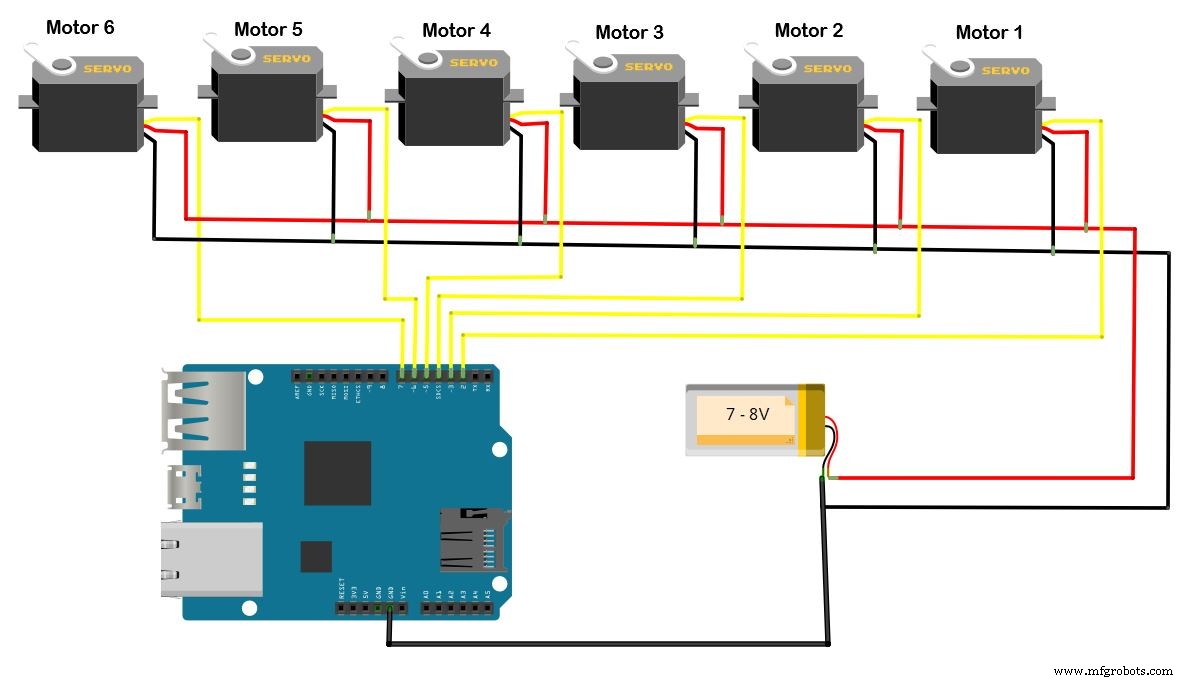
Esquemáticos
Se necesita proporcionar una fuente de alimentación externa para los 6 motores.
Proceso de manufactura
- Simple Pi Robot: Construye un Rover Autónomo 2‑WD con Raspberry Pi
- Centro de Control de Potencia Arduino: N-FET, P-FET, Relé y RTC
- Control Remoto IoT de Brazo Robótico Personalizado con Arduino MKR1000 y ThingSpeak
- Robot evasor de obstáculos con servo: Construcción con Arduino y HC-SR04
- Robot Seguidor de Línea Autónomo con Arduino UNO: Guía Paso a Paso
- Controlador de Humidificador DIY con Arduino y Relé: Configuración Segura de Alto Voltaje
- Arduino UNO + Shield WiFi: Visualización de Temperatura en Tiempo Real en Web vía Serial
- LittleArm 2C: Brazo Robot 3D Imprimible para Educación STEM con Arduino Nano
- Robot Asistente Doméstico Autónomo "O'nine" – Integración ROS, Alexa y Brazo Robótico
- Sistema de iluminación activado por movimiento con Intel Curie (Arduino 101)
- Kit de Robot de Navegación Interior Inteligente para Proyectos Arduino