



Mini plotter CNC 2D casero con unidades de DVD recicladas y shield L293D
Componentes y materiales
| Arduino UNO (cerebro) | ×1 |
| Shield L293D Motor Driver (controla steppers X/Y) | ×1 |
| Servo Tower Pro 9g (eje Z: pluma arriba/abajo) | ×1 |
| Unidad DVD reciclada (mecánica X e Y) | ×1 |
| Cables jumpers | ×1 |
Aplicaciones y servicios online
- Arduino IDE
- Processing IDE (envía G-code)
- Inkscape (vectorial → G-code)
Sobre el proyecto
Montaje mecánico
Desarma dos unidades DVD y extrae las bandejas internas con su mecanismo stepper: serán ejes X e Y. Perfora la carcasa vacía para montar cada eje con tornillos. Colócalos perpendiculares.

- Descarga Arduino IDE.
- Descarga Processing IDE.
- Abre Arduino IDE y carga el sketch Arduino CNC (ver sección Código).
- Abre Processing IDE y carga el sketch Processing G-code sender (ver Código).
Generar G-code con Inkscape
Inkscape (gratis, open-source, Win/Mac/Linux) convierte gráficos vectoriales (SVG) a G-code.
- Instala Inkscape versión 0.48.5 (importante: versiones nuevas cambian la extensión).
- Instala add-on G-code export (con instrucciones).
- Sigue tutorial en YouTube para crear archivo G-code.
Usar el plotter
- Sube sketch Processing y pulsa Play.
- Pulsa 'p' → selecciona puerto serie.
- Opcional: '1'/'2'/'3' = velocidad jog (1/10/100 mils).
- Pulsa 'g' → carga archivo G-code.
- Enter → ¡empieza a dibujar!
Archivos G-code de prueba:
Ver ilustración completa en el enlace del proyecto original.


Código
Sketch Arduino (CNC)
#include <Servo.h>
#include <AFMotor.h>

#define LINE_BUFFER_LENGTH 512
char STEP = MICROSTEP;

const int penZUp = 95, penZDown = 83;
const int penServoPin = 10;
const int stepsPerRevolution = 48;

Servo penServo;
AF_Stepper myStepperY(stepsPerRevolution, 1);
AF_Stepper myStepperX(stepsPerRevolution, 2);

struct point { float x, y, z; };
point actuatorPos;

float StepInc = 1, StepDelay = 0, LineDelay = 0, penDelay = 50;
float StepsPerMillimeterX = 100.0, StepsPerMillimeterY = 100.0;
float Xmin = 0, Xmax = 40, Ymin = 0, Ymax = 40, Zmin = 0, Zmax = 1;
float Xpos = Xmin, Ypos = Ymin, Zpos = Zmax;
boolean verbose = false;

// Interpreta: G0/G1 movimiento, G4 espera, M300 S30 pluma abajo, M300 S50 pluma arriba
void setup() {
  Serial.begin(9600);
  penServo.attach(penServoPin);
  penServo.write(penZUp);
  delay(100);
  myStepperX.setSpeed(600);
  myStepperY.setSpeed(600);
  Serial.println("Mini CNC Plotter alive and kicking!");
  Serial.print("X range: "); Serial.print(Xmin); Serial.print(" to "); Serial.print(Xmax); Serial.println(" mm.");
  Serial.print("Y range: "); Serial.print(Ymin); Serial.print(" to "); Serial.print(Ymax); Serial.println(" mm.");
}

void loop() {
  delay(100);
  char line[LINE_BUFFER_LENGTH], c;
  int lineIndex = 0;
  bool lineIsComment = false, lineSemiColon = false;

  while (1) {
    while (Serial.available() > 0) {
      c = Serial.read();
      if (c == '\n' || c == '\r') {
        if (lineIndex > 0) {
          line[lineIndex] = '\0';
          if (verbose) { Serial.print("Received: "); Serial.println(line); }
          processIncomingLine(line, lineIndex);
          lineIndex = 0;
        }
        lineIsComment = lineSemiColon = false;
        Serial.println("ok");
      } else {
        if (lineIsComment || lineSemiColon) {
          if (c == ')') lineIsComment = false;
        } else if (c <= ' ') { /* ignore */ }
        else if (c == '/') { /* ignore */ }
        else if (c == '(') { lineIsComment = true; }
        else if (c == ';') { lineSemiColon = true; }
        else if (lineIndex >= LINE_BUFFER_LENGTH - 1) {
          Serial.println("ERROR - lineBuffer overflow");
          lineIsComment = lineSemiColon = false;
        } else if (c >= 'a' && c <= 'z') {
          line[lineIndex++] = c - 'a' + 'A';
        } else {
          line[lineIndex++] = c;
        }
      }
    }
  }
}

void processIncomingLine(char* line, int charNB) {
  int currentIndex = 0;
  char buffer[64];
  point newPos = {0, 0, 0};

  while (currentIndex < charNB) {
    switch (line[currentIndex++]) {
      case 'U': penUp(); break;
      case 'D': penDown(); break;
      case 'G':
        buffer[0] = line[currentIndex++];
        buffer[1] = '\0';
        switch (atoi(buffer)) {
          case 0: case 1: { // G0/G1
            char* indexX = strchr(line + currentIndex, 'X');
            char* indexY = strchr(line + currentIndex, 'Y');
            if (!indexY) { newPos.x = atof(indexX + 1); newPos.y = actuatorPos.y; }
            else if (!indexX) { newPos.y = atof(indexY + 1); newPos.x = actuatorPos.x; }
            else { newPos.y = atof(indexY + 1); *indexY = '\0'; newPos.x = atof(indexX + 1); }
            drawLine(newPos.x, newPos.y);
            actuatorPos.x = newPos.x; actuatorPos.y = newPos.y;
            break; }
        }
        break;
      case 'M':
        buffer[0] = line[currentIndex++];
        buffer[1] = line[currentIndex++];
        buffer[2] = line[currentIndex++];
        buffer[3] = '\0';
        switch (atoi(buffer)) {
          case 300: {
            char* indexS = strchr(line + currentIndex, 'S');
            float Spos = atof(indexS + 1);
            if (Spos == 30) penDown();
            if (Spos == 50) penUp();
            break; }
          case 114: // M114 report position
            Serial.print("Absolute position: X = "); Serial.print(actuatorPos.x);
            Serial.print(" - Y = "); Serial.println(actuatorPos.y);
            break;
          default:
            Serial.print("Command not recognized: M"); Serial.println(buffer);
        }
    }
  }
}

void drawLine(float x1, float y1) {
  if (x1 >= Xmax) x1 = Xmax;
  if (x1 <= Xmin) x1 = Xmin;
  if (y1 >= Ymax) y1 = Ymax;
  if (y1 <= Ymin) y1 = Ymin;

  long x0 = (long)(Xpos * StepsPerMillimeterX);
  long y0 = (long)(Ypos * StepsPerMillimeterY);
  x1 = (long)(x1 * StepsPerMillimeterX);
  y1 = (long)(y1 * StepsPerMillimeterY);

  long dx = abs(x1 - x0), dy = abs(y1 - y0);
  int sx = (x0 < x1) ? StepInc : -StepInc;
  int sy = (y0 < y1) ? StepInc : -StepInc;
  long i, over = 0;

  if (dx > dy) {
    for (i = 0; i < dx; ++i) {
      myStepperX.onestep(sx, STEP);
      over += dy;
      if (over >= dx) { over -= dx; myStepperY.onestep(sy, STEP); }
      delay(StepDelay);
    }
  } else {
    for (i = 0; i < dy; ++i) {
      myStepperY.onestep(sy, STEP);
      over += dx;
      if (over >= dy) { over -= dy; myStepperX.onestep(sx, STEP); }
      delay(StepDelay);
    }
  }
  delay(LineDelay);
  Xpos = x1 / StepsPerMillimeterX;
  Ypos = y1 / StepsPerMillimeterY;
}

void penUp() {
  penServo.write(penZUp);
  delay(penDelay);
  Zpos = Zmax;
  digitalWrite(15, LOW); digitalWrite(16, HIGH);
  if (verbose) Serial.println("Pen up!");
}

void penDown() {
  penServo.write(penZDown);
  delay(penDelay);
  Zpos = Zmin;
  digitalWrite(15, HIGH); digitalWrite(16, LOW);
  if (verbose) Serial.println("Pen down.");
}
Sketch Processing (G-code sender)
import java.awt.event.KeyEvent;
import javax.swing.JOptionPane;
import processing.serial.*;

Serial port = null;
String portname = null;  // null = interactivo (tecla 'p')
boolean streaming = false;
float speed = 0.001;
String[] gcode;
int i = 0;

void openSerialPort() {
  if (portname == null) return;
  if (port != null) port.stop();
  port = new Serial(this, portname, 9600);
  port.bufferUntil('\n');
}

void selectSerialPort() {
  String result = (String) JOptionPane.showInputDialog(frame,
    "Select the serial port for your Arduino.", "Select serial port",
    JOptionPane.QUESTION_MESSAGE, null, Serial.list(), 0);
  if (result != null) { portname = result; openSerialPort(); }
}

void setup() {
  size(500, 250);
  openSerialPort();
}

void draw() {
  background(0); fill(255);
  int y = 24, dy = 12;
  text("INSTRUCCIONES", 12, y); y += dy;
  text("p: seleccionar puerto serie", 12, y); y += dy;
  text("1: velocidad 0.001 pulg/paso", 12, y); y += dy;
  text("2: velocidad 0.010 pulg/paso", 12, y); y += dy;
  text("3: velocidad 0.100 pulg/paso", 12, y); y += dy;
  text("flechas: jog X-Y", 12, y); y += dy;
  text("RePag/AvPag: jog Z", 12, y); y += dy;
  text("$: mostrar ajustes GRBL", 12, y); y += dy;
  text("h: ir a home (0,0,0)", 12, y); y += dy;
  text("0: cero máquina (home = posición actual)", 12, y); y += dy;
  text("g: enviar archivo G-code", 12, y); y += dy;
  text("x: detener envío G-code (no inmediato)", 12, y); y += dy;
  y = height - dy;
  text("velocidad jog actual: " + speed + " pulg/paso", 12, y); y -= dy;
  text("puerto serie actual: " + portname, 12, y);
}

void keyPressed() {
  if (key == '1') speed = 0.001;
  if (key == '2') speed = 0.01;
  if (key == '3') speed = 0.1;

  if (!streaming) {
    if (keyCode == LEFT)  port.write("G91\nG20\nG00 X-" + speed + " Y0.000 Z0.000\n");
    if (keyCode == RIGHT) port.write("G91\nG20\nG00 X"  + speed + " Y0.000 Z0.000\n");
    if (keyCode == UP)    port.write("G91\nG20\nG00 X0.000 Y"  + speed + " Z0.000\n");
    if (keyCode == DOWN)  port.write("G91\nG20\nG00 X0.000 Y-" + speed + " Z0.000\n");
    if (keyCode == KeyEvent.VK_PAGE_UP)   port.write("G91\nG20\nG00 X0.000 Y0.000 Z"  + speed + "\n");
    if (keyCode == KeyEvent.VK_PAGE_DOWN) port.write("G91\nG20\nG00 X0.000 Y0.000 Z-" + speed + "\n");
    if (key == 'h') port.write("G90\nG20\nG00 X0.000 Y0.000 Z0.000\n");
    if (key == 'v') port.write("$0=75\n$1=74\n$2=75\n");
    if (key == 's') port.write("$3=10\n");
    if (key == 'e') port.write("$16=1\n");
    if (key == 'd') port.write("$16=0\n");
    if (key == '0') openSerialPort();
    if (key == 'p') selectSerialPort();
    if (key == '$') port.write("$$\n");
  }

  if (!streaming && key == 'g') {
    gcode = null; i = 0;
    println("Cargando archivo...");
    selectInput("Selecciona archivo G-code:", "fileSelected", null);
  }
  if (key == 'x') streaming = false;
}

void fileSelected(File selection) {
  if (selection == null) { println("Cancelado."); return; }
  println("Archivo: " + selection.getAbsolutePath());
  gcode = loadStrings(selection.getAbsolutePath());
  if (gcode == null) return;
  streaming = true;
  stream();
}

void stream() {
  if (!streaming) return;
  while (true) {
    if (i == gcode.length) { streaming = false; return; }
    if (gcode[i].trim().length() == 0) i++;
    else break;
  }
  println(gcode[i]);
  port.write(gcode[i] + '\n');
  i++;
}

void serialEvent(Serial p) {
  String s = p.readStringUntil('\n');
  println(s.trim());
  if (s.trim().startsWith("ok") || s.trim().startsWith("error")) stream();
}
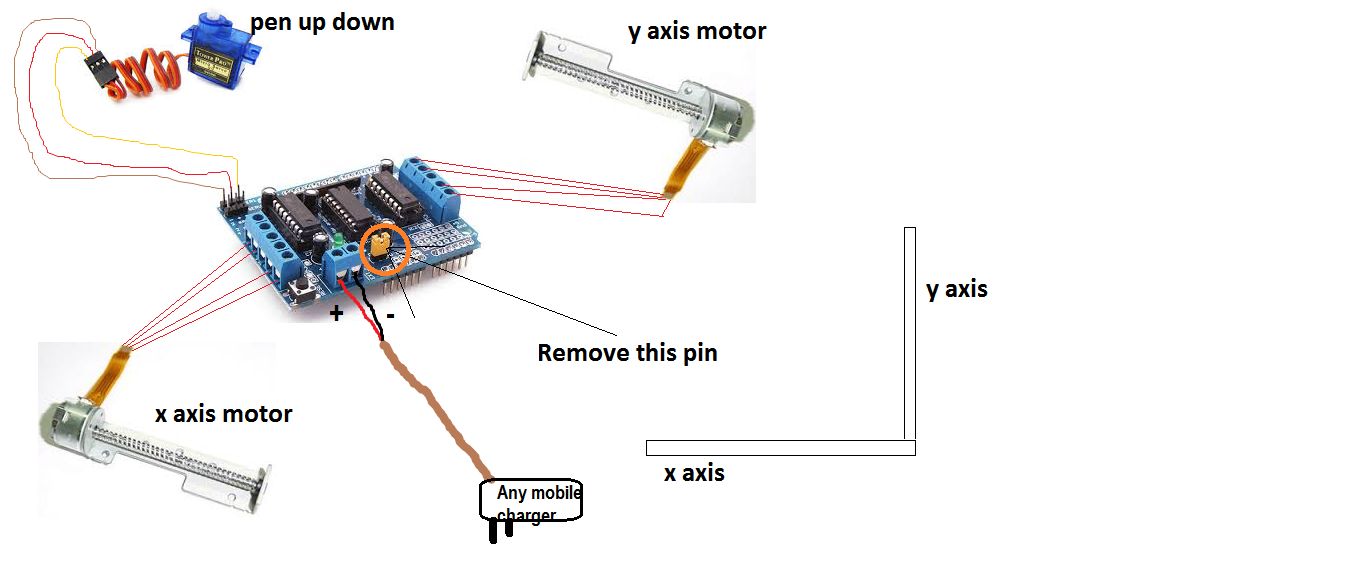
Esquemático
Conecta todos los componentes como se muestra:
Autopiloto avanzado para veleros: dirección automática de precisión
Construye un impresionante cilindro POV con Arduino Due – Guía paso a paso
Proceso de manufactura
- Construye tu propia máquina de escribir deberes casera (DIY Homework Writing Machine)
- Crea un Impresionante Sistema Ambilight para Monitor con Arduino
- Robot de Detección Humana con Arduino Uno: Integración de Sensores Paso a Paso
- Vehículo Controlado por Android con Raspberry Pi, Arduino y Motor Shield: Guía Completa
- Crea un Botón de Teclado Personalizado y "Apuñalable" con Arduino: Guía Paso a Paso
- Mide la masa de la Tierra con Arduino: Guía paso a paso DIY
- Crea una Interfaz Web en PHP para Controlar tu Arduino Uno
- Genera Tonos Musicales con Arduino: Guía Paso a Paso
- Puerta automática con Arduino y sensor ultrasónico HC-SR04
- Construye un Coche Bluetooth Controlado con Arduino Nano: Guía DIY Completa
- Construye una Brújula Digital en Tiempo Real con Arduino y Processing