



Vehículo Controlado por Android con Raspberry Pi, Arduino y Motor Shield: Guía Completa
Componentes y Suministros
| Dispositivo Android | ×1 |
| Arduino 101 | ×1 |
| Raspberry Pi 2 Model B | ×1 |
| Dk Electronic Motor Shield | ×1 |
| Wifi Dongle Oficial Raspberry | ×1 |
| Power Bank Trust 5V | ×1 |
Aplicaciones y Servicios en Línea
- Microsoft Windows 10 IoT Core
- Arduino IDE
- Microsoft Visual Studio 2015
Sobre el Proyecto
Al final controlaremos un vehículo todo terreno mediante el sensor acelerómetro de un dispositivo Android.
El proyecto integra Motor Shield, Raspberry Pi, Arduino y motores DC.
PASO 1: Bus I2C entre Raspberry Pi y Arduino
Primero establecemos bus I2C entre Raspberry Pi y Arduino. Ver por qué elegir I2C.
Código completo (I2C + control Motor Shield) para Arduino:
#include <Wire.h>
#define MyAddress 0x40
#include <AFMotor.h>
AF_DCMotor motorhiz(3);
AF_DCMotor motoryon(4);
byte DataToBeSend[1];
byte ReceivedData;
int counter = 0;

void setup() {
  Serial.begin(9600);
  Wire.begin(MyAddress);
  Wire.onReceive(I2CReceived);
  Wire.onRequest(I2CRequest);
  motorhiz.setSpeed(254); motorhiz.run(RELEASE);
  motoryon.setSpeed(254); motoryon.run(RELEASE);
}

void loop() {
  // DataToBeSend[0] = (DataToBeSend[0] >= 99) ? 0 : DataToBeSend[0] + 1;
}

void I2CReceived(int NumberOfBytes) {
  ReceivedData = Wire.read();
  int ReceivedDataInt = (int)ReceivedData;
  String ReceivedDataStr = String(ReceivedData);
  Serial.println(ReceivedDataInt);

  if (ReceivedDataInt >= 100) { // Datos X
    Serial.println("DataX: " + ReceivedDataStr);
    if (ReceivedDataInt > 145 && ReceivedDataInt < 154) {
      Serial.println("RELEASE"); motorhiz.run(RELEASE);
    } else if (ReceivedDataInt >= 100 && ReceivedDataInt < 104) {
      Serial.println("RELEASE"); motorhiz.run(RELEASE);
    } else if (ReceivedDataInt >= 155) {
      ReceivedDataInt -= 155;
      int motorSpeed = (ReceivedDataInt * 10) + 50;
      if (motorSpeed > 254) motorSpeed = 254;
      motorhiz.setSpeed(motorSpeed); motorhiz.run(BACKWARD);
      Serial.println("MotorHiz: " + String(motorSpeed));
    } else if (ReceivedDataInt >= 105) {
      ReceivedDataInt -= 105;
      int motorSpeed = (ReceivedDataInt * 10) + 50;
      if (motorSpeed > 254) motorSpeed = 254;
      motorhiz.setSpeed(motorSpeed); motorhiz.run(FORWARD);
      Serial.println("MotorHiz: " + String(motorSpeed));
    }
  } else { // Datos Y
    Serial.println("DataY: " + ReceivedDataStr);
    if (ReceivedDataInt > 45 && ReceivedDataInt < 54) {
      Serial.println("RELEASE"); motoryon.run(RELEASE);
    } else if (ReceivedDataInt >= 0 && ReceivedDataInt < 4) {
      Serial.println("RELEASE"); motoryon.run(RELEASE);
    } else if (ReceivedDataInt >= 55) {
      ReceivedDataInt -= 55;
      int motorSpeed = (ReceivedDataInt * 12) + 50;
      if (motorSpeed > 254) motorSpeed = 254;
      motoryon.setSpeed(motorSpeed); motoryon.run(BACKWARD);
      Serial.println("MotorHiz: " + String(motorSpeed));
    } else if (ReceivedDataInt >= 5) {
      ReceivedDataInt -= 5;
      int motorSpeed = (ReceivedDataInt * 12) + 50;
      if (motorSpeed > 254) motorSpeed = 254;
      motoryon.setSpeed(motorSpeed); motoryon.run(FORWARD);
      Serial.println("MotorHiz: " + String(motorSpeed));
    }
  }
}

void I2CRequest() {
  // Wire.write(DataToBeSend, 1);
}

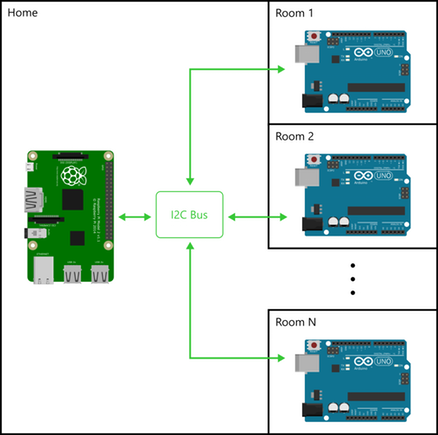
Esquema pines I2C para comunicación Arduino-Raspberry Pi. No necesita alimentación externa para Arduino: se alimenta del pin Vout de Raspberry Pi.
PASO 2: Código Raspberry Pi (Servidor Web)
Código para Raspberry Pi (funciona como servidor web) que envía datos a Arduino vía I2C. Código al final (sección Código).
PASO 3: Aplicación Android (Visual Studio Cordova)
Desarrollamos app Android Cordova en Visual Studio que envía datos del acelerómetro al servidor web vía peticiones AJAX. Código al final (sección Código).
RESUMEN FLUJO
- App Android → datos acelerómetro → servidor web en Raspberry Pi
- Servidor web (Raspberry Pi) → datos → Arduino vía I2C
- Arduino procesa datos → controla motores vía Motor Shield
Código
Wire.h I2C Comunicación y Motor Shield (Arduino)
Arduino
Comunicación I2C entre Arduino y Raspberry Pi. Para comunicación serie entre dos dispositivos con mínimo I/O.
#include <Wire.h>
#define MyAddress 0x40
#include <AFMotor.h>
AF_DCMotor motorhiz(3);
AF_DCMotor motoryon(4);
byte DataToBeSend[1];
byte ReceivedData;
int counter = 0;

void setup() {
  Serial.begin(9600);
  Wire.begin(MyAddress);
  Wire.onReceive(I2CReceived);
  Wire.onRequest(I2CRequest);
  motorhiz.setSpeed(254); motorhiz.run(RELEASE);
  motoryon.setSpeed(254); motoryon.run(RELEASE);
}

void loop() { }

void I2CReceived(int NumberOfBytes) {
  ReceivedData = Wire.read();
  int ReceivedDataInt = (int)ReceivedData;
  String ReceivedDataStr = String(ReceivedData);
  Serial.println(ReceivedDataInt);

  if (ReceivedDataInt >= 100) {
    Serial.println("DataX: " + ReceivedDataStr);
    if (ReceivedDataInt > 145 && ReceivedDataInt < 154) {
      Serial.println("RELEASE"); motorhiz.run(RELEASE);
    } else if (ReceivedDataInt >= 100 && ReceivedDataInt < 104) {
      Serial.println("RELEASE"); motorhiz.run(RELEASE);
    } else if (ReceivedDataInt >= 155) {
      ReceivedDataInt -= 155;
      int motorSpeed = (ReceivedDataInt * 10) + 50;
      if (motorSpeed > 254) motorSpeed = 254;
      motorhiz.setSpeed(motorSpeed); motorhiz.run(BACKWARD);
      Serial.println("MotorHiz: " + String(motorSpeed));
    } else if (ReceivedDataInt >= 105) {
      ReceivedDataInt -= 105;
      int motorSpeed = (ReceivedDataInt * 10) + 50;
      if (motorSpeed > 254) motorSpeed = 254;
      motorhiz.setSpeed(motorSpeed); motorhiz.run(FORWARD);
      Serial.println("MotorHiz: " + String(motorSpeed));
    }
  } else {
    Serial.println("DataY: " + ReceivedDataStr);
    if (ReceivedDataInt > 45 && ReceivedDataInt < 54) {
      Serial.println("RELEASE"); motoryon.run(RELEASE);
    } else if (ReceivedDataInt >= 0 && ReceivedDataInt < 4) {
      Serial.println("RELEASE"); motoryon.run(RELEASE);
    } else if (ReceivedDataInt >= 55) {
      ReceivedDataInt -= 55;
      int motorSpeed = (ReceivedDataInt * 12) + 50;
      if (motorSpeed > 254) motorSpeed = 254;
      motoryon.setSpeed(motorSpeed); motoryon.run(BACKWARD);
      Serial.println("MotorHiz: " + String(motorSpeed));
    } else if (ReceivedDataInt >= 5) {
      ReceivedDataInt -= 5;
      int motorSpeed = (ReceivedDataInt * 12) + 50;
      if (motorSpeed > 254) motorSpeed = 254;
      motoryon.setSpeed(motorSpeed); motoryon.run(FORWARD);
      Serial.println("MotorHiz: " + String(motorSpeed));
    }
  }
}

void I2CRequest() {
  // Wire.write(DataToBeSend, 1);
}
Control Remoto Android
C#
Sin vista previa (solo descarga).
Servidor Web Windows IoT
C#
Sin vista previa (solo descarga).
Piezas Personalizadas y Carcasas
Diagrama pines Arduino-Raspberry Pi
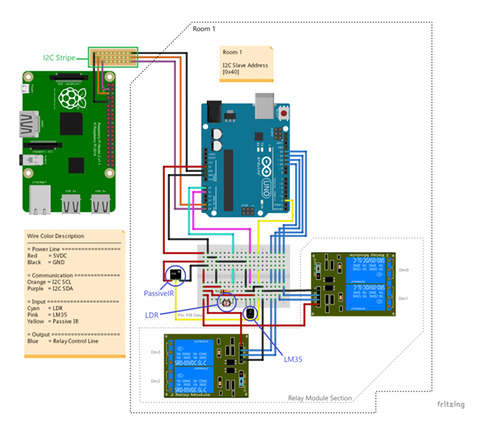
Esquemáticos
Para detalles: hackster.io/AnuragVasanwala/home-automation-0dcefc
Proceso de manufactura
- Controle un LED con Sensor PIR de Movimiento en Raspberry Pi
- Construye un robot inteligente con Bridge Shield – Integración Raspberry Pi y Arduino
- Construya un robot Raspberry Pi controlado por Bluetooth con retroalimentación de audio
- Construya un robot con streaming de vídeo controlado por Internet con Arduino y Raspberry Pi
- Robot Controlado por Gestos con Raspberry Pi
- Construye un Robot Controlado por WiFi con Raspberry Pi y Smartphone Android
- Construye un Robot Raspberry Pi Controlado por Wi‑Fi con Python – Guía Paso a Paso
- Robot de Detección Humana con Arduino Uno: Integración de Sensores Paso a Paso
- Construye un Spybot controlado por Bluetooth con Arduino
- Mando universal Android con Arduino, 1Sheeld y control IR
- Controla LEDs con Alexa mediante Raspberry Pi – Guía paso a paso fácil