



Sistema de Ventilación Inteligente para Sótanos: Control de Humedad con Arduino
Componentes y suministros
| Componente | Descripción | Cantidad |
|---|---|---|
| Arduino Nano R3 | Controlador principal. | 1 |
| Expansor IO | Interfaz I2C para sensores y actuadores. | 1 |
| Paquete Expansor IO | Incluye módulos necesarios. | 1 |
Aplicaciones y servicios
- Arduino IDE
Sobre el proyecto
Características
- Sensores temperatura/humedad interior y exterior (1-Wire).
- Control inteligente de ventiladores comparando humedad absoluta.
- Reduce humedad en sótanos/espacios bajo forjado.
- Previene moho y hongos.
- Ventilación inteligente ahorra energía.

Lista completa de materiales
- Expansor IO + 1-Wire a I2C
- Arduino Nano
- Relé 1 canal 5V DC
- 2x Sensor humedad SHT10
- Pantalla OLED I2C SSD1306 128x64
- 2x Ventiladores 110V 172x150x38mm 0.34A 2400 RPM
- Caja estanca 158x90x65mm
- Prensacables IP68 PG7 y PG9
- 2x Jack RJ11 Keystone + cajas
- Cable RJ11 4C4P 50ft (x2) + 6"
- Cable 110V 100ft
- Enchufe AC
- Cable header 2.54mm
- Fuente 12VDC 1A
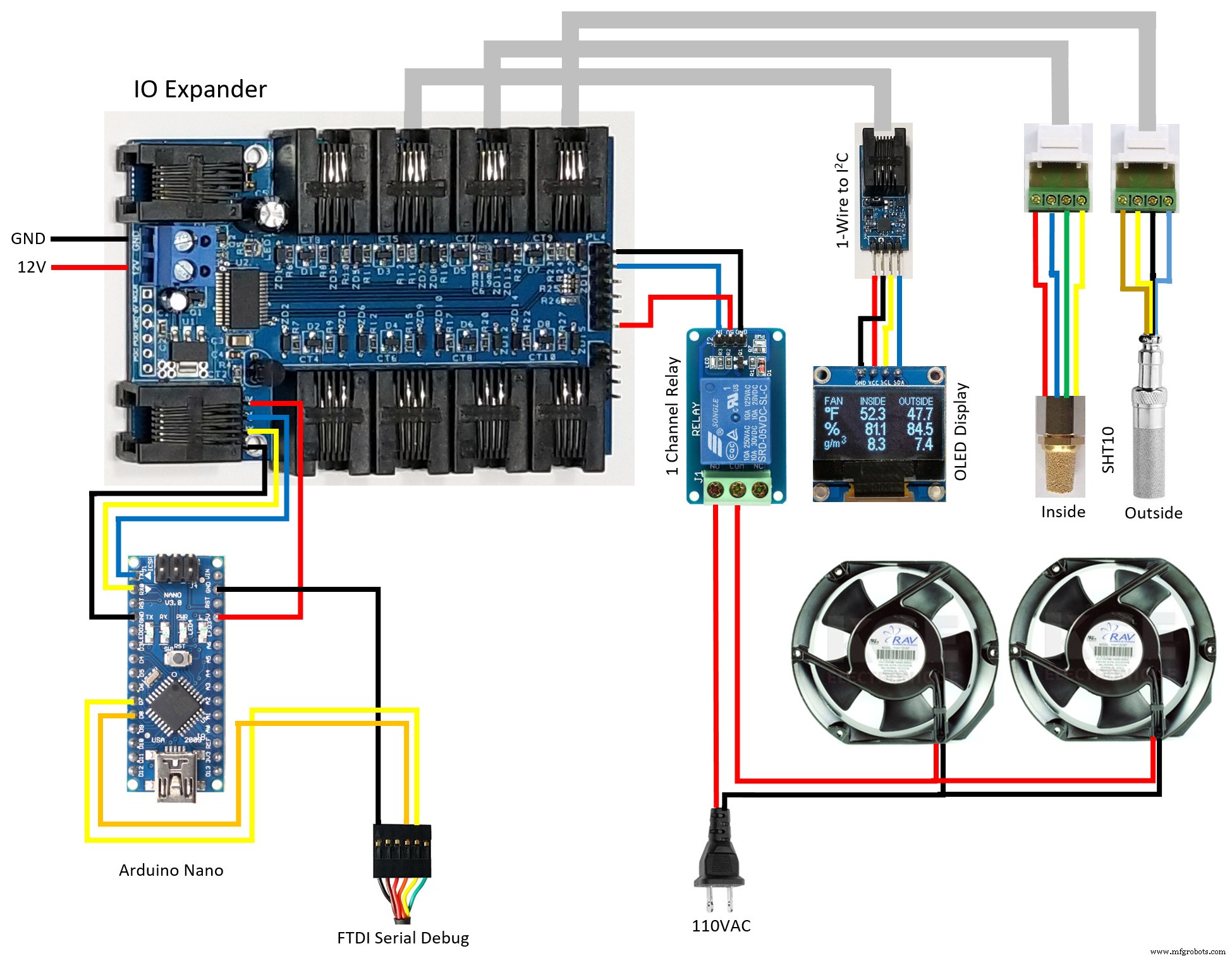
Diagrama de cableado

Pantalla OLED
Muestra temperatura, humedad relativa/absoluta interior/exterior, estado ventilador y versión.

¿Por qué usar Expansor IO?
- Diseño más simple, componentes estándar.
- Sin drivers 1-Wire, relé, OLED, fuentes que escribir.
- Ahorra espacio en Arduino (solo 6106 bytes, 19%).
- Código en menos de un día.
- Cableado fácil con cable telefónico RJ11 estándar.
- Sin problemas de longitud de cable de sensores.
- Más barato que sistemas comerciales.
- Fácil adaptación a necesidades individuales.
- Fuente de alimentación única.
Construcción del sistema
- Conecta Arduino Nano al Expansor IO y programa con el código adjunto. El header de 6 pines es puerto serie debug (no necesario en instalación final).
- Cambia la dirección
ONEWIRE_TO_I2C_ROMa la de tu módulo 1-Wire a I2C. - Conecta ventiladores a 110VAC.
- Perfora caja para prensacables PG7 (12V entrada) y PG9 (sensores/ventiladores).
- Instala ventiladores en rejilla de extracción (hacia fuera). Asegura rejillas de entrada abiertas en lado opuesto.
- Pasa cable sensor exterior por acceso existente, alejado de obstáculos. Verifica lecturas con partes meteorológicos locales.
- Conecta sensores a jacks keystone y monta en interior (ubicación central o zona crítica).
- Une cables RJ11 50ft a sensores y lleva a punto de acceso para caja de control.
- Ensambla todo en caja estanca con cinta doble cara y espuma. Prueba desconectando Arduino del expansor y controlando relé manualmente desde PC.
Actualización 20/03/2019
Tras meses funcionando en videosanitario, bajó humedad relativa de >95% (fuga calentador) a <50%. Sistema robusto.
Cambio a pantalla SH1106 1.3" (más legible). Cambio trivial en código: ST10 → ST13.
Actualización 12/09/2019
Versión 1.1: solucionado arranque en frío con OLED en blanco. Sigue ventilando el videosanitario.
Código: Sistema Ventilación Sótano/Video Sanitario v1.1
/* IO Expander * Basement/Crawlspace Ventilation System v1.1 */
#include <math.h>
#include <SoftwareSerial.h>
#include <avr/wdt.h>
#include "IOExpander.h"

#define FAHRENHEIT
#define ONEWIRE_TO_I2C_ROM "i4s71"
#define INIT_OLED "st13;si;sc;sd"
#define HUMIDITY_SENSOR_INSIDE "s6t1"
#define HUMIDITY_SENSOR_OUTSIDE "s8t1"
#define FAN_ON "r1o"
#define FAN_OFF "r1f"
#define ABSOLUTE_DELTA_FAN_ON 1.0
#define ABSOLUTE_DELTA_FAN_OFF 0.5
#define OUTSIDE_RELATIVE_FAN_ON 88
#define OUTSIDE_RELATIVE_FAN_OFF 90
#define MINIMUM_TEMPERATURE 15
#define FAN_ON_TIME (20*60*1000L)
#define FAN_OFF_TIME (20*60*1000L)
#define SERIAL_TIMEOUT 5000

struct HS { float temp; float relative; float absolute; bool error; };

int led = 13;
bool init_oled = true;
long ontime, offtime;

#ifdef FAHRENHEIT
#define C2F(temp) CelsiusToFahrenheit(temp)
float CelsiusToFahrenheit(float celsius) { return ((celsius*9)/5)+32; }
#else
#define C2F(temp) (temp)
#endif

void SerialPrint(const char* str, float decimal, char error) {
  Serial.print(str);
  if (error) Serial.print(F("NA")); else Serial.print(decimal, 1);
}

float AbsoluteHumidity(float temp, float relative) {
  // Fórmula Buck (1981)
  return (6.1121 * pow(2.718281828, (17.67 * temp) / (temp + 243.5)) * relative * 18.01534) / ((273.15 + temp) * 8.21447215);
}

void ReadHumiditySensor(HS* hs) {
  SerialCmd("sr");
  if (SerialReadFloat(&hs->temp) && SerialReadFloat(&hs->relative)) {
    hs->absolute = AbsoluteHumidity(hs->temp, hs->relative);
    hs->error = false;
  } else hs->error = true;
  SerialReadUntilDone();
}

void setup() {
  Serial.begin(115200);
  pinMode(led, OUTPUT);
  wdt_enable(WDTO_8S);
  offtime = millis() - FAN_OFF_TIME;
}

void loop() {
  HS inside, outside;
  static bool fan = false, cycle = false;
  static long last_time = -(60L * 1000L);

  Serial.println();
  if (SerialReadUntilDone()) {
    if (millis() - last_time > 60L * 1000L) {
      if (SerialCmdDone(HUMIDITY_SENSOR_INSIDE)) ReadHumiditySensor(&inside);
      if (SerialCmdDone(HUMIDITY_SENSOR_OUTSIDE)) ReadHumiditySensor(&outside);

      if (inside.error || outside.error) fan = false;
      else {
        if (fan) {
          if (outside.relative >= OUTSIDE_RELATIVE_FAN_OFF || inside.absolute - outside.absolute <= ABSOLUTE_DELTA_FAN_OFF)
            cycle = fan = false;
          else {
            if (cycle && outside.temp <= MINIMUM_TEMPERATURE && millis() - ontime > FAN_ON_TIME) fan = false;
          }
          if (!fan) offtime = millis();
        } else {
          if (outside.relative <= OUTSIDE_RELATIVE_FAN_ON && inside.absolute - outside.absolute >= ABSOLUTE_DELTA_FAN_ON)
            cycle = fan = true;
          if (cycle && outside.temp <= MINIMUM_TEMPERATURE)
            fan = (millis() - offtime > FAN_OFF_TIME) ? true : false;
          if (fan) ontime = millis();
        }
      }

      if (fan) SerialCmdDone(FAN_ON); else SerialCmdDone(FAN_OFF);

      if (SerialCmdNoError(ONEWIRE_TO_I2C_ROM)) {
        if (init_oled) { SerialCmdDone(INIT_OLED); init_oled = false; }
        // Comandos de dibujo en OLED (omitidos por brevedad)
        SerialPrint("sf1;sa1;sd70,12,\"\"", C2F(inside.temp), inside.error);
        SerialPrint("\";sd70,30,\"\"", inside.relative, inside.error);
        SerialPrint("\";sd70,48,\"\"", inside.absolute, inside.error);
        SerialPrint("\";sd127,12,\"\"", C2F(outside.temp), outside.error);
        SerialPrint("\";sd127,30,\"\"", outside.relative, outside.error);
        SerialPrint("\";sd127,48,\"\"", outside.absolute, outside.error);
        Serial.print("\";");
        Serial.print("sf0;sa0;sd0,0,\"\"");
        if (fan) Serial.print("FAN"); else Serial.print("v1.1");
        Serial.println("\";sd");
        SerialReadUntilDone();
      } else init_oled = true;
      last_time = millis();
    }
    delay(1000);
  } else {
    digitalWrite(led, HIGH); delay(500);
    digitalWrite(led, LOW); delay(500);
    init_oled = true;
  }
  wdt_reset();
}
Esquemático
Maqueta de Parada de Autobús Inteligente con Toldos Automáticos
ArduFarmBot Parte 2: Estación de Control IoT Remota para Cultivos
Proceso de manufactura
- Sistema de Asistencia RFID Fiable con Arduino y Python
- Robot de Detección Humana con Arduino Uno: Integración de Sensores Paso a Paso
- Construye un Spybot controlado por Bluetooth con Arduino
- FlickMote: Mando IR por gestos para Smart Home
- TV‑B‑Gone DIY con Arduino: Mando universal para apagar cualquier TV
- Construye un Reloj Maestro LED Personalizado con Alarma – Visible desde 12 Metros
- SERENA: Sistema de Alarma Personalizado Arduino Mega 2560 con Pantalla TFT LCD Táctil
- Sistema automático de riego para plantas con Arduino
- Sistema de monitorización de incendios forestales en tiempo real con alertas SMS
- Sistema de control de asistencia RFID en tiempo real con Arduino y Google Sheets
- Entendiendo los Sistemas de Ventilación: Manteniendo el Aire Interior Fresco y Saludable