



Celebra con Luz y Sonido: Proyecto Arduino de Cumpleaños DIY
Componentes y materiales
| Altavoz: 0.25W, 8 ohmios | × | 1 |
| Protoboard (genérica) | × | 1 |
| Arduino UNO | × | 1 |
| Cables jumper (genéricos) | × | 1 |
| LEDs (genéricos) - 1 rojo, 1 azul, 1 blanco (puedes elegir tus propios colores) | × | 3 |
Herramientas necesarias
- Soldador (genérico) - si es necesario
Aplicaciones y servicios online
- Arduino IDE
Sobre este proyecto
Introducción
Después de intentar y fallar al crear un visualizador de distancia con barra de LEDs, decidí hacer proyectos más sencillos. Buscando inspiración en Arduino Project Hub, se me ocurrió esta idea.
Paso 1: Reunir materiales
Reúne todos los componentes. Si es necesario, suelda cables jumper al altavoz.

Paso 2: Colocar los LEDs en la protoboard
Conecta los 3 LEDs en la protoboard, manteniéndolos cerca unos de otros.

Paso 3: Conectar los ánodos (patas positivas/largas)
Usa cables jumper para conectar cada ánodo a los pines de Arduino:
- ROJO: pin 9
- AZUL: pin 10
- BLANCO: pin 11

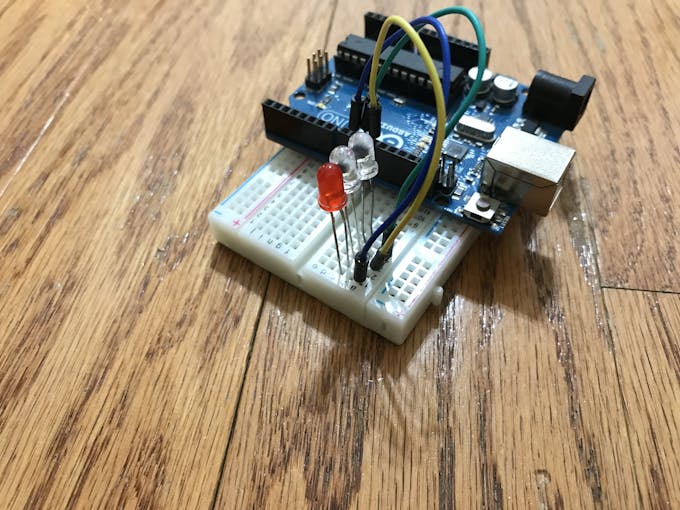
Paso 4: Conectar los cátodos (patas negativas/cortas)
Conecta cada cátodo a una resistencia de 220 Ω. Une estas resistencias al carril negativo de la protoboard. Conecta el carril negativo al pin GND de Arduino.

Paso 5: Conectar el altavoz
El cable negativo va al carril negativo de la protoboard, y el positivo al pin 3 de Arduino.

Código
Happy Birthday Lights + Sounds (C/C++)
Programa que indica al altavoz reproducir tonos específicos y a los LEDs encenderse en diferentes momentos.
// ROJO 9; //AZUL 10; //BLANCO 11;
#include "pitches.h"

// Notas de la melodía
int melody[] = {
  NOTE_C4, NOTE_C4, NOTE_D4, NOTE_C4, NOTE_F4, NOTE_E4,
  NOTE_C4, NOTE_C4, NOTE_D4, NOTE_C4, NOTE_G4, NOTE_F4,
  NOTE_C4, NOTE_C4, NOTE_C5, NOTE_A4, NOTE_F4, NOTE_E4,
  NOTE_D4, NOTE_AS4, NOTE_AS4, NOTE_A4, NOTE_F4, NOTE_G4, NOTE_F4
};

// Duración de notas: 4 = negra, 8 = corchea, etc.
int noteDurations[] = {
  8, 8, 4, 4, 4, 2, 8, 8, 4, 4, 4, 2, 8, 8, 4, 4, 4, 4, 4, 8, 8, 4, 4, 4, 2
};

void setup() {
  pinMode(9, OUTPUT);
  pinMode(10, OUTPUT);
  pinMode(11, OUTPUT);

  for (int thisNote = 0; thisNote < 25; thisNote++) {
    int randomLight1 = random(9, 12);
    int randomLight2 = random(9, 12);
    int randomLight3 = random(9, 12);
    digitalWrite(randomLight1, HIGH);
    digitalWrite(randomLight2, HIGH);
    digitalWrite(randomLight3, LOW);

    int noteDuration = 1130 / noteDurations[thisNote];
    tone(3, melody[thisNote], noteDuration);
    int pause = noteDuration * 1.275;
    delay(pause);
    noTone(3);
  }
  delay(3000);
  digitalWrite(9, LOW);
  digitalWrite(10, LOW);
  digitalWrite(11, LOW);
}

void loop() {
  // No es necesario repetir
}
pitches.h (C/C++)
Biblioteca que asigna frecuencias a notas musicales.
/*************************************************
 * Constantes Públicas
 *************************************************/
#define NOTE_B0  31
#define NOTE_C1  33
#define NOTE_CS1 35
#define NOTE_D1  37
#define NOTE_DS1 39
#define NOTE_E1  41
#define NOTE_F1  44
#define NOTE_FS1 46
#define NOTE_G1  49
#define NOTE_GS1 52
#define NOTE_A1  55
#define NOTE_AS1 58
#define NOTE_B1  62
#define NOTE_C2  65
#define NOTE_CS2 69
#define NOTE_D2  73
#define NOTE_DS2 78
#define NOTE_E2  82
#define NOTE_F2  87
#define NOTE_FS2 93
#define NOTE_G2  98
#define NOTE_GS2 104
#define NOTE_A2  110
#define NOTE_AS2 117
#define NOTE_B2  123
#define NOTE_C3  131
#define NOTE_CS3 139
#define NOTE_D3  147
#define NOTE_DS3 156
#define NOTE_E3  165
#define NOTE_F3  175
#define NOTE_FS3 185
#define NOTE_G3  196
#define NOTE_GS3 208
#define NOTE_A3  220
#define NOTE_AS3 233
#define NOTE_B3  247
#define NOTE_C4  262
#define NOTE_CS4 277
#define NOTE_D4  294
#define NOTE_DS4 311
#define NOTE_E4  330
#define NOTE_F4  349
#define NOTE_FS4 370
#define NOTE_G4  392
#define NOTE_GS4 415
#define NOTE_A4  440
#define NOTE_AS4 466
#define NOTE_B4  494
#define NOTE_C5  523
#define NOTE_CS5 554
#define NOTE_D5  587
#define NOTE_DS5 622
#define NOTE_E5  659
#define NOTE_F5  698
#define NOTE_FS5 740
#define NOTE_G5  784
#define NOTE_GS5 831
#define NOTE_A5  880
#define NOTE_AS5 932
#define NOTE_B5  988
#define NOTE_C6  1047
#define NOTE_CS6 1109
#define NOTE_D6  1175
#define NOTE_DS6 1245
#define NOTE_E6  1319
#define NOTE_F6  1397
#define NOTE_FS6 1480
#define NOTE_G6  1568
#define NOTE_GS6 1661
#define NOTE_A6  1760
#define NOTE_AS6 1865
#define NOTE_B6  1976
#define NOTE_C7  2093
#define NOTE_CS7 2217
#define NOTE_D7  2349
#define NOTE_DS7 2489
#define NOTE_E7  2637
#define NOTE_F7  2794
#define NOTE_FS7 2960
#define NOTE_G7  3136
#define NOTE_GS7 3322
#define NOTE_A7  3520
#define NOTE_AS7 3729
#define NOTE_B7  3951
#define NOTE_C8  4186
#define NOTE_CS8 4435
#define NOTE_D8  4699
#define NOTE_DS8 4978
Esquemáticos
Muestra cómo conectar los componentes al Arduino.
Archivo: happy_birthday_lights__sounds_I16bf0SBDq.fzz
Proceso de manufactura
- Control de Brillo LED con PWM mediante Pulsador en Arduino Mega
- Proyecto Sensor DHT11 Temperatura y Humedad con Indicadores LED y Altavoz Piezo
- Registrador GPS con Análisis Espacial en Azure IoT Hub
- Registrador de Temperatura y Humedad con Arduino, DHT11 y Ethernet Shield
- Medición de Distancia en Tiempo Real con Sonar Arduino y Visualización en Processing
- Púa de Velocidad y Pedal Stomp para Guitarra DIY – Construye tu Propia Púa Motorizada Impresa en 3D
- Descifrando el Cuadro de Mandos de tu Coche: Luces, Testigos y Qué Significan
- Convenciones de conexiones de cables en esquemas eléctricos: Guía clara
- Redes vs Buses: Guía Clara del Cableado en Sistemas Digitales
- Celebrando 50 Años de Precisión: Metal Cutting Corporation Cumple Medio Siglo
- Alambres de titanio: Tipos, propiedades y aplicaciones industriales