



Pantalla LED Matricial Interactiva en Puerta con Sensor PIR - Saludo Navideño Arduino
Componentes y materiales
| Arduino UNO | 1 |
| Arduino Nano R3 | 1 |
| Sensor PIR movimiento (genérico) | 1 |
| Relé 5V (genérico) | 1 |
| Cables jumper | 1 juego |
| Cable alimentación PC PSU (para fuente 5V 30A) | 1 |
| Tira LED RGB 12V | 1 |
| Panel Neopixel 8x8 (WS2812B) | 3 |
Herramientas necesarias
- Soldador
- Pelacables
Sobre el proyecto
Este proyecto combina 3 matrices WS2812B 8x8 RGB (24x8 píxeles total) y un sensor PIR para saludar a visitantes con el texto "¡Felices Fiestas y Feliz Año Nuevo!" cuando se acercan a la puerta, y mostrar efectos tipo "salvapantallas" cuando no hay nadie.
Controlado por Arduino UNO y alimentado por fuente 5V 30A (necesaria para 192 LEDs a brillo decente).
El código es una combinación ("kitbash") de:
- Ejemplo
DemoReel100de librería FastLED (efectos idle/standby) - Código de sensor PIR
- Configuración NeoPixel (Adafruit NeoMatrix)
También uso un segundo PIR + relé 5V + tira RGB 12V controlado por Arduino Nano: ubicado en techo cerca del primer escalón, enciende la tira LED y luces navideñas al detectar movimiento. Tras unos escalones, el segundo PIR (en la puerta) activa el saludo en las matrices.


Redes sociales del autor:
- Facebook: fb.me/HeathenHacks
- Twitter: twitter.com/HeathenHacks
- Instagram: instagr.am/HeathenHacks
Código Arduino - "Arduino Holiday"
#include <FastLED.h>
FASTLED_USING_NAMESPACE
#include <Adafruit_GFX.h>
#include <Adafruit_NeoMatrix.h>
#include <Adafruit_NeoPixel.h>

#ifndef PSTR
#define PSTR
#endif

#define PIN 6
#define DATA_PIN 6
#define LED_TYPE WS2811
#define COLOR_ORDER GRB
#define NUM_LEDS 192

CRGB leds[NUM_LEDS];

const uint8_t kMatrixWidth = 24;
const uint8_t kMatrixHeight = 8;
const bool kMatrixSerpentineLayout = true;

#define MAX_DIMENSION ((kMatrixWidth>kMatrixHeight) ? kMatrixWidth : kMatrixHeight)
#define BRIGHTNESS 50
#define FRAMES_PER_SECOND 120

static uint16_t x, y, z;

Adafruit_NeoMatrix matrix = Adafruit_NeoMatrix(24, 8, PIN,
NEO_MATRIX_TOP + NEO_MATRIX_RIGHT + NEO_MATRIX_COLUMNS + NEO_MATRIX_PROGRESSIVE,
NEO_GRB + NEO_KHZ800);

const uint16_t colors[] = {
matrix.Color(255, 0, 0),    // Rojo
matrix.Color(0, 255, 0),    // Verde
matrix.Color(0, 0, 255),    // Azul
matrix.Color(0, 255, 255),  // Cian
matrix.Color(255, 0, 255),  // Magenta
matrix.Color(255, 255, 0),  // Amarillo
matrix.Color(255, 255, 255) // Blanco
};

uint16_t speed = 20;
uint16_t scale = 30;
uint8_t noise[MAX_DIMENSION][MAX_DIMENSION];
CRGBPalette16 currentPalette(PartyColors_p);
uint8_t colorLoop = 1;

int pirSensorPin = 5;
int pirState = true;
int val = 0;
int minimummSecsLowForInactive = 5000;
long unsigned int timeLow;
boolean takeLowTime;
int calibrationTime = 30;

void setup() {
delay(3000);
FastLED.addLeds<LED_TYPE, DATA_PIN, COLOR_ORDER>(leds, NUM_LEDS).setCorrection(TypicalLEDStrip);
FastLED.setBrightness(BRIGHTNESS);
matrix.setTextWrap(false);
matrix.setBrightness(40);
matrix.setTextColor(colors[0]);
pinMode(pirSensorPin, INPUT);
LEDS.addLeds<WS2812, DATA_PIN, RGB>(leds, NUM_LEDS);
x = random16(); y = random16(); z = random16();
}

int a = matrix.width();
int pass = 0;

typedef void (*SimplePatternList[])();
SimplePatternList gPatterns = { rainbow, rainbowWithGlitter, confetti, sinelon, juggle, bpm, cylon };
uint8_t gCurrentPatternNumber = 0;
uint8_t gHue = 0;

void fadeall() {
for (int i = 0; i < NUM_LEDS; i++) leds[i].nscale8(250);
}

void loop() {
val = digitalRead(pirSensorPin);

if (val == HIGH) { // MOVIMIENTO DETECTADO → MENSAJE
matrix.fillScreen(0);
matrix.setCursor(a, 0);
matrix.print(F("Happy Holidays & Happy New Year!"));
if (--a < -200) {
a = matrix.width();
if (++pass >= 6) pass = 0;
matrix.setTextColor(colors[pass]);
}
matrix.show();
delay(100);
if (pirState) { pirState = false; }
takeLowTime = true;
}
else { // SIN MOVIMIENTO → EFECTOS SALVAPANTALLAS
gPatterns[gCurrentPatternNumber]();
FastLED.show();
FastLED.delay(1000 / FRAMES_PER_SECOND);

EVERY_N_MILLISECONDS(20) { gHue++; }
EVERY_N_SECONDS(10) { nextPattern(); }
}
}

#define ARRAY_SIZE(A) (sizeof(A) / sizeof((A)[0]))
void nextPattern() {
gCurrentPatternNumber = (gCurrentPatternNumber + 1) % ARRAY_SIZE(gPatterns);
}

void rainbow() { fill_rainbow(leds, NUM_LEDS, gHue, 7); }
void rainbowWithGlitter() { rainbow(); addGlitter(80); }
void addGlitter(fract8 chance) { if (random8() < chance) leds[random16(NUM_LEDS)] += CRGB::White; }
void confetti() { fadeToBlackBy(leds, NUM_LEDS, 10); int pos = random16(NUM_LEDS); leds[pos] += CHSV(gHue + random8(64), 200, 255); }
void sinelon() { fadeToBlackBy(leds, NUM_LEDS, 20); int pos = beatsin16(13, 0, NUM_LEDS - 1); leds[pos] += CHSV(gHue, 255, 192); }
void bpm() { uint8_t BeatsPerMinute = 62; CRGBPalette16 palette = PartyColors_p; uint8_t beat = beatsin8(BeatsPerMinute, 64, 255); for (int i = 0; i < NUM_LEDS; i++) leds[i] = ColorFromPalette(palette, gHue + (i * 2), beat - gHue + (i * 10)); }
void juggle() { fadeToBlackBy(leds, NUM_LEDS, 20); byte dothue = 0; for (int i = 0; i < 8; i++) { leds[beatsin16(i + 7, 0, NUM_LEDS - 1)] |= CHSV(dothue, 200, 255); dothue += 32; } }
void cylon() {
static uint8_t hue = 0;
for(int i = 0; i < NUM_LEDS; i++) { leds[i] = CHSV(hue++, 255, 255); FastLED.show(); fadeall(); delay(10); }
for(int i = NUM_LEDS-1; i >= 0; i--) { leds[i] = CHSV(hue++, 255, 255); FastLED.show(); fadeall(); delay(10); }
}
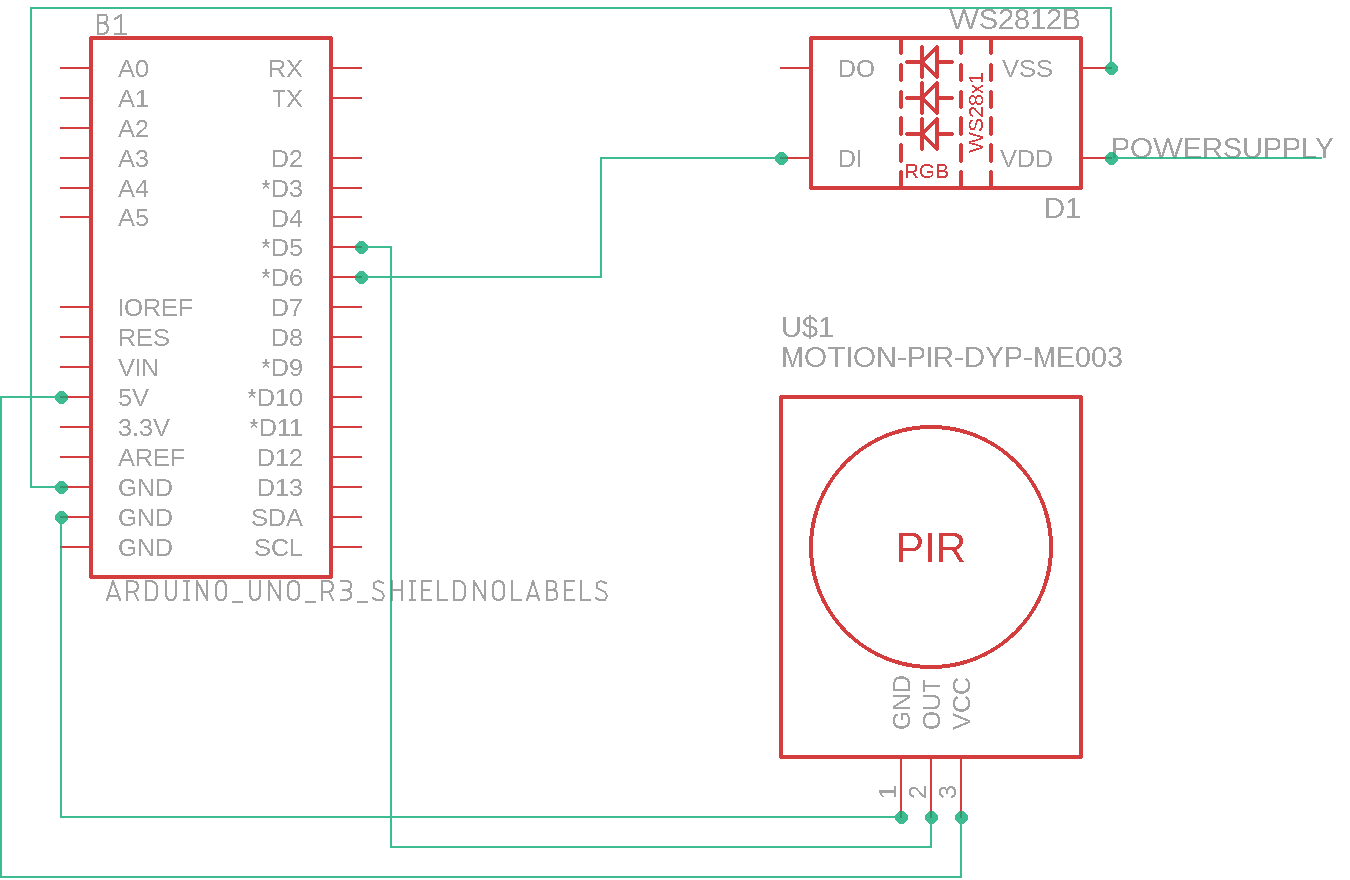
Esquemático
Proceso de manufactura
- Construya su propio LUMAZOID: Visualizador de música DIY con Arduino
- Proyecto Sensor DHT11 Temperatura y Humedad con Indicadores LED y Altavoz Piezo
- Monitor de Salud Fluvial: Sistema de Calidad de Agua con Arduino
- Sensor de obstáculos IR casero con Arduino – Tutorial fácil con LED IR y fotodiodo
- Find Me: Localizador Inteligente de Objetos con Arduino y Bluetooth
- Construye un Robot Cuadrúpedo Inteligente con Arduino: Guía Paso a Paso
- Pistola de Agua Inteligente Activada por Movimiento con Arduino Nano
- Medición de Distancia en Tiempo Real con Sonar Arduino y Visualización en Processing
- Osciloscopio DIY con Arduino Nano (10 Hz–50 kHz) y LCD 128×64
- Reloj flip Arduino con matriz LED 8×8: proyecto DIY de reloj en tiempo real
- Control de Matriz LED 8×8 con Arduino Uno: Guía Paso a Paso