



Proyecto Arduino Melodía Coffin Dance: Construya y Reproduzca el Viral Tune
Componentes y suministros
 |
|
× | 1 | |||
 |
|
× | 1 | |||
 |
|
× | 1 | |||
 |
|
× | 1 | |||
 |
|
× | 1 | |||
 |
|
× | 1 | |||
 |
|
× | 1 |
Aplicaciones y servicios en línea
 |
|
Sobre este proyecto
Hola chicos...
Hoy hice un video sobre la famosa melodía del coffin dance...
Espero que disfruten esto y hagan proyectos en casa..
Si les gusta este proyecto, den like..
Pasos para hacer este proyecto:
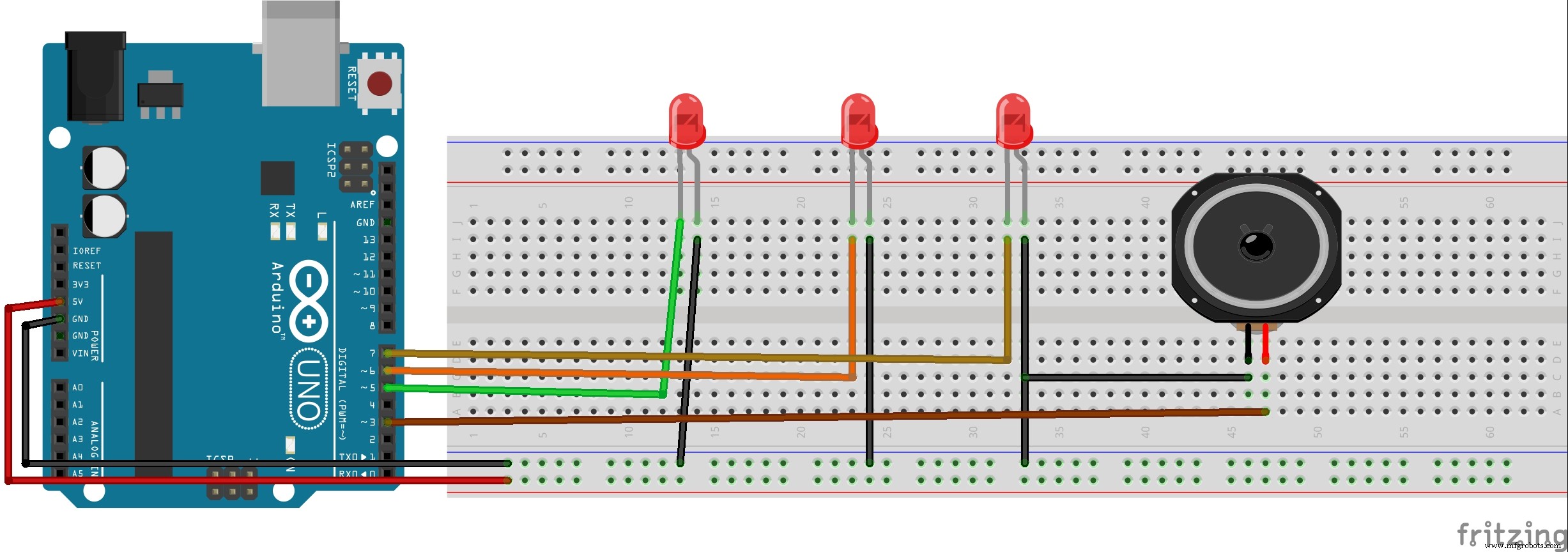
1. Reúna componentes como Arduino, altavoz 8 ohmios, protoboard, 3 LEDs, cables de puente.
2. Conecte los 3 cátodos de los LEDs a pines 5, 6, 7 de Arduino y ánodos a GND.
3. Conecte pin + del altavoz al pin 3 de Arduino y - a GND.
4. Suba el código y disfrute...
Gracias..
Código
- código
- pitches.h
códigoArduino
#include "pitches.h" int green= 7; int red= 5; int blue= 6; int melody[] = { NOTE_AS4, NOTE_AS4, NOTE_AS4, NOTE_AS4, NOTE_AS4, NOTE_AS4, NOTE_AS4, NOTE_AS4, NOTE_AS4, NOTE_AS4, NOTE_AS4, NOTE_AS4, NOTE_AS4, NOTE_AS4, NOTE_AS4, NOTE_AS4, NOTE_AS4, NOTE_AS4, NOTE_AS4, NOTE_AS4, NOTE_D5, NOTE_D5, NOTE_D5, NOTE_D5, NOTE_C5, NOTE_C5, NOTE_C5, NOTE_C5, NOTE_F5, NOTE_F5, NOTE_F5, NOTE_F5, NOTE_G5, NOTE_G5, NOTE_G5, NOTE_G5, NOTE_G5, NOTE_G5, NOTE_G5, NOTE_G5, NOTE_G5, NOTE_G5, NOTE_G5, NOTE_G5, NOTE_C5, NOTE_AS4, NOTE_A4, NOTE_F4, NOTE_G4, 0, NOTE_G4, NOTE_D5, NOTE_C5, 0, NOTE_AS4, 0, NOTE_A4, 0, NOTE_A4, NOTE_A4, NOTE_C5, 0, NOTE_AS4, NOTE_A4, NOTE_G4,0, NOTE_G4, NOTE_AS5, NOTE_A5, NOTE_AS5, NOTE_A5, NOTE_AS5, NOTE_G4,0, NOTE_G4, NOTE_AS5, NOTE_A5, NOTE_AS5, NOTE_A5, NOTE_AS5, NOTE_G4, 0, NOTE_G4, NOTE_D5, NOTE_C5, 0, NOTE_AS4, 0, NOTE_A4, 0, NOTE_A4, NOTE_A4, NOTE_C5, 0, NOTE_AS4, NOTE_A4, NOTE_G4,0, NOTE_G4, NOTE_AS5, NOTE_A5, NOTE_AS5, NOTE_A5, NOTE_AS5, NOTE_G4,0, NOTE_G4, NOTE_AS5, NOTE_A5, NOTE_AS5, NOTE_A5, NOTE_AS5 }; // note durations: 4 = quarter note, 8 = eighth note, etc.: int noteDurations[] = { 4,4,4,4, 4,4,4,4, 4,4,4,4, 4,4,4,4, 4,4,4,4, 4,4,4,4, 4,4,4,4, 4,4,4,4, 4,4,4,4, 4,4,4,4, 4,4,4,4, 4,4,4,4, 4,4,4,4, 4,4,4,4, 4,4,4,4, 4,4,4,4, 4,4,4,4, 4,4,4,4, 4,4,4,4, 4,4,4,4, 4,4,4,4, 4,4,4,4, 4,4,4,4, 4,4,4,4, 4,4,4,4, 4,4,4,4, 4,4,4,4, 4,4,4,4, 4,4,4,4, 4,4,4,4, 4,4,4,4, }; void setup() { pinMode (7, OUTPUT); pinMode (5, OUTPUT); pinMode (6, OUTPUT); pinMode (3, OUTPUT); } void loop() { for (int thisNote = 0; thisNote < 112; thisNote++) { int randomLight1 = random(5, 12); int randomLight2 = random(5, 12); int randomLight3 = random(5, 12); digitalWrite (randomLight1, HIGH); digitalWrite (randomLight2, HIGH); digitalWrite (randomLight3, LOW); int noteDuration = 750 / noteDurations[thisNote]; tone(3, melody[thisNote], noteDuration); int pauseBetweenNotes = noteDuration * 1.30; delay(pauseBetweenNotes); noTone(3); } delay(3000); digitalWrite(5, LOW); digitalWrite(6, LOW); digitalWrite(7, LOW); }
pitches.hArduino
/************************************************* * Constantes Públicas *************************************************/ #define NOTE_B0 31 #define NOTE_C1 33 #define NOTE_CS1 35 #define NOTE_D1 37 #define NOTE_DS1 39 #define NOTE_E1 41 #define NOTE_F1 44 #define NOTE_FS1 46 #define NOTE_G1 49 #define NOTE_GS1 52 #define NOTE_A1 55 #define NOTE_AS1 58 #define NOTE_B1 62 #define NOTE_C2 65 #define NOTE_CS2 69 #define NOTE_D2 73 #define NOTE_DS2 78 #define NOTE_E2 82 #define NOTE_F2 87 #define NOTE_FS2 93 #define NOTE_G2 98 #define NOTE_GS2 104 #define NOTE_A2 110 #define NOTE_AS2 117 #define NOTE_B2 123 #define NOTE_C3 131 #define NOTE_CS3 139 #define NOTE_D3 147 #define NOTE_DS3 156 #define NOTE_E3 165 #define NOTE_F3 175 #define NOTE_FS3 185 #define NOTE_G3 196 #define NOTE_GS3 208 #define NOTE_A3 220 #define NOTE_AS3 233 #define NOTE_B3 247 #define NOTE_C4 262 #define NOTE_CS4 277 #define NOTE_D4 294 #define NOTE_DS4 311 #define NOTE_E4 330 #define NOTE_F4 349 #define NOTE_FS4 370 #define NOTE_G4 392 #define NOTE_GS4 415 #define NOTE_A4 440 #define NOTE_AS4 466 #define NOTE_B4 494 #define NOTE_C5 523 #define NOTE_CS5 554 #define NOTE_D5 587 #define NOTE_DS5 622 #define NOTE_E5 659 #define NOTE_F5 698 #define NOTE_FS5 740 #define NOTE_G5 784 #define NOTE_GS5 831 #define NOTE_A5 880 #define NOTE_AS5 932 #define NOTE_B5 988 #define NOTE_C6 1047 #define NOTE_CS6 1109 #define NOTE_D6 1175 #define NOTE_DS6 1245 #define NOTE_E6 1319 #define NOTE_F6 1397 #define NOTE_FS6 1480 #define NOTE_G6 1568 #define NOTE_GS6 1661 #define NOTE_A6 1760 #define NOTE_AS6 1865 #define NOTE_B6 1976 #define NOTE_C7 2093 #define NOTE_CS7 2217 #define NOTE_D7 2349 #define NOTE_DS7 2489 #define NOTE_E7 2637 #define NOTE_F7 2794 #define NOTE_FS7 2960 #define NOTE_G7 3136 #define NOTE_GS7 3322 #define NOTE_A7 3520 #define NOTE_AS7 3729 #define NOTE_B7 3951 #define NOTE_C8 4186 #define NOTE_CS8 4435 #define NOTE_D8 4699 #define NOTE_DS8 4978
Esquemáticos
Transforme su Coche RC en un Vehículo Controlado por Bluetooth
Crear iluminación de marquesina LED dinámica con Arduino Nano y NeoPixels
Proceso de manufactura
- El Arte y la Industria de la Fabricación de Ataúdes
- Diodos Emisores de Luz (LED): Desde sus Inicios a Vidas de 100 Años
- Construye tu Propio Juego de Ruleta de 37 LEDs con Arduino Nano
- Construye un impresionante cubo LED 5x5x5 con Arduino Mega
- Revitaliza mandos a distancia antiguos: Crea dispositivos inteligentes DIY con Arduino
- Controla un LED por Bluetooth con Arduino – Guía DIY paso a paso
- Reloj analógico por persistencia de visión (POV) con Arduino Nano – Proyecto DIY
- Pantalla de 8 LED activada por sonido con Arduino
- Construye un Robot Cuadrúpedo Inteligente con Arduino: Guía Paso a Paso
- Mezclador de Colores RGB con Arduino – Proyecto DIY para Principiantes
- Teatro de Sombras Navideño DIY: Espectáculo de Luces con Arduino y Tira LED Direccionable