



Construye un Cubo LED RGB 8x8x8 con Arduino – Guía DIY
Componentes y suministros
| Componente | Cantidad | Notas |
|---|---|---|
| LED RGB Difuso Ánodo Común | 512 | |
| Driver LED DM13A | 12 | |
| Decodificador 74HC138 3 a 8 líneas | 1 | |
| MOSFET P-Channel IRF9640 | 8 | |
| Arduino UNO | 1 | También puedes crear versión en protoboard solo con ATmega328, cristal 16MHz, 2x condensadores 22pf |
| Fuente conmutada 5V 2.5A Digilent | 1 | |
| Resistencia 10k ohm | 8 | |
| Resistencia 1k ohm | 8 | |
| Resistencia 100 ohm | 8 |
Aplicaciones y servicios en línea
- Arduino IDE
Sobre el proyecto
Video
Video demostrativo del cubo en funcionamiento.
Construcción
Esta construcción se inspiró en el cubo RGB de Kevin Darrah.

Mirando la construcción de Kevin, su paciencia no debe tener límites - desafortunadamente la mía sí.
Decidí reemplazar los 24 registros de desplazamiento, 192 transistores y 640 resistencias con 12 drivers LED DM13A (unos $1 US cada uno en eBay).

El cubo en sí se construyó como describe Kevin en el siguiente video:

Una vez hecho el cubo, creé una placa de circuito impreso usando el método del tóner para alojar los chips DM13A y el cubo. En lugar de pagar el costo de una placa comercial con metalización de agujeros, decidí cablear a mano cada conexión de LED al pin apropiado del DM13A usando wire-wrap. Los archivos Eagle incluidos contienen la versión cableada a mano y una versión auto-ruteada (sin probar).


La placa del microprocesador y ánodos también contiene un MSGEQ7 - Ecualizador Gráfico de 7 Bandas y preamplificador de micrófono que planeo experimentar en el futuro. Ahora mismo no se usan. Si quieres usar una placa UNO o Nano comercial, solo necesitas el decodificador 74HC138 3 a 8 líneas y los 8 MOSFETs P-Channel con sus resistencias asociadas. Puedes cablearlos en una protoboard si lo deseas.
La fuente 5V 20W se compró en eBay. Hice la caja de pino cepillado 40mm x 9mm.

Añadí un par de animaciones al software del cubo de Kevin pero básicamente permanece sin cambios.
Conclusión
Deberías poder comprar 600 LEDs RGB 5mm Ánodo Común difusos en eBay por unos $30 US. Incluso simplificando la electrónica, la construcción del cubo fue muy laboriosa pero al final, gratificante.
Código
Cube_8x8x8_V1.ino (C/C++)
/* Cubo LED RGB 8x8x8 por John Bradnam basado en trabajo de Kevin Darrah
   Última V12 04/17/2013
   Notas: V11 - Bug fix timing BAM - Movido pin Blank a ISR
   V12 operación bitwise para poner pines LOW era incorrecta...
   Descargo: No soy constructor profesional de cubos LED, así es como lo hice.
*/
#include <SPI.h>
#define LATCH_PIN 2
#define BLANK_PIN 4
#define DATA_PIN 11
#define CLOCK_PIN 13
#define LAYER_A 5
#define LAYER_B 6
#define LAYER_C 7
#define SWITCH_PGM 10
#define SWITCH_SEQ 9
#define CUBE_SIZE 8
#define CUBE_MAX (CUBE_SIZE - 1)
#define LEDS_PER_LEVEL (CUBE_SIZE * CUBE_SIZE)

// Arrays para brillo de cada color (4 bits de resolución)
byte red0[LEDS_PER_LEVEL], red1[LEDS_PER_LEVEL], red2[LEDS_PER_LEVEL], red3[LEDS_PER_LEVEL];
byte blue0[LEDS_PER_LEVEL], blue1[LEDS_PER_LEVEL], blue2[LEDS_PER_LEVEL], blue3[LEDS_PER_LEVEL];
byte green0[LEDS_PER_LEVEL], green1[LEDS_PER_LEVEL], green2[LEDS_PER_LEVEL], green3[LEDS_PER_LEVEL];

int level = 0;
int anodeLevel = 0;
int BAM_Bit, BAM_Counter = 0;
int animation = 0;

void setup() {
  SPI.setBitOrder(MSBFIRST);
  SPI.setDataMode(SPI_MODE0);
  SPI.setClockDivider(SPI_CLOCK_DIV2);
  noInterrupts();
  TCCR1A = B00000000;
  TCCR1B = B00001011; // CTC mode, prescaler 64 -> 250kHz
  TIMSK1 = B00000010; // Interrupt on OCR1A match
  OCR1A = 30; // ~124us por interrupción -> ~8kHz multiplex
  pinMode(LATCH_PIN, OUTPUT);
  pinMode(DATA_PIN, OUTPUT);
  pinMode(CLOCK_PIN, OUTPUT);
  pinMode(LAYER_A, OUTPUT);
  pinMode(LAYER_B, OUTPUT);
  pinMode(LAYER_C, OUTPUT);
  digitalWrite(LAYER_A, LOW);
  digitalWrite(LAYER_B, LOW);
  digitalWrite(LAYER_C, LOW);
  pinMode(SWITCH_PGM, INPUT);
  pinMode(SWITCH_SEQ, INPUT);
  SPI.begin();
  interrupts();
}

void loop() {
  if (digitalRead(SWITCH_PGM) == HIGH) test_leds();
  else {
    clean();
    animation++;
    switch (animation) {
      case 1: rainVersionTwo(20); break;
      case 2: folder(10); break;
      case 3: sinwaveTwo(15); break;
      case 4: randomColor(10); break;
      case 5: wipe_out(10); break;
      case 6: bouncyvTwo(15); break;
      case 7: color_wheelTWO(10); break;
      case 8: harlem_shake(); break;
      case 9: ripples(10); break;
      case 10: animation = 0; break;
    }
  }
}

void LED(int level, int row, int column, byte red, byte green, byte blue) {
  level = constrain(level, 0, CUBE_MAX);
  row = constrain(row, 0, CUBE_MAX);
  column = constrain(column, 0, CUBE_MAX);
  red = constrain(red, 0, 15);
  green = constrain(green, 0, 15);
  blue = constrain(blue, 0, 15);

  int wholebyte = (level * LEDS_PER_LEVEL) + (row * CUBE_SIZE) + column;
  int whichbyte = int(wholebyte / 8);
  int whichbit = (wholebyte & 7);

  bitWrite(red0[whichbyte], whichbit, bitRead(red, 0));
  bitWrite(red1[whichbyte], whichbit, bitRead(red, 1));
  bitWrite(red2[whichbyte], whichbit, bitRead(red, 2));
  bitWrite(red3[whichbyte], whichbit, bitRead(red, 3));
  bitWrite(green0[whichbyte], whichbit, bitRead(green, 0));
  bitWrite(green1[whichbyte], whichbit, bitRead(green, 1));
  bitWrite(green2[whichbyte], whichbit, bitRead(green, 2));
  bitWrite(green3[whichbyte], whichbit, bitRead(green, 3));
  bitWrite(blue0[whichbyte], whichbit, bitRead(blue, 0));
  bitWrite(blue1[whichbyte], whichbit, bitRead(blue, 1));
  bitWrite(blue2[whichbyte], whichbit, bitRead(blue, 2));
  bitWrite(blue3[whichbyte], whichbit, bitRead(blue, 3));
}

ISR(TIMER1_COMPA_vect) {
  PORTD |= 1 << BLANK_PIN; // Apagar todos los LEDs

  if (BAM_Counter == (CUBE_SIZE * 1)) BAM_Bit++;
  else if (BAM_Counter == (CUBE_SIZE * 3)) BAM_Bit++;
  else if (BAM_Counter == (CUBE_SIZE * 7)) BAM_Bit++;
  BAM_Counter++;

  int bytes_per_level = LEDS_PER_LEVEL / 8;
  int shift_max = level + bytes_per_level;

  switch (BAM_Bit) {
    case 0:
      for (int shift_out = level; shift_out < shift_max; shift_out++) SPI.transfer(blue0[shift_out]);
      for (int shift_out = level; shift_out < shift_max; shift_out++) SPI.transfer(green0[shift_out]);
      for (int shift_out = level; shift_out < shift_max; shift_out++) SPI.transfer(red0[shift_out]);
      break;
    case 1:
      for (int shift_out = level; shift_out < shift_max; shift_out++) SPI.transfer(blue1[shift_out]);
      for (int shift_out = level; shift_out < shift_max; shift_out++) SPI.transfer(green1[shift_out]);
      for (int shift_out = level; shift_out < shift_max; shift_out++) SPI.transfer(red1[shift_out]);
      break;
    case 2:
      for (int shift_out = level; shift_out < shift_max; shift_out++) SPI.transfer(blue2[shift_out]);
      for (int shift_out = level; shift_out < shift_max; shift_out++) SPI.transfer(green2[shift_out]);
      for (int shift_out = level; shift_out < shift_max; shift_out++) SPI.transfer(red2[shift_out]);
      break;
    case 3:
      for (int shift_out = level; shift_out < shift_max; shift_out++) SPI.transfer(blue3[shift_out]);
      for (int shift_out = level; shift_out < shift_max; shift_out++) SPI.transfer(green3[shift_out]);
      for (int shift_out = level; shift_out < shift_max; shift_out++) SPI.transfer(red3[shift_out]);
      if (BAM_Counter == (CUBE_SIZE * 15)) {
        BAM_Counter = 0;
        BAM_Bit = 0;
      }
      break;
  }

  digitalWrite(LAYER_A, bitRead(anodeLevel, 0));
  digitalWrite(LAYER_B, bitRead(anodeLevel, 1));
  digitalWrite(LAYER_C, bitRead(anodeLevel, 2));
  PORTD |= 1 << LATCH_PIN;
  PORTD &= ~(1 << LATCH_PIN);
  PORTD &= ~(1 << BLANK_PIN);
  anodeLevel = (anodeLevel + 1) & CUBE_MAX;
  level = (level + bytes_per_level) & (LEDS_PER_LEVEL - 1);
  pinMode(BLANK_PIN, OUTPUT);
}

// Funciones de animación (test_leds, wipe_out, rainVersionTwo, folder, etc.)
// El archivo completo es muy largo, se ha truncado. Descárgalo para ver todo.
Esquemáticos
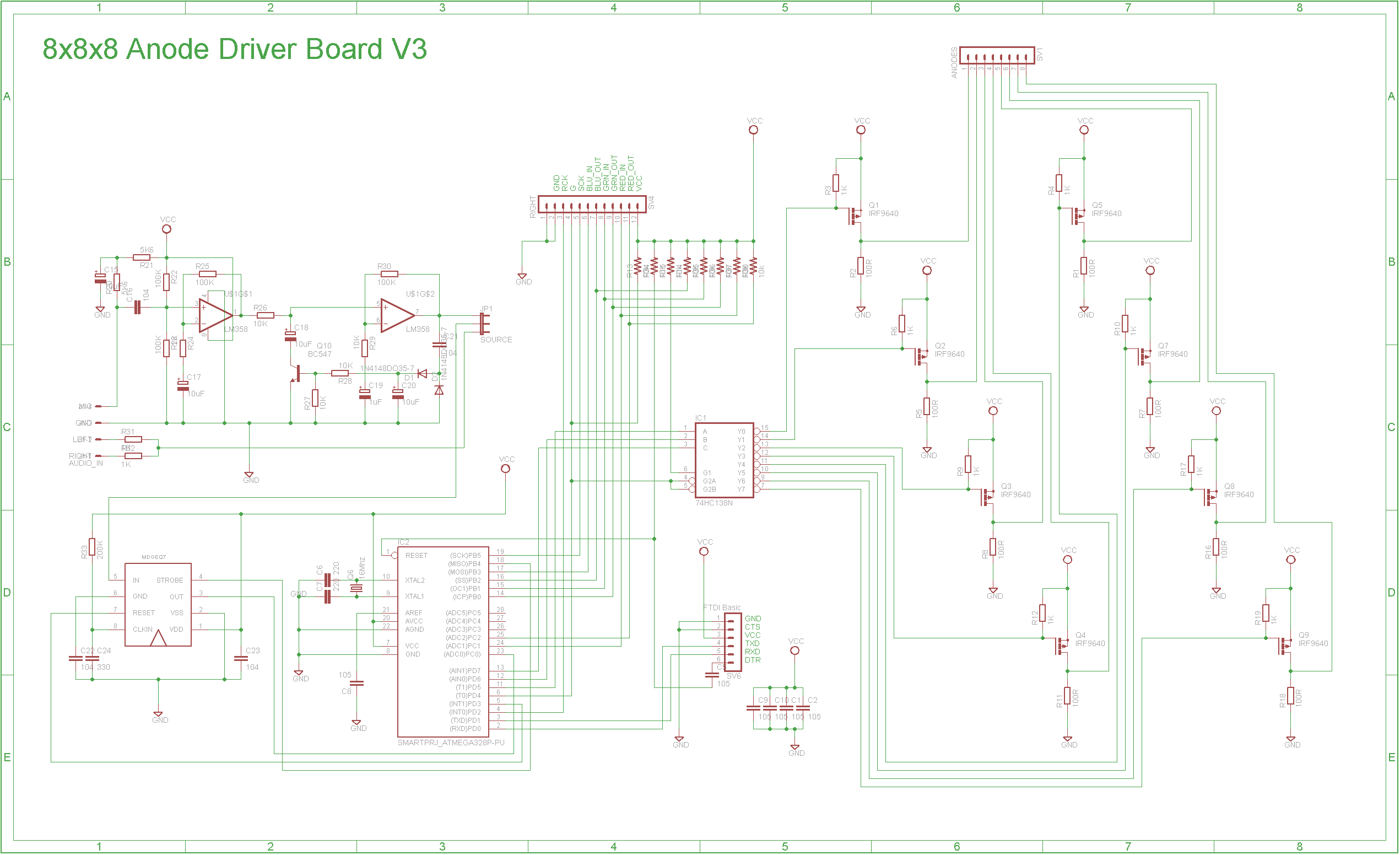
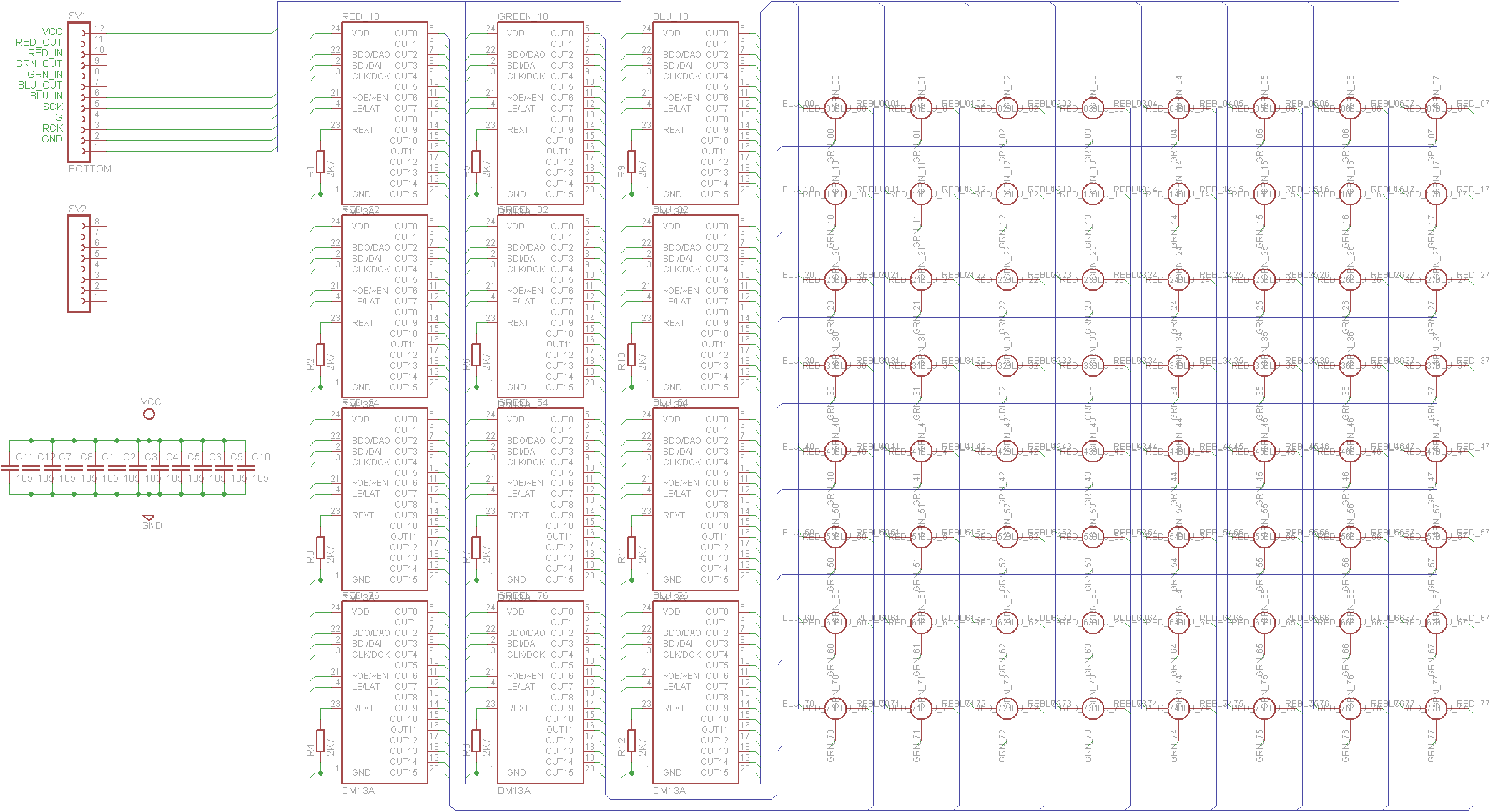 eagle_files_WfqPEUP7Mp.zip
Proceso de manufactura
- Alerta de Sed Inteligente para Plantas: Sensor DIY para Riego Óptimo
- Construye un impresionante cubo LED 5x5x5 con Arduino Mega
- Reloj de Palabras en Italiano con Arduino Nano, NeoPixel, LCD y RTC
- Medidor kWh Sigfox Fiable con Arduino MKR Fox 1200
- Mezclador de Colores RGB con Arduino – Proyecto DIY para Principiantes
- Monitor de temperatura con Bluetooth usando Arduino Nano
- Focos LED RGB Exterior Controlados por DMX – Económicos y Alto Rendimiento
- Cerradura por Gestos Sin Contacto: Acceso Seguro con APDS-9960 y Arduino
- Kit Compañero Arduino Nano: Componentes y Herramientas Esenciales para Electrónica DIY
- Circuito de entrada analógica aislada para Arduino
- Test de Precisión de Tiempo de Reacción con Arduino UNO