



Reloj de Palabras en Italiano con Arduino Nano, NeoPixel, LCD y RTC
Componentes y Suministros
| Arduino Nano R3 | ×1 |
| Tira NeoPixel (144 LEDs) | ×1 |
| LCD Estándar Adafruit 16x2 Blanco/Azul con módulo I2C | ×1 |
| Reloj Tiempo Real (RTC) | ×1 |
| Pulsador 12mm SparkFun | ×4 |
| Resistencia 10k Ω | ×3 |
| Resistencia 475 Ω | ×1 |
| Diodo 1N4007 Alta Tensión/Corriente | ×3 |
| Convertidor DC-DC Ajustable Step-Down | ×1 |
| Marco Pared RIBBA (IKEA) | ×1 |
| Tapa Caja Gewiss 150x110 | ×1 |
| Tiras Aluminio 230mm x 10mm x 1mm | ×1 |
Sobre el Proyecto
Mi pasión por relojes Arduino me llevó a hacer un "Word Clock" (reloj de palabras). Vivo en Italia, así que lo hice en italiano. Me inspiré en el tutorial "Word Clock Javelin", con pequeños cambios. ¡Aquí tenéis el "Word Clock de Italia"!
Además de "decir las horas" en italiano, añadí los cumpleaños de mi familia (incluido el gato). Para el marco usé uno de IKEA, y para interno materiales que tenía en casa:


Para la pantalla usé patrón dibujado en Inkscape. Mi panel mide 12x12 letras (200mm). Sin impresora 3D, hice la rejilla con tiras aluminio, aislando contacto LED con esponja adhesiva (también aísla luz).
Circuito Electrónico


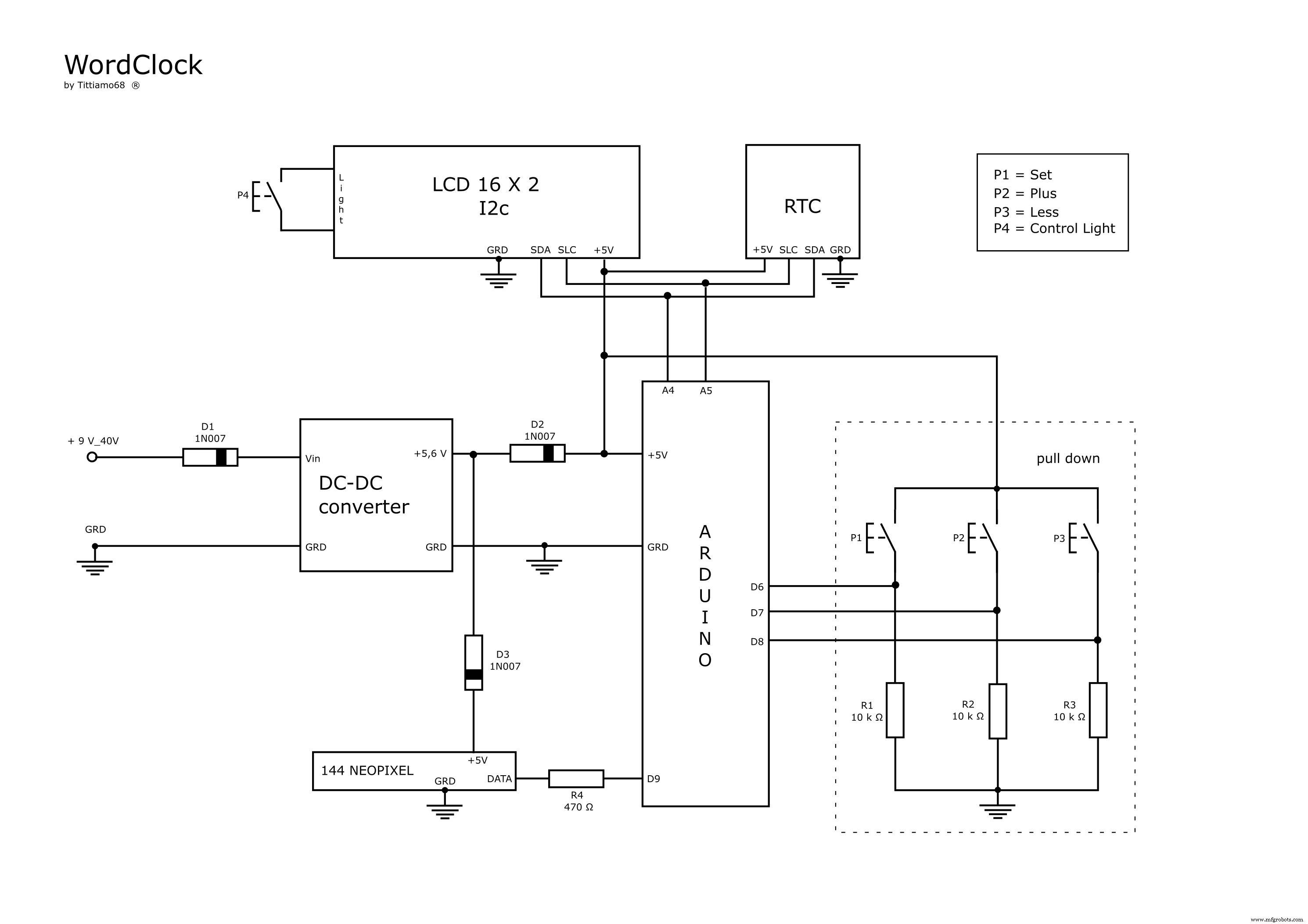
Para hora usé RTC. Para ajustar hora: botones (P1, P2, P3) y display 16x2 (ver proyecto "Clock Set Date Time"). Botones conectados vía circuito pull-down.
Como el display solo sirve para ajustar hora, reemplacé el jumper de retroiluminación por un botón: así solo se enciende al usarlo. Diodo D1: protección polaridad inversa. D2: evita alimentar NeoPixel al cambiar sketch (exceso corriente dañaría). D3: lleva a 5V el voltaje NeoPixel.
Adjunto diagrama circuito, esquema Fritzing, layout PCB.
Matriz LED


Conecté tiras en zigzag desde esquina superior izquierda descendiendo.
Librerías Arduino
- RTC
- LiquidCrystal_I2C
- Adafruit_NeoPixel
Explicación del Código
Código en 5 partes principales:
DisplayDateTime: muestra fecha/hora en LCDHourClock: muestra horas en panelMinuteClock: muestra minutos en panelAuguri: felicitaciones cumpleañospaintWord(arrWord[], color): corazón del código para encender NeoPixels;arrWord= LEDs a encender,color= su color
Para mayor precisión, añadí números 1,2,3,4 para minutos progresivos.
Ejemplo: "SONO LE ORE DIECI E VENTI 4" = 10:24 (10:20 + 00:04); "SONO LE DIECI MENO QUINDICI 2" = 09:47 (09:45 + 00:02)
Montaje


- Abrir marco y limpiar cristal
- Insertar impresión en acetato
- Insertar impresión papel
- Insertar rejilla
- Insertar panel con LEDs
- Pegar contrachapado un poco mayor que caja control
- Fijar caja control con tornillos autorroscantes
¡Atención a la alineación de las dos impresiones!
Ubicación

Queda genial en el salón.
Código
Italian WordClock
Arduino
/* :Project: WordClock :Author: Tiziano Bianchettin :Date: 25/09/2016 :Revision: 1 :License: Public Domain
thanks to: https://www.instructables.com/id/Javelins-Word-Clock/
https://arduinoenonsolo.blogspot.it/2012/12/orologio-con-arduino-e-il-ds1307.html
https://www.mauroalfieri.it/ https://www.danielealberti.it/ https://www.maffucci.it/
My electronics laboratory professor "Perito Carli" */

#include <Wire.h>
#include <RTClib.h>
#include <LiquidCrystal_I2C.h>
#include <Adafruit_NeoPixel.h>

#define PIN 9
#define NUM_LEDS 144
#define GIORNO 255
#define SERA 25

Adafruit_NeoPixel strip = Adafruit_NeoPixel(NUM_LEDS, PIN, NEO_GRB + NEO_KHZ800);
int intBrightness;

uint32_t Red = strip.Color(255, 0, 0);
uint32_t Green = strip.Color(0, 255, 0);
uint32_t Blue = strip.Color(0, 0, 255);
uint32_t White = strip.Color(255, 255, 255);
uint32_t Yellow = strip.Color(255, 255, 0);
uint32_t Purple = strip.Color(60, 0, 255);
uint32_t Off = strip.Color(0, 0, 0);

LiquidCrystal_I2C lcd(0x27, 16, 2);
RTC_DS1307 RTC;

int P1 = 6, P2 = 7, P3 = 8;
int oraagg, minagg, annoagg, meseagg, dayagg;
int menu = 0, ora;

// Arrays para palabras (índices LEDs)
int txtSONO[] = {1,2,3,4,6,7,9,10,11,-1};
int txtUNA[] = {20,21,22,-1};
int txtDUE[] = {17,18,19,-1};
int txtTRE[] = {57,58,59,-1};
int txtQUATTRO[] = {96,97,98,99,100,101,102,-1};
int txtCINQUE[] = {30,31,32,33,34,35,-1};
int txtSEI[] = {103,104,105,-1};
int txtSETTE[] = {48,49,50,51,52,-1};
int txtOTTO[] = {72,73,74,75,-1};
int txtNOVE[] = {60,61,62,63,-1};
int txtDIECI[] = {12,13,14,15,16,-1};
int txtUNDICI[] = {84,85,86,87,88,89,-1};
int txtDODOCI[] = {90,91,92,93,94,95,-1};

int txtAUGURI[] = {24,25,26,27,28,29,-1};
int txtSIMONE[] = {36,37,38,39,40,41,-1};
int txtJACOPO[] = {42,43,44,45,46,47,-1};
int txtMINU[] = {53,54,55,56,-1};
int txtTIZIANO[] = {65,66,67,68,69,70,71,-1};
int txtMARILENA[] = {76,77,78,79,80,81,82,83,-1};

int txtE[] = {107,-1};
int txtMENO[] = {116,117,118,119,-1};
int txtMUNO[] = {5,-1};
int txtMDUE[] = {64,-1};
int txtMTRE[] = {106,-1};
int txtMQUATTRO[] = {125,-1};
int txtMCINQUE[] = {132,133,134,135,136,137,-1};
int txtMDIECI[] = {120,121,122,123,124,-1};
int txtQUINDICI[] = {108,109,110,111,112,113,114,115,-1};
int txtVENTI[] = {139,140,141,142,143,-1};
int txtTRENTA[] = {126,127,128,129,130,131,-1};

void setup() {
  strip.begin(); strip.show();
  lcd.begin(); lcd.backlight(); lcd.clear();
  pinMode(P1, INPUT); pinMode(P2, INPUT); pinMode(P3, INPUT);
  Serial.begin(9600); Wire.begin(); RTC.begin();
  if (!RTC.isrunning()) {
    Serial.println("RTC is NOT running!");
    RTC.adjust(DateTime(__DATE__, __TIME__));
  }
}

void loop() {
  if (digitalRead(P1)) { menu++; }

  if (menu == 0) {
    DisplayDateTime();
    DateTime now = RTC.now();
    intBrightness = (now.hour() >= 19 || now.hour() < 7) ? SERA : GIORNO;
    strip.setBrightness(intBrightness); strip.show();

    int timeMin = now.minute(); int modMin = timeMin % 5;
    if (modMin == 0) { paintWord(txtSONO, White); paintWord(txtMQUATTRO, Off); }
    else if (modMin == 1) { paintWord(txtSONO, Yellow); paintWord(txtMUNO, Red); }
    else if (modMin == 2) { paintWord(txtSONO, Green); paintWord(txtMUNO, Off); paintWord(txtMDUE, Blue); }
    else if (modMin == 3) { paintWord(txtSONO, Blue); paintWord(txtMDUE, Off); paintWord(txtMTRE, Green); }
    else if (modMin == 4) { paintWord(txtSONO, Red); paintWord(txtMTRE, Off); paintWord(txtMQUATTRO, Yellow); }

    HourClock(); MinuteClock(); Auguri(); strip.show();
  }
  else if (menu == 1) DisplaySetHour();
  else if (menu == 2) DisplaySetMinute();
  else if (menu == 3) DisplaySetYear();
  else if (menu == 4) DisplaySetMonth();
  else if (menu == 5) DisplaySetDay();
  else if (menu == 6) { StoreAgg(); delay(500); menu = 0; }

  delay(100);
}

void paintWord(int arrWord[], uint32_t intColor) {
  for (int i = 0; arrWord[i] != -1; i++) {
    strip.setPixelColor(arrWord[i], intColor);
  }
}

// Funciones DisplayDateTime, DisplaySetHour, DisplaySetMinute, DisplaySetYear,
// DisplaySetMonth, DisplaySetDay, StoreAgg, HourClock, MinuteClock, Auguri
// ... (código completo disponible en descarga)
Piezas Personalizadas y Carcasas
wordklock_aWvuaZRw4N.svg
Esquemáticos
wordklock_JBoZPYrsYr.fzz (Fritzing)
Proceso de manufactura
- Alerta de Sed Inteligente para Plantas: Sensor DIY para Riego Óptimo
- Reloj de Palabras DIY con Arduino: Construye una Pantalla Elegante en Tiempo Real
- Reloj de Palabras de Precisión: Visualización del Tiempo en Palabras Minuto a Minuto
- Medidor kWh Sigfox Fiable con Arduino MKR Fox 1200
- Monitor de temperatura con Bluetooth usando Arduino Nano
- Cerradura por Gestos Sin Contacto: Acceso Seguro con APDS-9960 y Arduino
- Kit Compañero Arduino Nano: Componentes y Herramientas Esenciales para Electrónica DIY
- Kit Adaptador USB MIDI para Arduino Micro / Leonardo: Lista Completa de Componentes
- Circuito de entrada analógica aislada para Arduino
- Visualizador Espectro Audio RGB 32 Bandas - Matriz LED Arduino
- Test de Precisión de Tiempo de Reacción con Arduino UNO