



Visualizador de espectro de audio FHT – Construye una impresionante pantalla LED de audio
Componentes y suministros
 |
Arduino Nano R3 | × | 1 |
| Matriz LED RGB WS2812B 8x32 | × | 1 | |
 |
Resistencia 4.75k ohm | × | 3 |
 |
Resistencia 100k ohm | × | 2 |
 |
Resistencia 10k ohm | × | 2 |
 |
Resistencia 390 ohm (agujero pasante) | × | 1 |
 |
Diodo 1N4007 – Alto voltaje/corriente (incluso 1N4004 sirve) | × | 1 |
 |
Capacitor 100 nF | × | 2 |
 |
Capacitor 1000 µF | × | 1 |
 |
Pulsador 12mm SparkFun (o dos pulsadores de panel si vas a meter el circuito en una caja) | × | 2 |
| Placa de prototipo genérica 4x6 cm | × | 1 | |
| Conector RCA Estéreo Hembra para PCB | × | 1 |
Herramientas y máquinas necesarias
 |
Soldador (genérico) |
| Cable Jack 3.5mm a RCA Estéreo |
Sobre este proyecto
La librería Arduino FHT
La FHT (Transformada Rápida de Hartley) hace el mismo trabajo que la más conocida FFT (Transformada Rápida de Fourier), pero a diferencia de esta, usa solo datos reales, mientras que FFT trabaja con datos complejos. Por tanto, FHT usa la mitad de potencia de procesamiento y la mitad de memoria del sistema.
Esta librería usa un solo array para muestreo en lugar de dos (uno para valores reales y otro para imaginarios, usado por FFT). También simplifica cálculos matemáticos complejos evitando bucles con cálculos logarítmicos de punto flotante complejos, usando en su lugar tablas numéricas.
La desventaja es que siempre devuelve la mitad de valores del tamaño del array usado para muestreo, lo que conlleva cierta pérdida de resolución y precisión en los extremos del rango de audio. Sin embargo, para nuestro caso -no un instrumento de medición sino un gadget simple- no necesitamos precisión extrema, solo encender LEDs al ritmo de la música.
Quien quiera profundizar puede consultar el sitio Open Music Lab con documentación completa, explicación de funciones y ejemplos genéricos para Arduino.
La librería FHT es tan rápida que fue necesario añadir un delay en el código para reducir parpadeo. El resultado es una visualización mucho más rápida y responsiva que la versión con FFT, que a menudo parecía ir retrasada respecto a la música. El menor uso de recursos permitió añadir código para gestionar funciones adicionales.
La nueva versión
El proyecto es idéntico a la versión anterior; quienes ya la construyeron solo necesitan añadir un botón, una resistencia de 10K y actualizar el código.
Además de implementar la librería FHT, esta versión incluye:
- Botón adicional para ajuste de brillo.
- Guardado de configuración de color y brillo en EEPROM para recuperarlos al encender.
- Visualización del nivel de color y brillo al pulsar botones y al encender (desactivable).
Código
Versión código FHT (Arduino)
/* Copyright (c) 2020 Janux
Permission is hereby granted, free of charge, to any person obtaining a copy
of this software and associated documentation files (the "Software"), to deal
in the Software without restriction, including without limitation the rights
to use, copy, modify, merge, publish, distribute, sublicense, and/or sell
copies of the Software, and to permit persons to whom the Software is
furnished to do so, subject to the following conditions:
The above copyright notice and this permission notice shall be included in
all copies or substantial portions of the Software.
THE SOFTWARE IS PROVIDED "AS IS", WITHOUT WARRANTY OF ANY KIND, EXPRESS OR
IMPLIED, INCLUDING BUT NOT LIMITED TO THE WARRANTIES OF MERCHANTABILITY,
FITNESS FOR A PARTICULAR PURPOSE AND NONINFRINGEMENT. IN NO EVENT SHALL THE
AUTHORS OR COPYRIGHT HOLDERS BE LIABLE FOR ANY CLAIM, DAMAGES OR OTHER
LIABILITY, WHETHER IN AN ACTION OF CONTRACT, TORT OR OTHERWISE, ARISING FROM,
OUT OF OR IN CONNECTION WITH THE SOFTWARE OR THE USE OR OTHER DEALINGS IN
THE SOFTWARE.
Basado en proyecto original para matriz MAX72xx y lib FFT de Shajeeb.
Sección de configuración basada en trabajo de Ragnar Ranøyen Homb (Norwegian Creations).
*/

#define LIN_OUT 1      // Salida lineal magnitud FHT
#define FHT_N 128      // Muestras para FHT, debe ser potencia de 2
#include <FHT.h>

#define xres 32        // Columnas totales en display, <= MUESTRAS/2
#define yres 8         // Filas totales en display
#define ledPIN 6       // Pin salida control LEDs
#define NUM_LEDS (xres * yres) // Total LEDs en matriz

#include <Adafruit_NeoPixel.h>

#define colorPIN 5         // Pin cambio color LED
#define brightnessPIN 10   // Pin cambio brillo

byte displaycolor = 0; // Valor color por defecto
byte brightness = 1;   // Nivel brillo por defecto

#include <EEPROM.h>
#define CONFIG_START 32
#define CONFIG_VERSION "VER01"

typedef struct {
  char version[6];
  byte displaycolor;
  byte brightness;
} configuration_type;

configuration_type CONFIGURATION = { CONFIG_VERSION, displaycolor, brightness };

byte yvalue;
int peaks[xres];
byte state = HIGH;
byte previousState = LOW;
unsigned long lastDebounceTime = 0;
unsigned long debounceDelay = 100;
byte data_avgs[xres];

Adafruit_NeoPixel pixel = Adafruit_NeoPixel(NUM_LEDS, ledPIN, NEO_GRB + NEO_KHZ800);

// Filtro ecualizador
byte eq[32] = {
  60, 65, 70, 75, 80, 85, 90, 95, 100, 100, 100, 100, 100, 100, 100, 100,
  100, 100, 100, 100, 100, 100, 100, 100, 115, 125, 140, 160, 185, 200, 200, 200
};
bool EQ_ON = true; // false para desactivar eq

// 5 sets de colores para LEDs, 0 = color personalizado
byte colors[][8] = {
  {170, 160, 150, 140, 130, 120, 1, 1},
  {1, 5, 10, 15, 20, 25, 90, 90},
  {90, 85, 80, 75, 70, 65, 1, 1},
  {90, 90, 90, 30, 30, 30, 1, 1},
  {170, 160, 150, 140, 130, 120, 110, 0}
};

// Caracteres para mostrar ajustes
byte charBitmap[] = {
  0x1C, 0x10, 0x10, 0x10, 0x10, 0x1C, 0x08, 0x18, 0x08, 0x08, 0x08, 0x1C,
  0x0C, 0x12, 0x04, 0x08, 0x10, 0x1E, 0x0C, 0x12, 0x02, 0x06, 0x12, 0x0C,
  0x10, 0x10, 0x10, 0x14, 0x1E, 0x04, 0x1E, 0x10, 0x1E, 0x02, 0x12, 0x0C,
  0x1E, 0x10, 0x10, 0x1E, 0x12, 0x1E, 0x1E, 0x02, 0x04, 0x08, 0x08, 0x08,
  0x0C, 0x12, 0x0C, 0x12, 0x12, 0x0C, 0x1C, 0x12, 0x1C, 0x12, 0x12, 0x1C
};

void setup() {
  pixel.begin();

  // Configuración ADC para modo free-running
  ADCSRA = 0b11100101; // free-running, prescaler 32 (0xe5)
  ADMUX = 0b00000000;  // Pin A0, referencia externa

  // Leer config de EEPROM
  if (loadConfig()) {
    displaycolor = CONFIGURATION.displaycolor;
    brightness = CONFIGURATION.brightness;
  }

  pixel.setBrightness(brightness * 24 + 8);
  showSettings(3, true); // Cambia a false si no quieres mostrar al inicio
}

void loop() {
  while (1) {
    Sampling();
    RearrangeFHT();
    SendToDisplay();
    colorChange();
    brightnessChange();
    delay(10); // Reduce parpadeo (FHT es muy rápido)
  }
}

void Sampling() {
  for (int i = 0; i < FHT_N; i++) {
    while (!(ADCSRA & 0x10)); // Esperar fin conversión ADC (bit ADIF)
    ADCSRA = 0b11110101;      // Limpiar bit ADIF (0xf5)
    byte m = ADCL;            // Leer dato ADC bajo
    byte j = ADCH;            // Leer dato ADC alto
    int value = (j << 8) | m; // Formar int de 10 bits (ADLAR=0)
    value -= 0x0200;          // Convertir a signed int
    value <<= 6;              // Formar signed int de 16 bits
    fht_input[i] = value / 8; // Copiar a array entrada FHT comprimiendo
  }

  // Proceso FHT
  fht_window();   // Ventana para mejor respuesta frecuencial
  fht_reorder();  // Reordenar antes de FHT
  fht_run();      // Procesar datos en FHT
  fht_mag_lin();  // Magnitud lineal de salida
}

void RearrangeFHT() {
  // FHT devuelve valores reales en un solo array
  // Tras fht_mag_lin(), muestras en primeras FHT_N/2 posiciones de fht_lin_out[]
  int step = (FHT_N / 2) / xres;
  int c = 0;
  for (int i = 0; i < (FHT_N / 2); i += step) {
    data_avgs[c] = 0;
    for (int k = 0; k < step; k++) {
      data_avgs[c] += fht_lin_out[i + k];
    }
    data_avgs[c] /= step; // Promedio
    c++;
  }
}

void SendToDisplay() {
  for (int i = 0; i < xres; i++) {
    if (EQ_ON) data_avgs[i] = data_avgs[i] * (float)(eq[i]) / 100;
    data_avgs[i] = constrain(data_avgs[i], 0, 80);
    data_avgs[i] = map(data_avgs[i], 0, 80, 0, yres);
    yvalue = data_avgs[i];
    peaks[i]--; // Decaimiento
    if (yvalue > peaks[i]) peaks[i] = yvalue;
    yvalue = peaks[i];
    setColumn(i, yvalue);
  }
  pixel.show();
}

void setColumn(byte x, byte y) {
  int led, i;
  for (i = 0; i < yres; i++) {
    led = GetLedFromMatrix(x, i);
    if (peaks[x] > i) {
      switch (displaycolor) {
        case 4: // Color personalizado
          if (colors[displaycolor][i] == 0) {
            pixel.setPixelColor(led, 255, 255, 255); // Blanco
          } else {
            pixel.setPixelColor(led, Wheel(colors[displaycolor][i]));
          }
          break;
        case 5: // Color por columna
          pixel.setPixelColor(led, Wheel(x * 16));
          break;
        case 6: // Color por fila
          pixel.setPixelColor(led, Wheel(i * y * 3));
          break;
        case 7: // Patrón especial (banderas)
          // Bandera Italia
          // if (x < 11) pixel.setPixelColor(led, 0, 255, 0);
          // if (x > 10 && x < 21) pixel.setPixelColor(led, 255, 255, 255);
          // if (x > 20) pixel.setPixelColor(led, 255, 0, 0);
          // Bandera EE.UU.
          if (i < yres - 2) {
            if (x & 0x01) pixel.setPixelColor(led, 0, 0, 255);
            else pixel.setPixelColor(led, 255, 0, 0);
          } else {
            pixel.setPixelColor(led, 255, 255, 255);
          }
          break;
        default: // Colores definidos en array
          pixel.setPixelColor(led, Wheel(colors[displaycolor][i]));
      }
    } else {
      pixel.setPixelColor(led, pixel.Color(0, 0, 0)); // Apagado
    }
  }
}

// Calcular número LED por coordenadas x,y
// Válido para WS2812B layout serpentinado horizontal, LED 0 en esquina inf. der. (DIN a la derecha)
// x: 0 a xres-1, y: 0 a yres-1
// Retorna: 0 a NUM_LEDS-1
int GetLedFromMatrix(byte x, byte y) {
  int led;
  x = xres - x - 1;
  if (x & 0x01) { // Columnas impares aumentan hacia atrás
    led = ((x + 1) * yres - y - 1);
  } else { // Columnas pares aumentan normalmente
    led = ((x + 1) * yres - yres + y);
  }
  return constrain(led, 0, NUM_LEDS);
}

void colorChange() {
  int reading = digitalRead(colorPIN);
  if (reading == HIGH && previousState == LOW && millis() - lastDebounceTime > debounceDelay) {
    displaycolor++;
    if (displaycolor > 7) displaycolor = 0;
    showSettings(1, true);
    saveConfig();
    lastDebounceTime = millis();
  }
  previousState = reading;
}

void brightnessChange() {
  int reading = digitalRead(brightnessPIN);
  if (reading == HIGH && previousState == LOW && millis() - lastDebounceTime > debounceDelay) {
    brightness++;
    if (brightness > 7) brightness = 0;
    pixel.setBrightness(brightness * 24 + 8);
    showSettings(2, true);
    saveConfig();
    lastDebounceTime = millis();
  }
  previousState = reading;
}

// Utilidad Adafruit Neopixel: Input 0-255 -> valor color
// Transición R - G - B - vuelta a R
unsigned long Wheel(byte WheelPos) {
  WheelPos = 255 - WheelPos;
  if (WheelPos < 85) {
    return pixel.Color(255 - WheelPos * 3, 0, WheelPos * 3);
  }
  if (WheelPos < 170) {
    WheelPos -= 85;
    return pixel.Color(0, WheelPos * 3, 255 - WheelPos * 3);
  }
  WheelPos -= 170;
  return pixel.Color(WheelPos * 3, 255 - WheelPos * 3, 0);
}

int loadConfig() {
  if (EEPROM.read(CONFIG_START + 0) == CONFIG_VERSION[0] &&
      EEPROM.read(CONFIG_START + 1) == CONFIG_VERSION[1] &&
      EEPROM.read(CONFIG_START + 2) == CONFIG_VERSION[2] &&
      EEPROM.read(CONFIG_START + 3) == CONFIG_VERSION[3] &&
      EEPROM.read(CONFIG_START + 4) == CONFIG_VERSION[4]) {
    for (unsigned int i = 0; i < sizeof(CONFIGURATION); i++) {
      *((char*)&CONFIGURATION + i) = EEPROM.read(CONFIG_START + i);
    }
    return 1;
  }
  return 0;
}

void saveConfig() {
  CONFIGURATION.displaycolor = displaycolor;
  CONFIGURATION.brightness = brightness;
  for (unsigned int i = 0; i < sizeof(CONFIGURATION); i++)
    EEPROM.write(CONFIG_START + i, *((char*)&CONFIGURATION + i));
}

// 1 = mostrar nivel color, 2 = mostrar nivel brillo, 3 = ambos
void showSettings(byte num, bool show) {
  if (show) {
    pixel.clear();
    if (num == 1 || num == 3) {
      drawChar(0, 0);
      drawChar(displaycolor + 1, 5);
    }
    if (num == 2 || num == 3) {
      drawChar(9, xres - 9);
      drawChar(brightness + 1, xres - 4);
    }
    delay(1000);
    pixel.clear();
  }
}

void drawChar(byte val, byte pos) {
  for (int x = 4; x >= 0; x--) {
    for (int y = 5; y >= 0; y--) {
      if ((charBitmap[val * 6 + 5 - y] >> x) & 0x01) {
        pixel.setPixelColor(GetLedFromMatrix(4 - x + pos, y + 1), Wheel((pos > 10) * 170));
        pixel.show();
      }
    }
  }
}

// by Janux®, Última versión 28/06/2020.
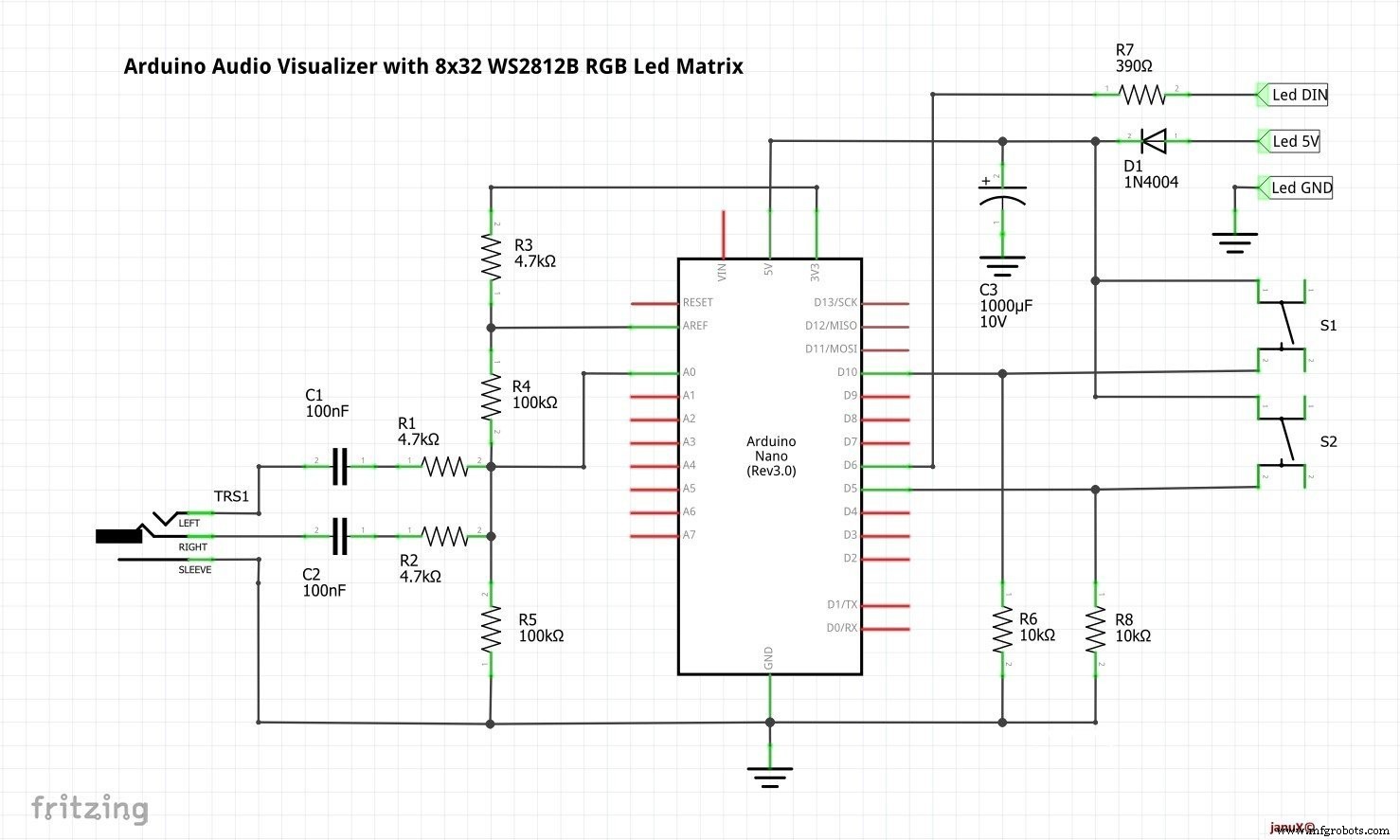
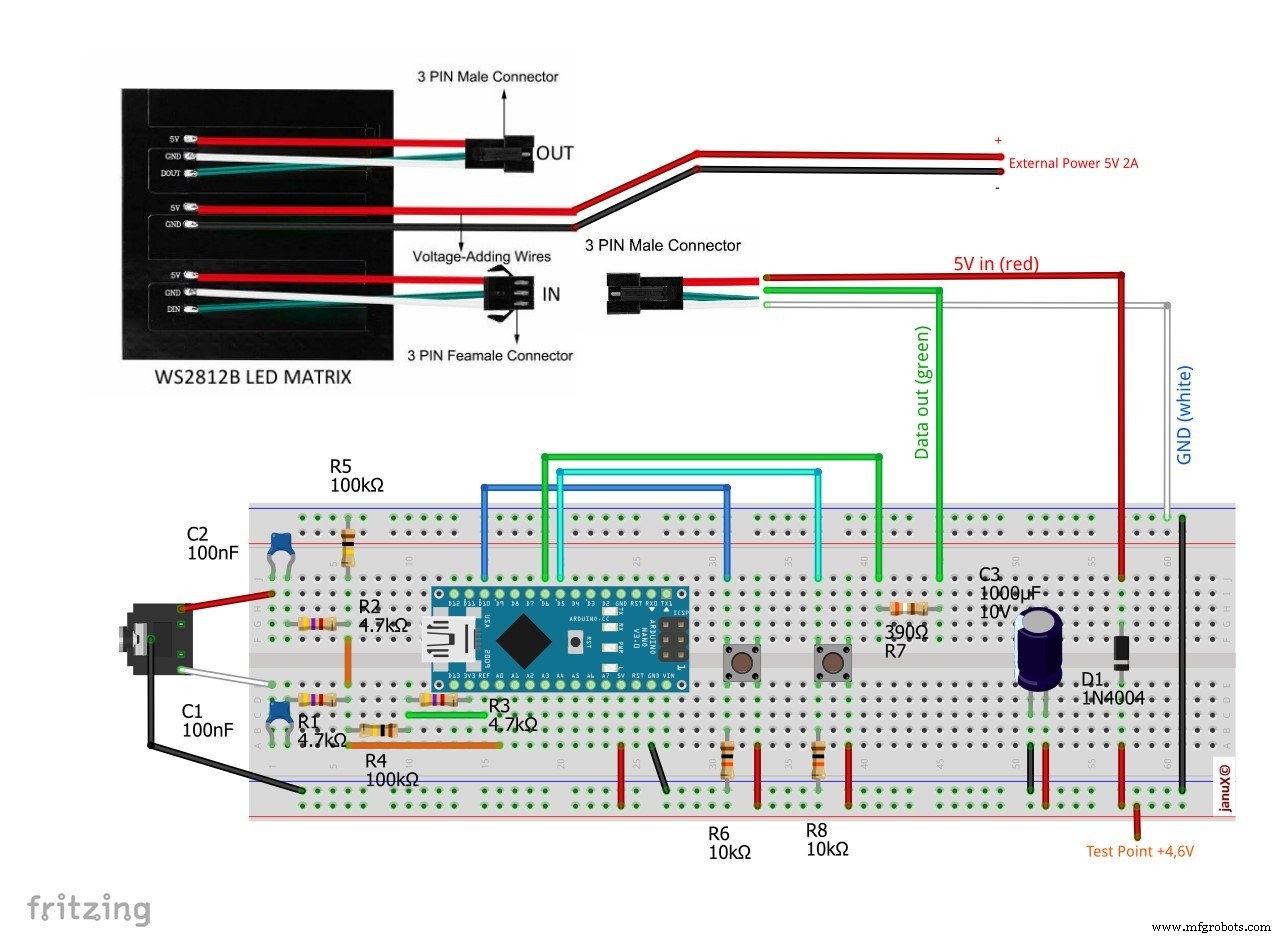
Esquemáticos
Proceso de manufactura
- Analizador de espectro de audio Arduino de 32 bandas – Visualización lineal y pseudo-logarítmica
- Alerta de Sed Inteligente para Plantas: Sensor DIY para Riego Óptimo
- Reloj de Palabras en Italiano con Arduino Nano, NeoPixel, LCD y RTC
- Medidor kWh Sigfox Fiable con Arduino MKR Fox 1200
- Monitor de temperatura con Bluetooth usando Arduino Nano
- Cerradura por Gestos Sin Contacto: Acceso Seguro con APDS-9960 y Arduino
- Kit Compañero Arduino Nano: Componentes y Herramientas Esenciales para Electrónica DIY
- Kit Adaptador USB MIDI para Arduino Micro / Leonardo: Lista Completa de Componentes
- Circuito de entrada analógica aislada para Arduino
- Visualizador Espectro Audio RGB 32 Bandas - Matriz LED Arduino
- Test de Precisión de Tiempo de Reacción con Arduino UNO