



Matriz LED 8x8 Bluetooth con Texto Desplazable - Proyecto Arduino
Componentes y suministros
| Arduino Nano R3 | ×1 |
| Módulo Bluetooth HC-05 | ×1 |
| Módulo matriz LED 8x8 con MAX7219 | ×7 |
| Resistencia 6.8 kΩ | ×1 |
| Resistencia 2.2 kΩ | ×2 |
Herramientas necesarias
- Soldador genérico
Aplicaciones y servicios en línea
- Arduino IDE
- Bluetooth SPP Pro (app Android - descarga desde Uptodown)
Sobre el proyecto
Tras varios intentos de lograr texto desplazable en matriz 8x8, encontré la guía completa en Embedded Lab: Portable Bluetooth Enabled Scrolling LED Matrix Display.
El dispositivo usa Arduino Nano, módulo Bluetooth para recibir datos del smartphone y 7 matrices 8x8 con driver MAX7219 (módulos baratos en eBay/AliExpress). Hice pequeña modificación al código original para 7 módulos (en lugar de 8). La app Android original ya no está en Google Play; se descarga desde: Bluetooth SPP Pro en Uptodown. Permite controlar velocidad desplazamiento, brillo, pausa, borrar texto y botones predefinidos.
Monté todo en una caja de PVC forrada con papel pintado negro.
Librerías Arduino necesarias:
Código
Código principal (Arduino)
/* Comandos que Arduino reconoce:
1. Texto entre paréntesis: (Hola mundo) → desplazamiento derecha-izquierda.
2. Brillo: /+ incrementa, /- decrementa (16 niveles).
3. Velocidad: /> más lento, /< más rápido.
4. /p pausa/reanuda desplazamiento.
5. /e borra buffer y apaga display.

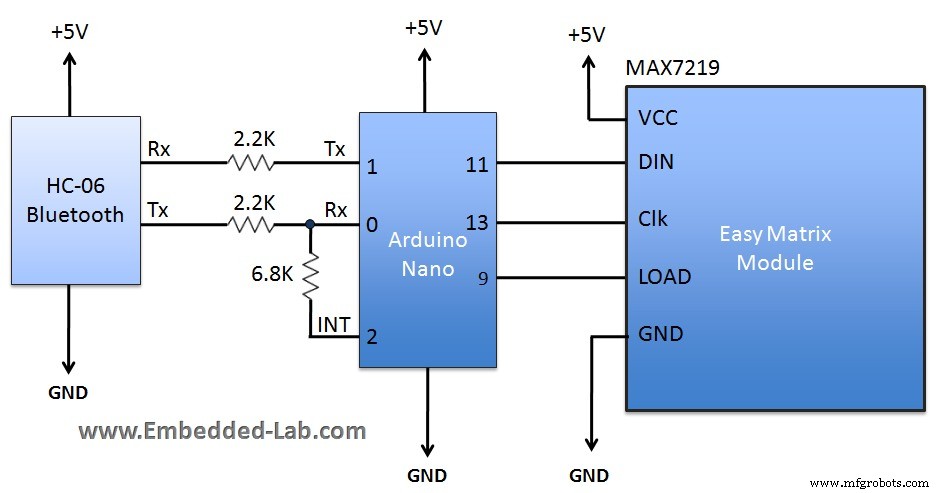
Conexiones:
Easy Matrix → Arduino
VCC → +5V
DIN → MOSI (Pin 11)
LOAD → pinCS (definido en código, Pin 10)
CLK → SCK (Pin 13)
GND → Gnd
UART a 9600 baudios.
*/

#include <SPI.h>
#include <Adafruit_GFX.h>
#include <Max72xxPanel.h>

int pinCS = 10;
int numberOfHorizontalDisplays = 7;
int numberOfVerticalDisplays = 1;
Max72xxPanel matrix = Max72xxPanel(pinCS, numberOfHorizontalDisplays, numberOfVerticalDisplays);

int scrollspeed = 100;
int spacer = 1;
int width = 5 + spacer;
boolean inChar = false, NewData = false, pause = false;
boolean dataAvailable = false;
char inputString[512];
int count = 0, BTvalue = 5;

void setup() {
  matrix.setIntensity(1); // 0-15
  matrix.setPosition(0, 0, 0);
  matrix.setPosition(1, 1, 0);
  matrix.setPosition(2, 2, 0);
  matrix.setPosition(3, 3, 0);
  matrix.setPosition(4, 4, 0);
  matrix.setPosition(5, 5, 0);
  matrix.setPosition(6, 6, 0);
  matrix.fillScreen(0);
  matrix.write();
  Serial.begin(9600);
  pinMode(2, INPUT);
  digitalWrite(2, LOW);
  attachInterrupt(0, serialInterrupt, CHANGE);
}

void loop() {
  if (dataAvailable) display_data();
}

void display_data() {
  for (int i = 0; i < width * count + matrix.width() - 1 - spacer; i++) {
    matrix.fillScreen(0);
    int letter = i / width;
    int x = (matrix.width() - 1) - i % width;
    int y = (matrix.height() - 8) / 2;
    while (x + width - spacer >= 0 && letter >= 0) {
      if (letter < count) matrix.drawChar(x, y, inputString[letter], HIGH, LOW, 1);
      letter--;
      x -= width;
    }
    matrix.write();
    if (!dataAvailable) { i = width * count + matrix.width() - 1 - spacer; matrix.fillScreen(LOW); matrix.write(); }
    if (NewData) { i = 0; matrix.fillScreen(LOW); matrix.write(); NewData = false; }
    while (pause) delay(0);
    delay(scrollspeed);
  }
}

volatile boolean inService = false;
void serialInterrupt() {
  if (inService) return;
  inService = true;
  interrupts();
  while (!Serial.available());
  while (Serial.available()) {
    char ch = Serial.read();
    if (ch == '(') {
      count = 0; inChar = true;
      while (inChar) {
        if (Serial.available()) {
          ch = Serial.read();
          if (ch == ')') { inChar = false; dataAvailable = true; }
          else { inputString[count] = ch; count++; if (count > 0) NewData = true; }
        }
      }
    }
    if (ch == '/') {
      inChar = true;
      while (inChar) {
        if (Serial.available()) {
          ch = Serial.read();
          if (ch == '+') { if (BTvalue < 15) { BTvalue++; matrix.setIntensity(BTvalue); } break; }
          if (ch == '-') { if (BTvalue > 0) { BTvalue--; matrix.setIntensity(BTvalue); } break; }
          if (ch == '>') { if (scrollspeed < 200) scrollspeed += 20; break; }
          if (ch == '<') { if (scrollspeed > 10) scrollspeed -= 10; break; }
          if (ch == 'e') { dataAvailable = false; break; }
          if (ch == 'p') { pause = !pause; break; }
          else break;
        }
      }
    }
  }
  inService = false;
}
Esquemáticos
Detección de Vibración con Arduino: Sensor Simple y Configuración LED
Radar de Aparcamiento DIY con Arduino UNO y Sensores Ultrasónicos HC-SR04
Proceso de manufactura
- Alcancía Inteligente: Controla un Aceptador de Monedas con Arduino Nano
- Construye una consola Pong 24×16 LED con Arduino Nano y MAX7219
- Controla un LED por Bluetooth con Arduino – Guía DIY paso a paso
- Teletransportador de Texto Bluetooth: Arduino + Android
- Electrodomésticos activados por voz: Control Bluetooth con Google Assistant
- Control de Matriz LED 8×8 con Arduino Uno: Guía Paso a Paso
- Medición Precisa de Radiación Solar con Arduino UNO y Shield Ethernet
- Control remoto de coche con Arduino Uno y Bluetooth: Guía paso a paso
- Envía y recibe SMS fácilmente con el shield GSM SIM900 para Arduino Mega
- UPS HID con Arduino Pro Micro: Convierte tu SAI "Tonto" en Inteligente USB
- Ratón Bluetooth Controlado por Smartphone: Crea tu Propio Joystick Virtual