



Arduino Mega: Captura Fotos y Súbelas Automáticamente a Google Drive
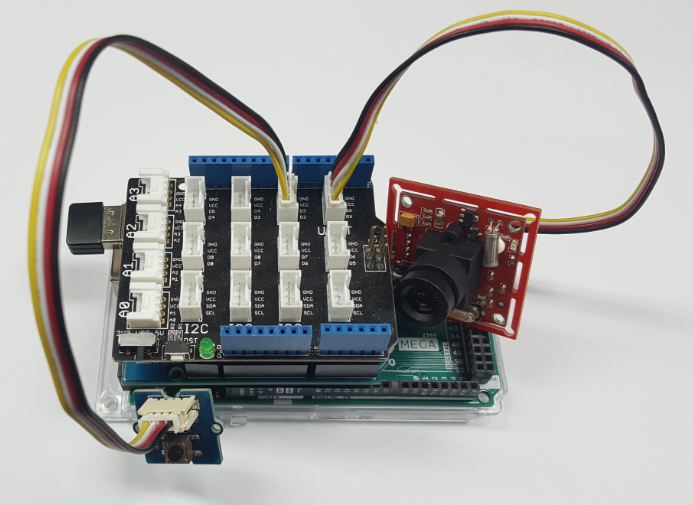
Componentes y suministros
| Componente | Cantidad |
|---|---|
| Arduino Mega 2560 | 1 |
| PHPoC WiFi Shield 2 para Arduino | 1 |
| Kit Seeed Grove - Cámara Serial | 1 |
| Seeed Grove base shield | 1 |
| Botón | 1 |
Sobre el proyecto
Si eres principiante, puedes aprender sobre Arduino aquí.
Demostración
Cómo funciona
1. Inicia sesión en tu cuenta de Google mediante OAuth 2.0 para dispositivos IoT y obtén el access_token. El proceso de login se describe en este proyecto en Hackster.
2. Al presionar el botón, Arduino obtiene la imagen de la cámara y la sube a Google Drive usando el access_token a través de la API de Google Drive. La API de Google Drive para subir archivos está descrita en la documentación de Google.
Cómo hacerlo
- Crear proyecto en Google Developer Portal y obtener GOOGLE_CLIENT_ID y GOOGLE_CLIENT_SECRET
- Reemplazar GOOGLE_CLIENT_ID y GOOGLE_CLIENT_SECRET en el código de Arduino
- Subir archivo login.php al PHPoC Shield. Ver instrucciones
- Compilar y subir código Arduino vía Arduino IDE
- Ver dirección IP del PHPoC shield en el Monitor Serie
- Acceder a la página de login en PHPoC Shield: https://ip_address/login.php e iniciar sesión en tu cuenta de Google
- Presionar botón para tomar foto
- Revisar tu Google Drive después de dos segundos, verás la foto tomada en tu Drive.
Otras plataformas de hardware
He realizado el mismo proyecto para otra plataforma de hardware aquí.
El mejor kit de inicio Arduino para principiantes
Si buscas un kit Arduino, consulta El mejor kit Arduino para principiantes.
Referencias de funciones
- Serial.begin()
- Serial.println()
- delay()
- millis()
- for loop
- while loop
- if else
- loop()
- setup()
- String.toInt()
- String.substring()
- String.indexOf()
- String.remove()
- String.equals()
Código
ArduinoGoogleDrive (Arduino)
Este es el código principal de Arduino.
#include <Phpoc.h>
#include <Arduino_JSON.h>
#include "grove_camera.h"

// Reemplaza tu GOOGLE_CLIENT_ID y GOOGLE_CLIENT_SECRET aquí
String GOOGLE_CLIENT_ID = "xxxxxxxxxxxxxxxxxxxxxxxxxxxxxxxxxxxxxxxxxxxxx.apps.googleusercontent.com";
String GOOGLE_CLIENT_SECRET = "xxxxxxxxxxxxxxxxxxxxxxxx";

PhpocServer websocket_server(80);

String http_resp_hearder(PhpocClient &client) {
  String hearder = "";
  while(1) {
    if(client.available()) {
      String line = client.readLine();
      if(line == "\r\n") break;
      else hearder += line;
    }
    if(!client.connected()) {
      client.stop();
      break;
    }
  }
  return hearder;
}

String http_resp_body(PhpocClient &client) {
  String body = "";
  while(1) {
    if(client.available()) {
      char c = client.read();
      body += c;
    }
    if(!client.connected()) {
      client.stop();
      break;
    }
  }
  return body;
}

String access_token = "";
String refresh_token = "";
unsigned long access_token_expire_at = 0;

void websocket_send(String msg) {
  char wbuf[256];
  msg.toCharArray(wbuf, msg.length() + 1);
  websocket_server.write(wbuf, msg.length());
}

void googleDeviceOAuthLogin() {
  PhpocClient client;
  // Paso 1: Solicitar códigos de dispositivo y usuario
  if(client.connectSSL("accounts.google.com", 443)) {
    Serial.println(F("Connected to server"));
    String body = F("client_id=");
    body += GOOGLE_CLIENT_ID;
    body += F("&scope=https://www.googleapis.com/auth/drive.file");
    client.println(F("POST /o/oauth2/device/code HTTP/1.1"));
    client.println(F("Host: accounts.google.com"));
    client.println(F("Connection: close"));
    client.println(F("Accept: */*"));
    client.println(F("Content-Type: application/x-www-form-urlencoded"));
    client.print(F("Content-Length: "));
    client.println(body.length());
    client.println();
    client.print(body);

    String response_hearder = http_resp_hearder(client);
    String response_body = http_resp_body(client);

    JSONVar body_json = JSON.parse(response_body);
    if(JSON.typeof(body_json) == "undefined") {
      Serial.println("Parsing input failed!");
      return;
    }

    // Paso 2: Manejar respuesta del servidor de autorización
    String device_code = "";
    String user_code = "";
    long expires_in = 0;
    int interval = 0;
    String verification_url = "";
    bool is_valid = true;

    if(body_json.hasOwnProperty("device_code")) device_code = body_json["device_code"]; else is_valid = false;
    if(body_json.hasOwnProperty("user_code")) user_code = body_json["user_code"]; else is_valid = false;
    if(body_json.hasOwnProperty("expires_in")) expires_in = (long) body_json["expires_in"]; else is_valid = false;
    if(body_json.hasOwnProperty("interval")) interval = (int) body_json["interval"]; else is_valid = false;
    if(body_json.hasOwnProperty("verification_url")) verification_url = body_json["verification_url"]; else is_valid = false;

    if(is_valid) {
      // Paso 3: Mostrar código de usuario
      Serial.print(F("Next, visit "));
      Serial.print(verification_url);
      Serial.print(F(" on your desktop or smartphone and enter this code: "));
      Serial.println(user_code);

      String msg = "{\"provider\": \"google\",";
      msg += "\"action\": \"LOGIN\",";
      msg += "\"verification_url\": \"" + verification_url + "\",";
      msg += "\"user_code\": \"" + user_code + "\"}";
      websocket_send(msg);

      // Paso 5: Consultar servidor de autorización
      int poll_max = expires_in / interval;
      body = F("client_id=");
      body += GOOGLE_CLIENT_ID;
      body += F("&client_secret=");
      body += GOOGLE_CLIENT_SECRET;
      body += F("&code=");
      body += device_code;
      body += F("&grant_type=https://oauth.net/grant_type/device/1.0");

      for(int poll_count = 0; poll_count < poll_max; poll_count++) {
        if(client.connectSSL("www.googleapis.com", 443)) {
          client.println(F("POST /oauth2/v4/token HTTP/1.1"));
          client.println(F("Host: www.googleapis.com"));
          client.println(F("Connection: close"));
          client.println(F("Accept: */*"));
          client.println(F("Content-Type: application/x-www-form-urlencoded"));
          client.print(F("Content-Length: "));
          client.println(body.length());
          client.println();
          client.print(body);

          response_hearder = http_resp_hearder(client);
          response_body = http_resp_body(client);

          body_json = JSON.parse(response_body);
          if(JSON.typeof(body_json) == "undefined") {
            Serial.println("Parsing input failed!");
            return;
          }

          long token_expires_in = 0;
          bool is_authorized = true;
          if(body_json.hasOwnProperty("access_token")) access_token = body_json["access_token"]; else is_authorized = false;
          if(body_json.hasOwnProperty("expires_in")) token_expires_in = (long) body_json["expires_in"]; else is_authorized = false;
          if(body_json.hasOwnProperty("refresh_token")) refresh_token = body_json["refresh_token"]; else is_authorized = false;

          if(is_authorized) {
            access_token_expire_at = millis() + token_expires_in * 1000;
            // Enviar mensaje de éxito a web
            msg = "{\"provider\": \"google\",";
            msg += "\"action\": \"SUCCESS\"}";
            websocket_send(msg);
            break;
          }
        }
        delay(interval * 1000);
      }
    } else {
      Serial.println(F("Invalid resonse from Google"));
    }
  } else {
    Serial.println(F("NOT Connected to server"));
  }
}

void cameraToGoogleDrive() {
  if(access_token == "") {
    Serial.println(F("access_token is invalid"));
    return;
  }

  long picture_len = cameraGetPicture();
  if(picture_len) {
    PhpocDateTime datetime;
    PhpocClient client;
    String file_name;
    String metadata;
    String jpeg_boundary;
    String end_boundary;

    datetime.date(F("YmdHis"));
    file_name = datetime.date();

    metadata = F("--foo_bar_baz\r\n");
    metadata += F("Content-Type: application/json; charset=UTF-8\r\n\r\n");
    metadata += "{\"title\": \"ARDUINO_" + file_name + "\"}\r\n\r\n";

    jpeg_boundary = F("--foo_bar_baz\r\n");
    jpeg_boundary += F("Content-Type: image/jpeg\r\n\r\n");
    end_boundary = F("\r\n--foo_bar_baz--");

    unsigned long body_len = metadata.length() + jpeg_boundary.length() + picture_len + end_boundary.length();
    int total = 0;

    if(client.connectSSL("www.googleapis.com", 443)) {
      Serial.println(F("Connected to server"));

      client.println(F("POST /upload/drive/v2/files?uploadType=multipart HTTP/1.1"));
      client.println(F("Host: www.googleapis.com"));
      client.println(F("Connection: close"));
      client.println(F("Accept: */*"));
      client.println(F("Content-Type: multipart/related; boundary=foo_bar_baz"));
      client.print(F("Content-Length: "));
      client.println(body_len);
      client.print(F("Authorization: Bearer "));
      client.println(access_token);
      client.println();

      client.print(metadata);
      client.print(jpeg_boundary);

      int i;
      int packet_num = cameraPacketNum();
      char packet[PIC_PKT_LEN] = {0};

      for(i = 0; i < packet_num; i++) {
        long packet_len = cameraGetPacket(i, packet);
        client.write((const uint8_t *)&packet[4], packet_len - 6);
        total += packet_len - 6;
      }

      cameraGetPacket(i, packet);
      client.print(end_boundary);

      String response_hearder = http_resp_hearder(client);
      String response_body = http_resp_body(client);
      Serial.println(response_body);
    }
  } else {
    Serial.print("picture_len:");
    Serial.println(picture_len);
  }
}

int buttonState;
int lastButtonState = LOW;
unsigned long lastDebounceTime = 0;
unsigned long debounceDelay = 50;

bool isButtonPressed(int pin) {
  int reading = digitalRead(pin);
  if (reading != lastButtonState) lastDebounceTime = millis();
  if ((millis() - lastDebounceTime) > debounceDelay) {
    if (reading != buttonState) {
      buttonState = reading;
      if (buttonState == HIGH) return true;
    }
  }
  lastButtonState = reading;
  return false;
}

void setup() {
  Serial.begin(115200);
  while(!Serial);
  Phpoc.begin(PF_LOG_SPI | PF_LOG_NET);
  websocket_server.beginWebSocket("login");
  Serial.print("WebSocket server address : ");
  Serial.println(Phpoc.localIP());
  pinMode(2, INPUT);
  cameraInit(CT_JPEG, PR_160x120, JR_640x480);
}

void loop() {
  PhpocClient client = websocket_server.available();
  if (client) {
    String ws_str = client.readLine();
    if(ws_str == "google\r\n") {
      googleDeviceOAuthLogin();
    }
  }

  if(isButtonPressed(2)) {
    if(access_token != "" && access_token_expire_at > millis())
      cameraToGoogleDrive();
    else
      Serial.println("access_token is invalid, please login again");
  }
}
login.php (PHP)
Este archivo se sube al PHPoC Shield. Proporciona interfaz web de usuario para el proceso de login de Google.
<html>
<head>
<title>PHPoC / <?echo system("uname -i")?></title>
<meta content="initial-scale=1.0, maximum-scale=1.0, minimum-scale=0.5, width=device-width, user-scalable=yes" name="viewport">
<link rel="stylesheet" href="https://fonts.googleapis.com/css?family=Roboto" type="text/css">
<style>
body { text-align:center; }
.center { margin: auto; position: absolute; -webkit-backface-visibility: hidden; left:0; right:0; text-align: center; top: 20%; }
.hearder { width: 100%; max-width:400px; color: #008B8B; padding: 5px; border-bottom: solid; margin-bottom: 5px; font-size: 200%; display: inline-block; }
.wc_text, .loader { display: inline-block; width: 100%; max-width:300px; line-height: 150%; }
.code { font-family: "Courier New", Courier, monospace; font-size: 150%; font-weight: bold; color: #A52A2A; }
.success {font-weight: bold; color: #A52A2A;}
/*loading icon*/
.lds-roller { display: inline-block; position: relative; width: 64px; height: 64px; }
.lds-roller div { animation: lds-roller 1.2s cubic-bezier(0.5, 0, 0.5, 1) infinite; transform-origin: 32px 32px; }
.lds-roller div:after { content: " "; display: block; position: absolute; width: 6px; height: 6px; border-radius: 50%; background: #A52A2A; margin: -3px 0 0 -3px; }
.lds-roller div:nth-child(1) {animation-delay: -0.036s;}
.lds-roller div:nth-child(1):after {top: 50px;left: 50px;}
.lds-roller div:nth-child(2) {animation-delay: -0.072s;}
.lds-roller div:nth-child(2):after {top: 54px;left: 45px;}
.lds-roller div:nth-child(3) {animation-delay: -0.108s;}
.lds-roller div:nth-child(3):after {top: 57px;left: 39px;}
.lds-roller div:nth-child(4) {animation-delay: -0.144s;}
.lds-roller div:nth-child(4):after {top: 58px;left: 32px;}
.lds-roller div:nth-child(5) {animation-delay: -0.18s;}
.lds-roller div:nth-child(5):after {top: 57px;left: 25px;}
.lds-roller div:nth-child(6) {animation-delay: -0.216s;}
.lds-roller div:nth-child(6):after {top: 54px;left: 19px;}
.lds-roller div:nth-child(7) {animation-delay: -0.252s;}
.lds-roller div:nth-child(7):after {top: 50px;left: 14px;}
.lds-roller div:nth-child(8) {animation-delay: -0.288s;}
.lds-roller div:nth-child(8):after {top: 45px;left: 10px;}
@keyframes lds-roller {0% {transform: rotate(0deg);}100% {transform: rotate(360deg);}}
</style>
<script>
var ws;
function init() {
  ws = new WebSocket("ws://<?echo _SERVER("HTTP_HOST")?>/login", "text.phpoc");
  ws.onopen = ws_onopen;
  ws.onclose = ws_onclose;
  ws.onmessage = ws_onmessage;
}
function ws_onopen() {
  if(ws && (ws.readyState == 1)) ws.send('google\r\n');
}
function ws_onclose() {
  alert('CANNOT connect to device. Please reload webpage');
  ws.onopen = null; ws.onclose = null; ws.onmessage = null; ws = null;
}
function ws_onmessage(e_msg) {
  e_msg = e_msg || window.event;
  var obj = JSON.parse(e_msg.data);
  var wc_text = document.getElementById('wc_text');
  if(obj.action == 'LOGIN') {
    wc_text.innerHTML = 'Next, visit <a href="' + obj.verification_url + '" target="_blank">' + obj.verification_url + '</a> and enter this code:<br>';
    wc_text.innerHTML += '<span class="code">' + obj.user_code + '</span>';
  } else if(obj.action == 'SUCCESS') {
    document.getElementById('loader').style.display = 'none';
    wc_text.innerHTML = '<span class="success">Success!</span><br>';
    wc_text.innerHTML += 'You are now logged in from Arduino via PHPoC Shield';
  }
}
window.onload = init;
</script>
</head>
<body>
<div class="center">
<div class="hearder">
<div style="font-size: 150%">
<span style="color:#4285F4">G</span>
<span style="color:#EA4335;">o</span>
<span style="color:#FBBC05;">o</span>
<span style="color:#4285F4;">g</span>
<span style="color:#34A853;">l</span>
<span style="color:#EA4335;">e</span>
</div>
Login for Arduino
</div>
<br><br>
<div class="wc_text" id="wc_text"></div><br><br>
<div class="loader" id="loader">
<div class="lds-roller"><div></div><div></div><div></div><div></div><div></div><div></div><div></div><div></div></div>
</div>
</div>
</body>
</html>
grove_camera.h (C/C++)
Librería para cámara Grove
#define PIC_PKT_LEN 512
#define CAM_ADDR 0

#define CT_GRAYSCALE_2 0x01
#define CT_GRAYSCALE_4 0x02
#define CT_GRAYSCALE_8 0x03
#define CT_COLOR_12 0x05
#define CT_COLOR_16 0x06
#define CT_JPEG 0x07

#define PR_80x60 0x01
#define PR_160x120 0x03

#define JR_80x64 0x01
#define JR_160x128 0x03
#define JR_320x240 0x05
#define JR_640x480 0x07

const byte camera_address = (CAM_ADDR << 5);
unsigned int camera_packet_num;
unsigned int camera_last_packet_len;

void cameraClearRxBuf() {
  while (Serial.available()) Serial.read();
}

void cameraSendCmd(char cmd[], int cmd_len) {
  for (char i = 0; i < cmd_len; i++) Serial.print(cmd[i]);
}

unsigned int cameraPacketNum() {
  return camera_packet_num;
}

void cameraInit(int color_type, int preview_resolution, int jpeg_resolution) {
  char cmd[] = {0xaa,0x0d|camera_address,0x00,0x00,0x00,0x00};
  unsigned char resp[6];
  Serial.setTimeout(500);

  while (1) {
    cameraSendCmd(cmd,6);
    if(Serial.readBytes((char *)resp, 6) != 6) continue;
    if(resp[0] == 0xaa && resp[1] == (0x0e | camera_address) && resp[2] == 0x0d && resp[4] == 0 && resp[5] == 0) {
      if(Serial.readBytes((char *)resp, 6) != 6) continue;
      if(resp[0] == 0xaa && resp[1] == (0x0d | camera_address) && resp[2] == 0 && resp[3] == 0 && resp[4] == 0 && resp[5] == 0) break;
    }
  }

  cmd[1] = 0x0e | camera_address;
  cmd[2] = 0x0d;
  cameraSendCmd(cmd, 6);

  char cmd2[] = {0xaa, 0x01 | camera_address, 0x00, color_type, preview_resolution, jpeg_resolution};
  Serial.setTimeout(100);

  while (1) {
    cameraClearRxBuf();
    cameraSendCmd(cmd2, 6);
    if(Serial.readBytes((char *)resp, 6) != 6) continue;
    if(resp[0] == 0xaa && resp[1] == (0x0e | camera_address) && resp[2] == 0x01 && resp[4] == 0 && resp[5] == 0) break;
  }

  char cmd3[] = {0xaa, 0x06 | camera_address, 0x08, PIC_PKT_LEN & 0xff, (PIC_PKT_LEN>>8) & 0xff, 0};

  while (1) {
    cameraClearRxBuf();
    cameraSendCmd(cmd3, 6);
    if(Serial.readBytes((char *)resp, 6) != 6) continue;
    if(resp[0] == 0xaa && resp[1] == (0x0e | camera_address) && resp[2] == 0x06 && resp[4] == 0 && resp[5] == 0) break;
  }
}

long cameraGetPicture() {
  char cmd[] = {0xaa, 0x04 | camera_address, 0x01, 0x00, 0x00, 0x00};
  unsigned char resp[6];
  unsigned long picTotalLen = 0;

  while (1) {
    cameraClearRxBuf();
    cameraSendCmd(cmd, 6);
    if(Serial.readBytes((char *)resp, 6) != 6) continue;
    if(resp[0] == 0xaa && resp[1] == (0x0e | camera_address) && resp[2] == 0x04 && resp[4] == 0 && resp[5] == 0) {
      Serial.setTimeout(1000);
      if(Serial.readBytes((char *)resp, 6) != 6) continue;
      if(resp[0] == 0xaa && resp[1] == (0x0a | camera_address) && resp[2] == 0x01) {
        picTotalLen = (resp[3]) | (resp[4] << 8) | (resp[5] << 16);
        break;
      }
    }
  }

  camera_packet_num = (picTotalLen) / (PIC_PKT_LEN - 6);
  camera_last_packet_len = PIC_PKT_LEN;

  if((picTotalLen % (PIC_PKT_LEN-6)) != 0) {
    camera_packet_num += 1;
    camera_last_packet_len = picTotalLen % (PIC_PKT_LEN - 6) + 6;
  }

  return picTotalLen;
}

long cameraGetPacket(unsigned int i, char* buf) {
  char cmd[] = {0xaa, 0x0e | camera_address, 0x00, 0x00, 0x00, 0x00};
  Serial.setTimeout(100);

  if(i < camera_packet_num) {
    cmd[4] = i & 0xff;
    cmd[5] = (i >> 8) & 0xff;
    cameraClearRxBuf();
    cameraSendCmd(cmd, 6);

    int pkt_len;
    if(i < (camera_packet_num - 1)) pkt_len = PIC_PKT_LEN;
    else pkt_len = camera_last_packet_len;

    uint16_t cnt = Serial.readBytes((char *)buf, pkt_len);
    return cnt;
  } else {
    cmd[4] = 0xf0;
    cmd[5] = 0xf0;
    cameraSendCmd(cmd, 6);
  }
  return "";
}
Esquemáticos
Proceso de manufactura
- Construye un Spybot controlado por Bluetooth con Arduino
- FlickMote: Mando IR por gestos para Smart Home
- TV‑B‑Gone DIY con Arduino: Mando universal para apagar cualquier TV
- Construye un Reloj Maestro LED Personalizado con Alarma – Visible desde 12 Metros
- Find Me: Localizador Inteligente de Objetos con Arduino y Bluetooth
- Soluciones de Alimentación Optimizadas para Proyectos Arduino
- Tres en raya con Arduino, matriz LED MAX7219 y carcasa de cartón
- Construye un Robot Cuadrúpedo Inteligente con Arduino: Guía Paso a Paso
- Electrodomésticos activados por voz: Control Bluetooth con Google Assistant
- Construye un volante joystick personalizado con Arduino para gaming
- Inversión de $450M de Google en ADT Acelera la Adopción de Seguridad IoT