



Marcador inteligente de baloncesto avanzado con Bluetooth, sensores y actualizaciones en tiempo real
Componentes y suministros
| Arduino Nano R3 | × | 1 |
| Módulo Bluetooth HC-05 | × | 1 |
| Sensor de proximidad infrarrojo E18-D80NK | × | 1 |
| Sensor de vibración Seeed Grove (SW-420) | × | 1 |
| Sensor de temperatura DHT22 | × | 1 |
| LED RGB 8 mm | × | 1 |
| Resistencias: 3×10 kΩ, 3×100 Ω, 1×47 Ω, 1×1 kΩ, 1×2.21 kΩ | × | — |
| Batería 9 V (genérica) | × | 1 |
Aplicaciones y servicios en línea
- Arduino IDE
- MIT App Inventor (IDE para Android)
Sobre este proyecto
Entreno baloncesto regularmente y siempre llevo estadísticas de las sesiones (tiros, aciertos, fallos, etc.). Llevar estos números es aburrido y difícil. Los balones inteligentes pueden usarse para esto, pero tienen inconvenientes:
- Si entrenas con varios balones, necesitas comprar varios (caros) balones inteligentes.
- La precisión no es muy buena.
- La durabilidad del balón.
En mi proyecto anterior (prototipo de marcador inteligente), usé el dispositivo Avnet SmartEdge para probar un método de seguimiento. Usé el acelerómetro para detectar tiros y el sensor de proximidad para detectar aciertos. Ahora, la idea es implementar una solución definitiva para el marcador de baloncesto.
Versiones
Al principio usé los componentes de hardware que tenía en casa y desarrollé el software (Arduino y Android) necesario. Esta primera versión (1.1.0) funcionó bastante bien, así que decidí hacer cambios para usar componentes más baratos e implementar mejoras de software. La segunda versión (2.0.0) es aún mejor.
Paso 1: Arduino
Hardware
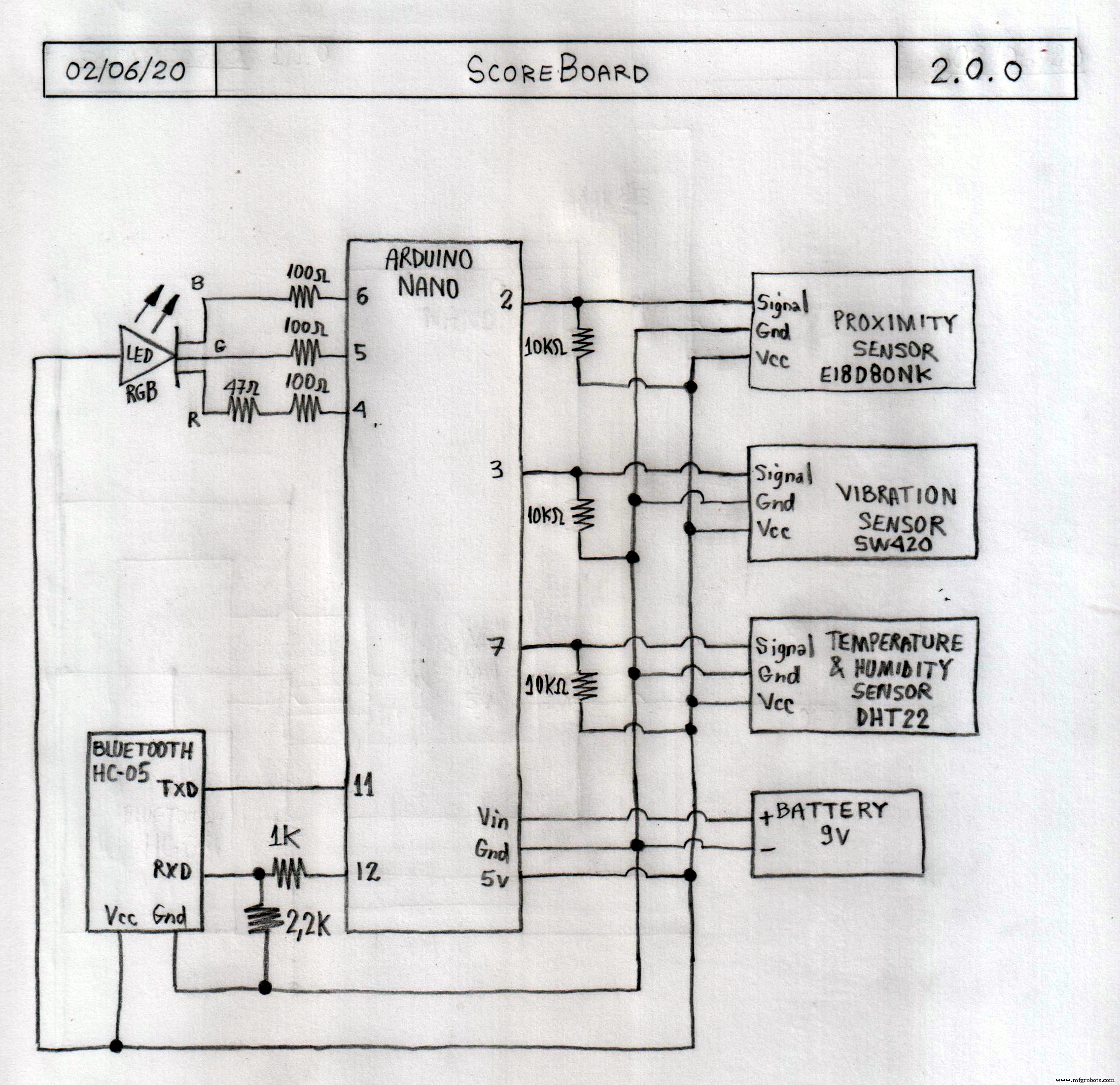
Puedes ver la lista de componentes para la versión 2.0.0 en la sección "Componentes".
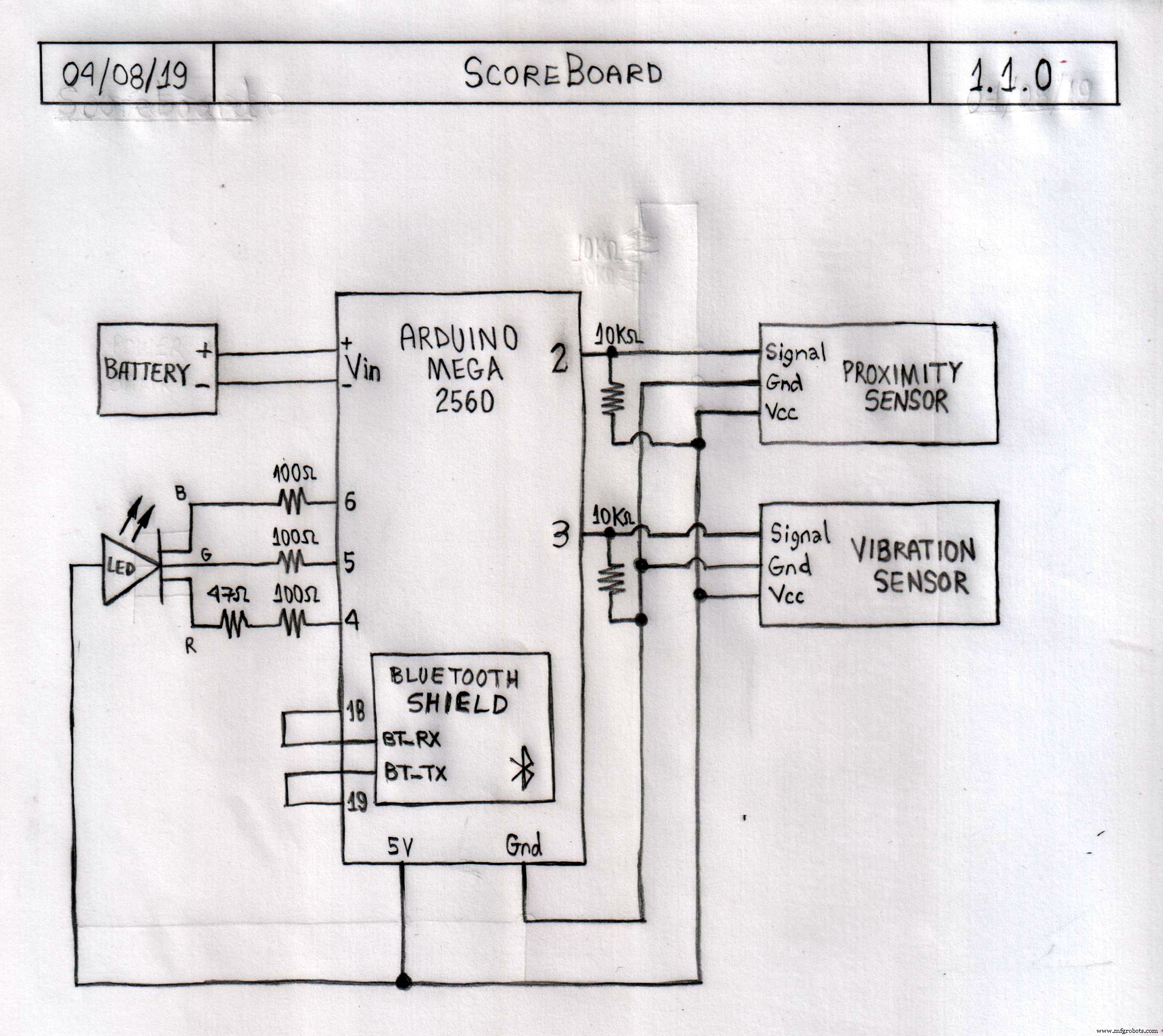
Principales cambios de la v1.1.0 a v2.0.0:
- Arduino Mega 2560 → Arduino Nano R3
- Bluetooth Shield → Módulo Bluetooth HC-05
- Batería Li-ion recargable → Batería 9 V
- Añadido sensor DHT22 (temperatura y humedad).
Consideraciones sobre otros componentes:
- Sensor infrarrojo E18-D80NK: Otros sensores de proximidad podrían usarse, pero es mejor uno que no sufra interferencia de la luz solar, como este.
- Sensor de vibración SW-420: Otros sensores de vibración podrían usarse, este funciona muy bien.
Los esquemáticos de Arduino para las dos versiones están en la sección "Esquemáticos".
Software
Usé Arduino IDE para desarrollar el código, con la siguiente estrategia:
- Tras la inicialización (variables, LED, Bluetooth, etc.), monitoriza continuamente el estado de los sensores.
- Si el sensor de proximidad detecta el balón, significa que acaba de ocurrir un tiro y es un acierto.
- Si el sensor de vibración detecta movimiento, significa que acaba de ocurrir un tiro, pero espera 2 segundos (máximo) para decidir.
- En ese tiempo, si el sensor de proximidad detecta el balón, sabe inmediatamente que es un acierto.
- Al final de los 2 segundos, si el sensor de proximidad no detectó el balón, sabe que es un fallo.
- El Arduino informa al Android vía Bluetooth de que ha ocurrido un tiro (acierto o fallo).
- El proceso se reinicia.
Principales cambios de v1.1.0 a v2.0.0:
- Cambio de soporte de Bluetooth Shield a módulo HC-05.
- Añadido soporte para sensor DHT22.
- Mejorada la lógica para detectar tiros, aciertos y fallos, y la señalización mediante LED.
Los códigos Arduino para ambas versiones están en la sección "Código".
Paso 2: Android
Usé MIT App Inventor para desarrollar la app Android, con esta estrategia:
- Tras la inicialización (tiros, aciertos, fallos, Bluetooth, etc.), espera a que se pulse "Iniciar".
- Al pulsar "Iniciar", monitoriza continuamente la conexión Bluetooth.
- Cada vez que recibe datos, actualiza el marcador y reproduce el sonido de notificación correcto.
- El proceso se repite hasta pulsar "Pausar".
- Hay botones para seleccionar dispositivo Bluetooth, reiniciar contadores y botones extra para ajustar el marcador si es necesario.
Principales cambios de v1.1.0 a v2.0.0:
- Cambio de disposición de retrato a horizontal (landscape).
- Añadidos: Luz, Humedad, Temperatura e Índice de calor.
- Mejorados los botones de ajuste.
- Añadida función para mantener la pantalla siempre encendida.
- Añadidos sonidos en todos los botones.
- Añadida funcionalidad para avisar cada vez que se alcanza la marca de 50 tiros (50, 100, 150, etc.).
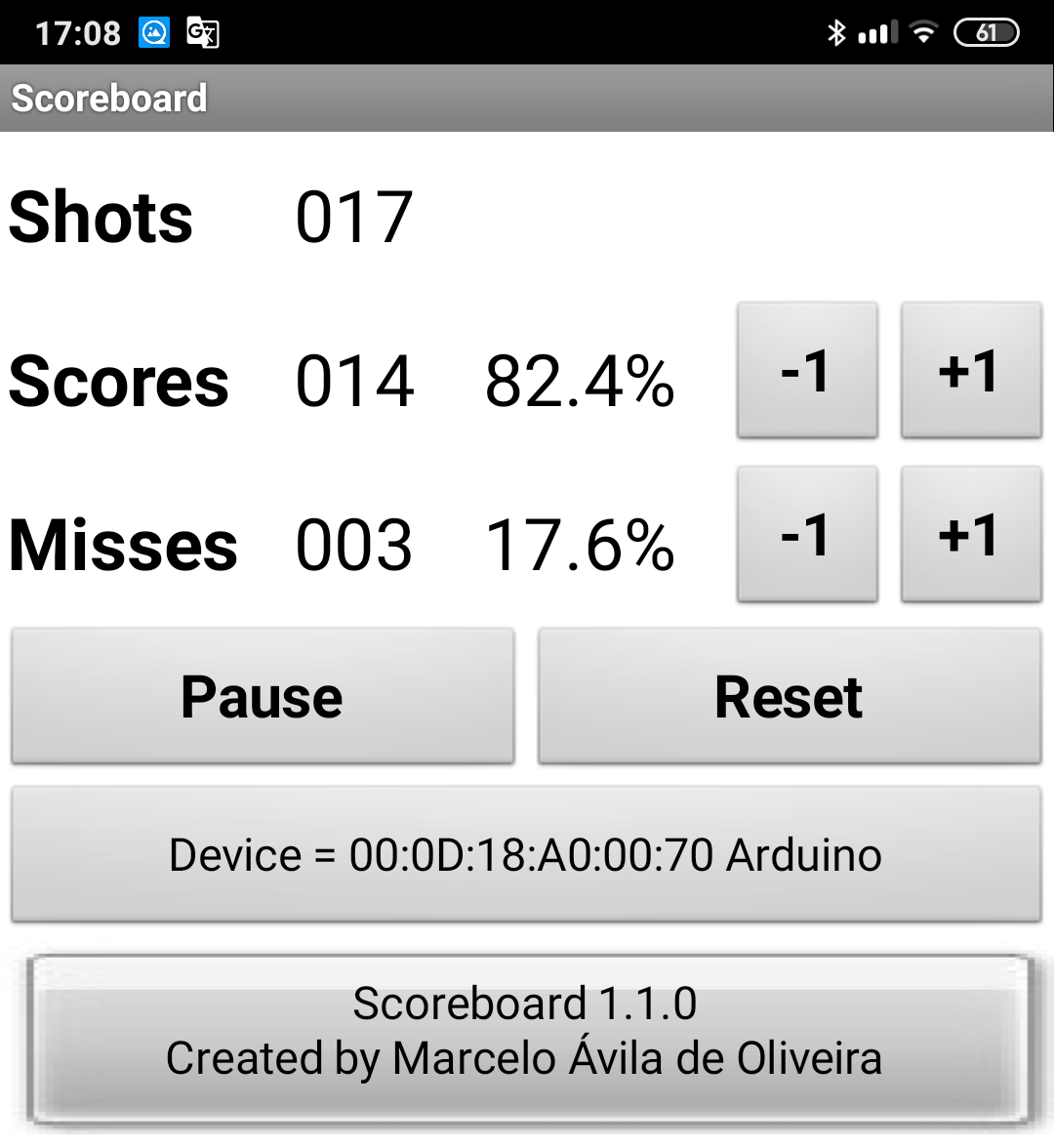
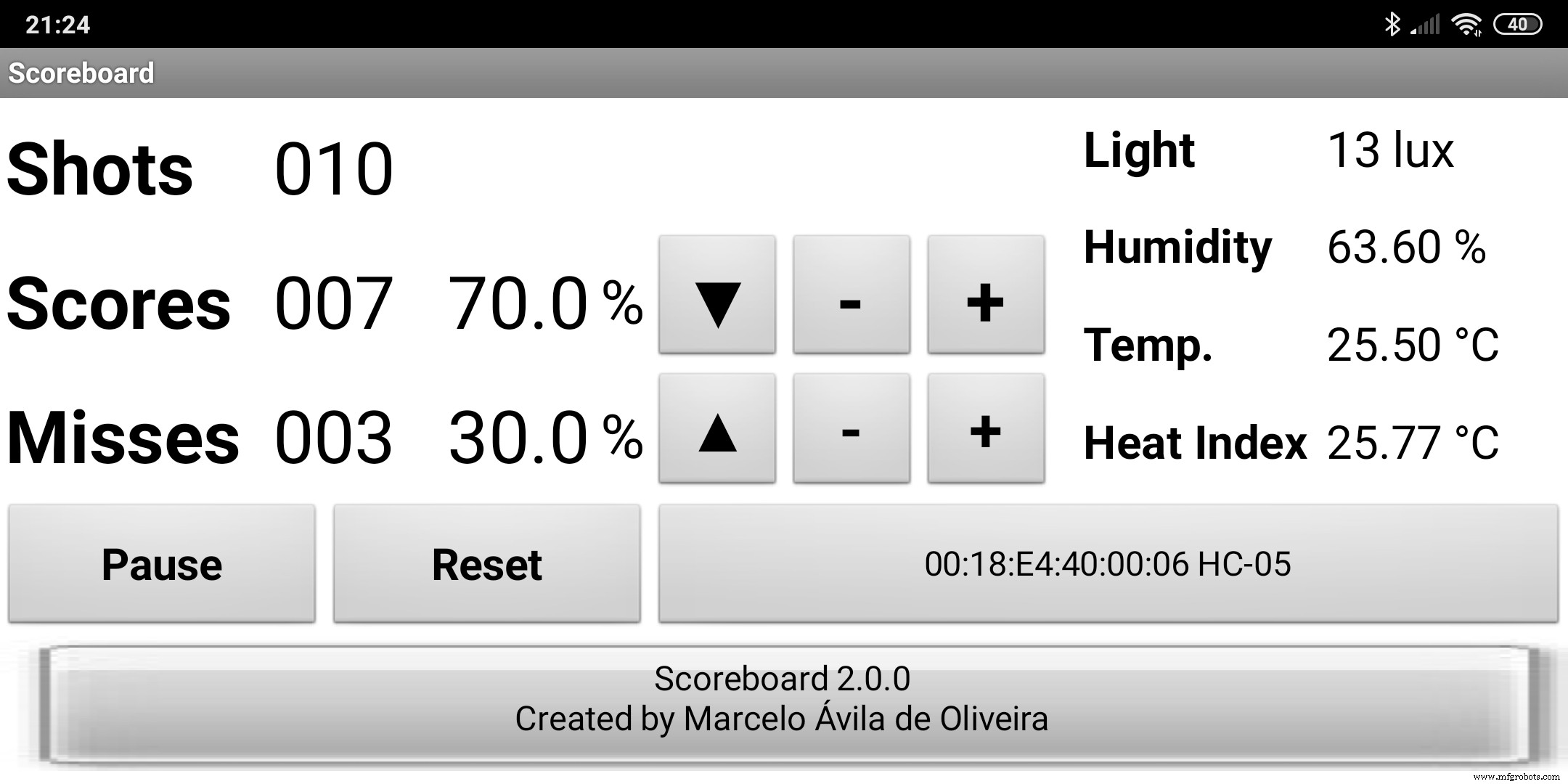
Los códigos Android para ambas versiones están en la sección "Código".
Paso 3: Montaje en el tablero de baloncesto
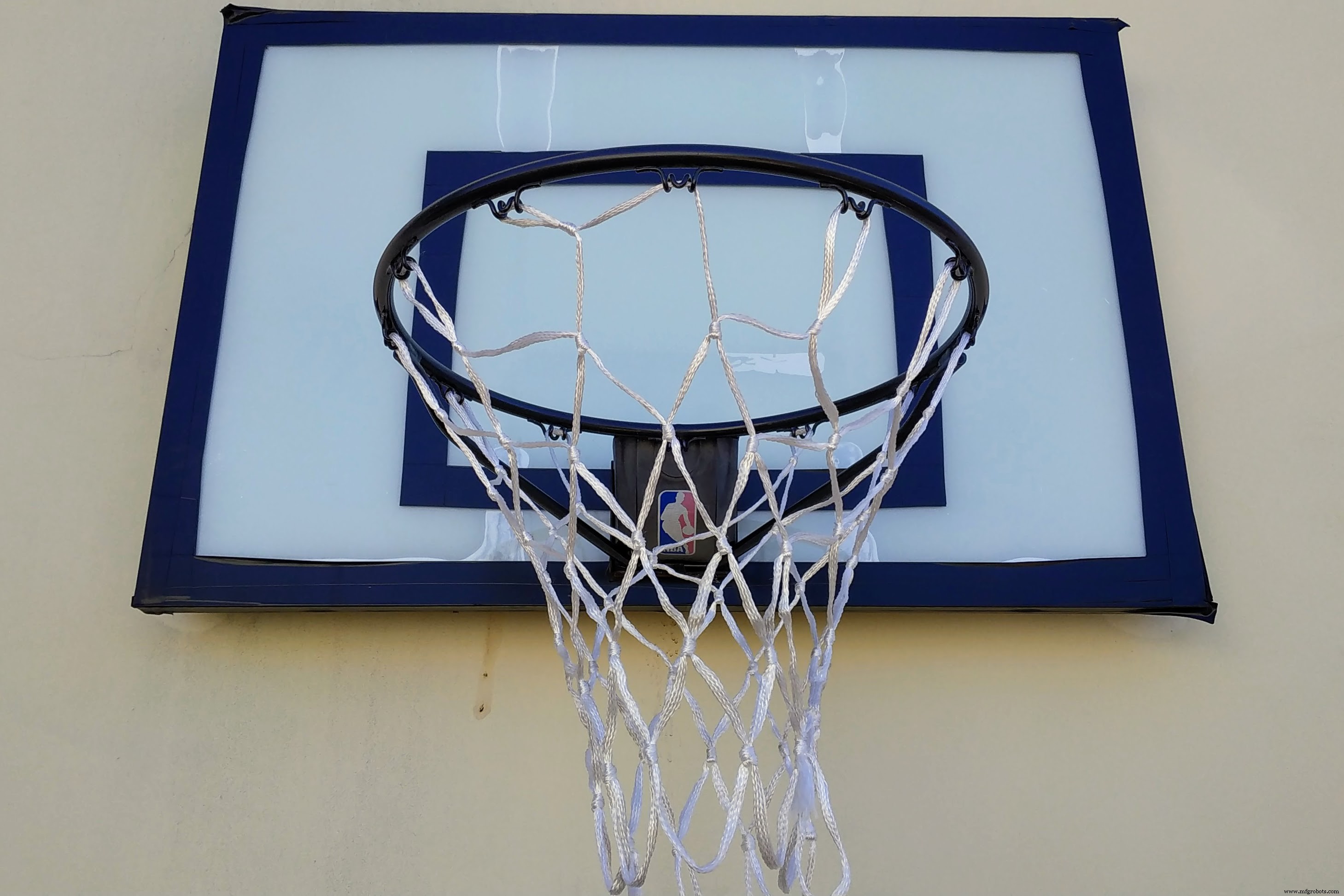
Este es el tablero original que uso para entrenar.
Primero quité la cubierta plástica bajo el aro y hice un orificio para el sensor de proximidad.
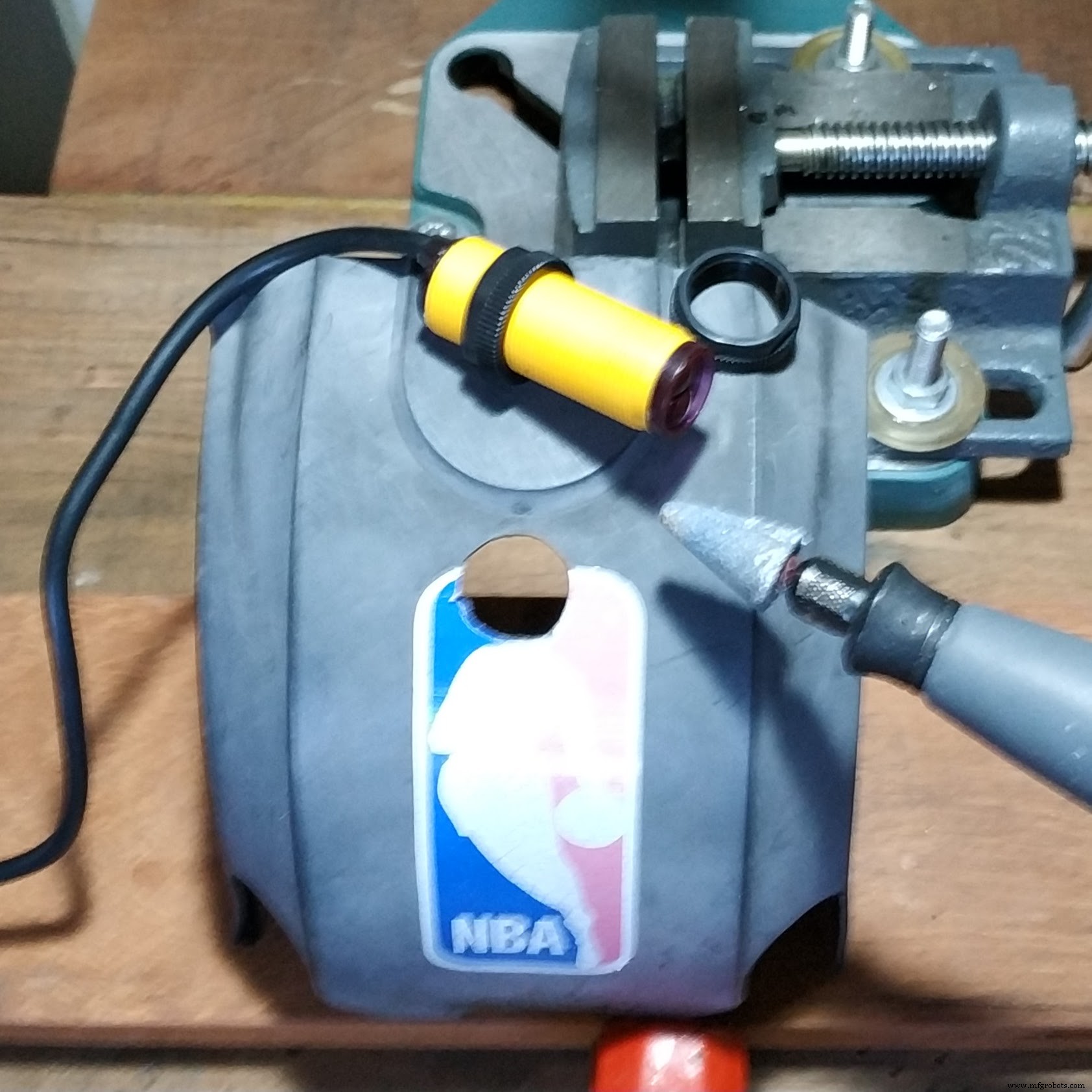
Luego hice un pequeño orificio para fijar el sensor de vibración.

No pude fijar el sensor directamente a la cubierta plástica por su curvatura, así que construí un soporte con MDF.
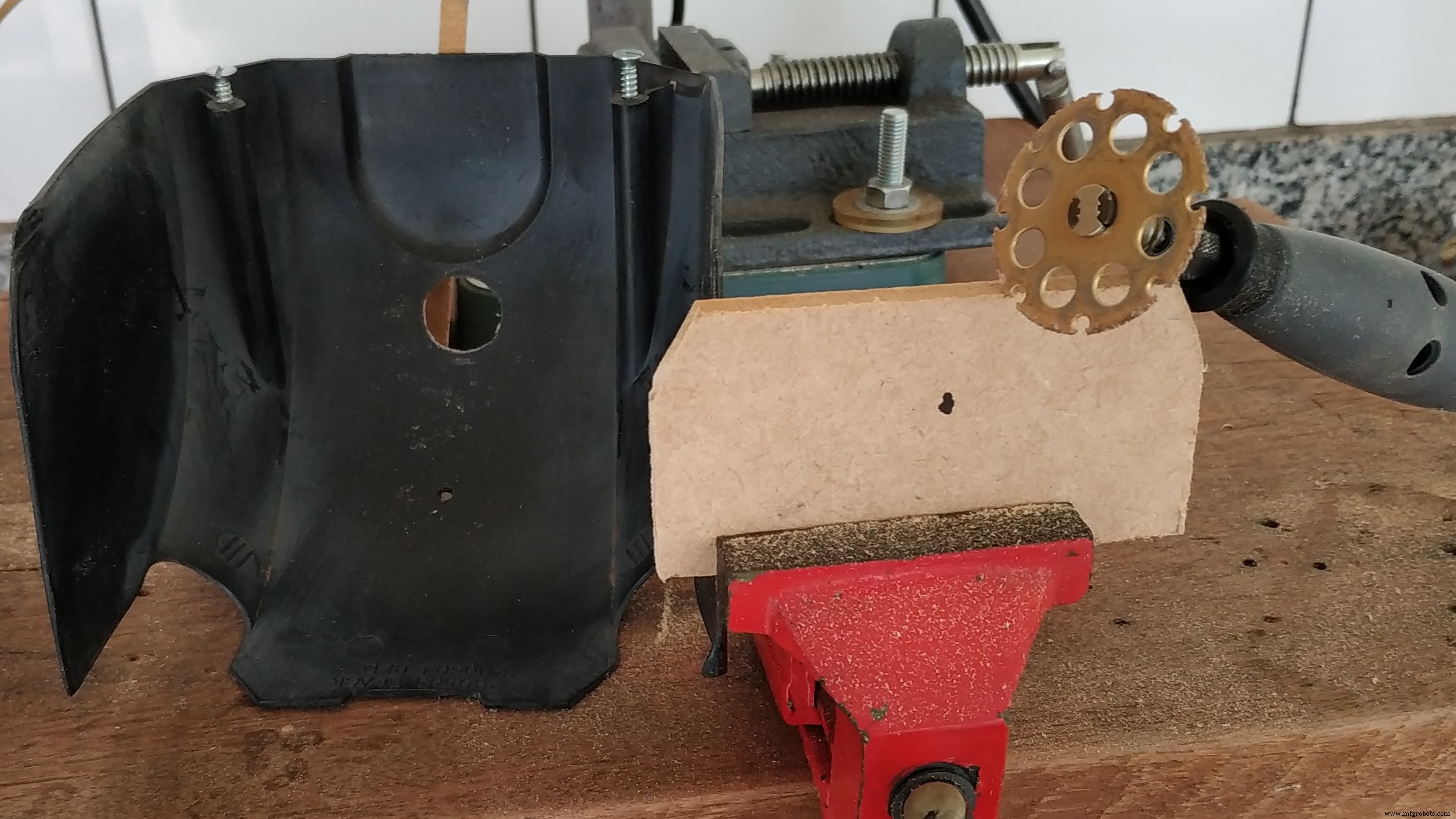
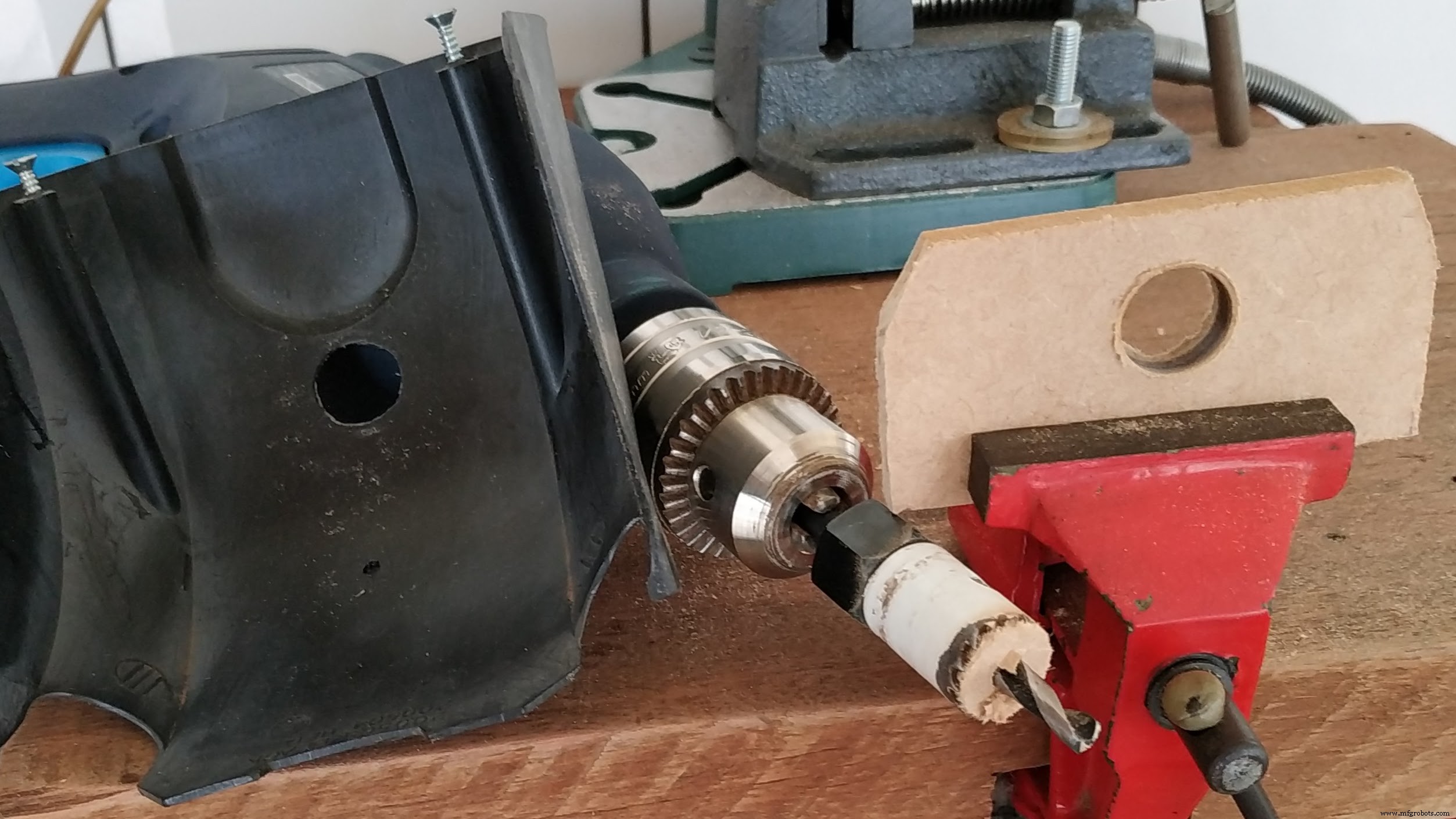

Fijé los sensores de proximidad y vibración con tornillos y tuercas.

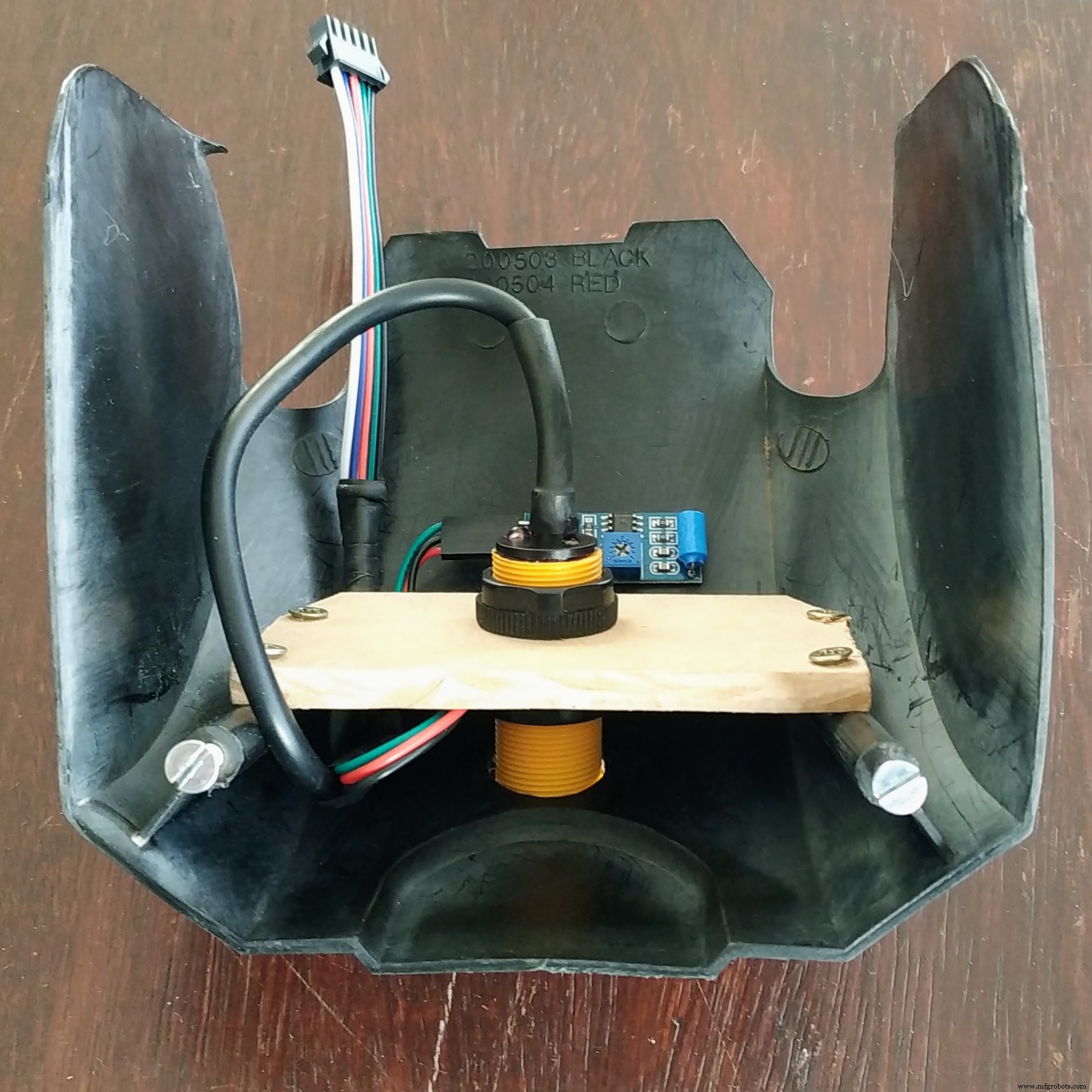
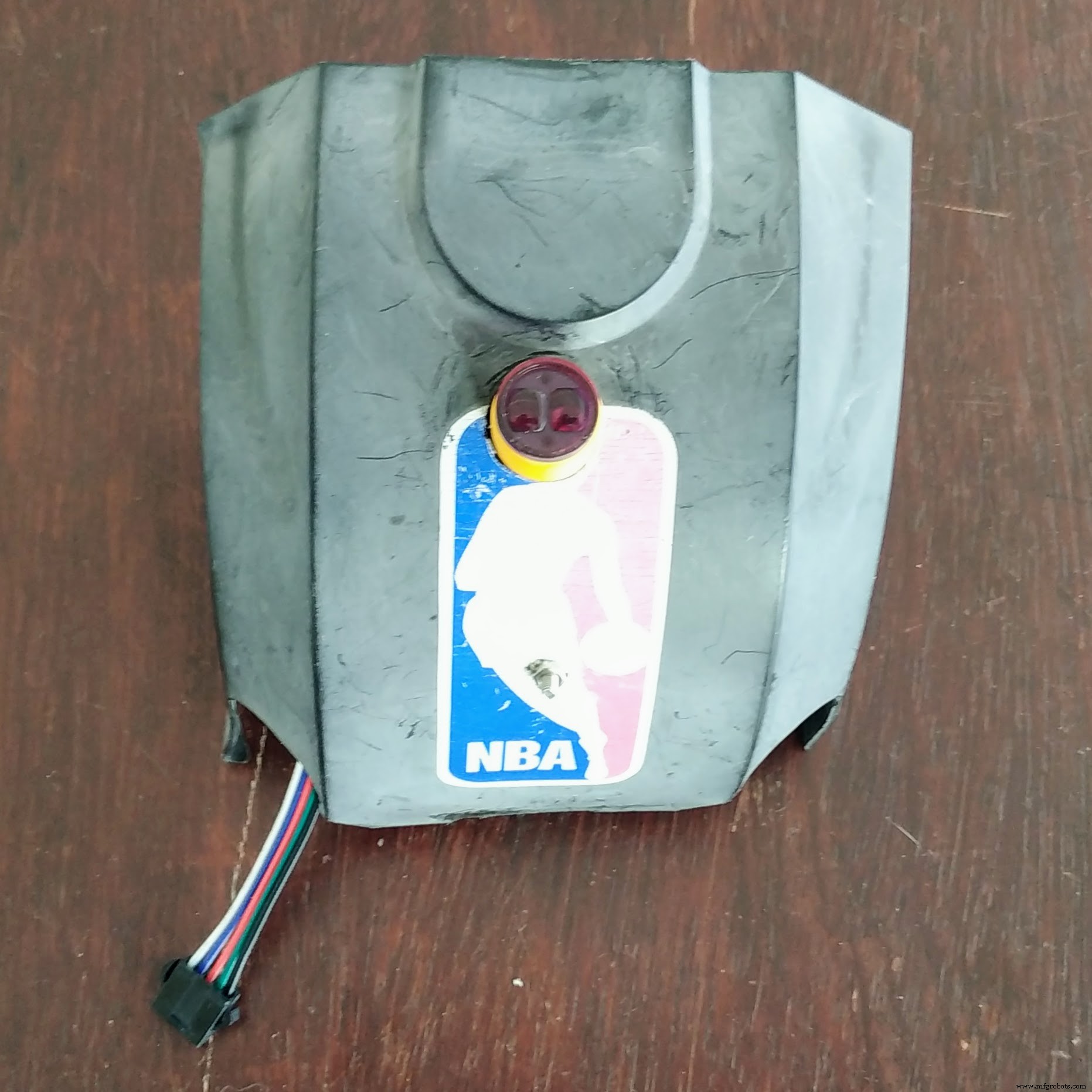
Luego conecté el resto de componentes.


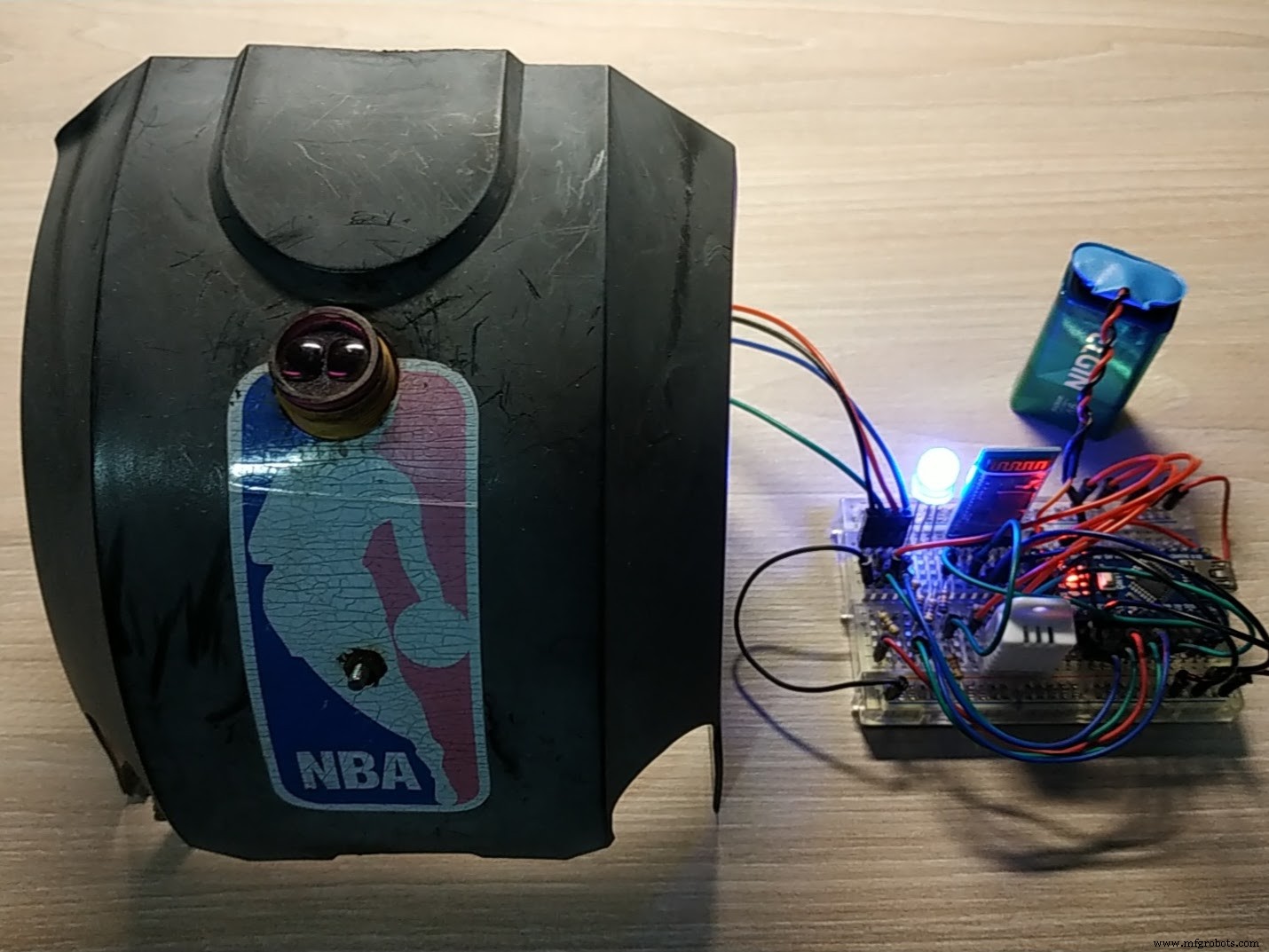
Prueba de humo (smoke test).
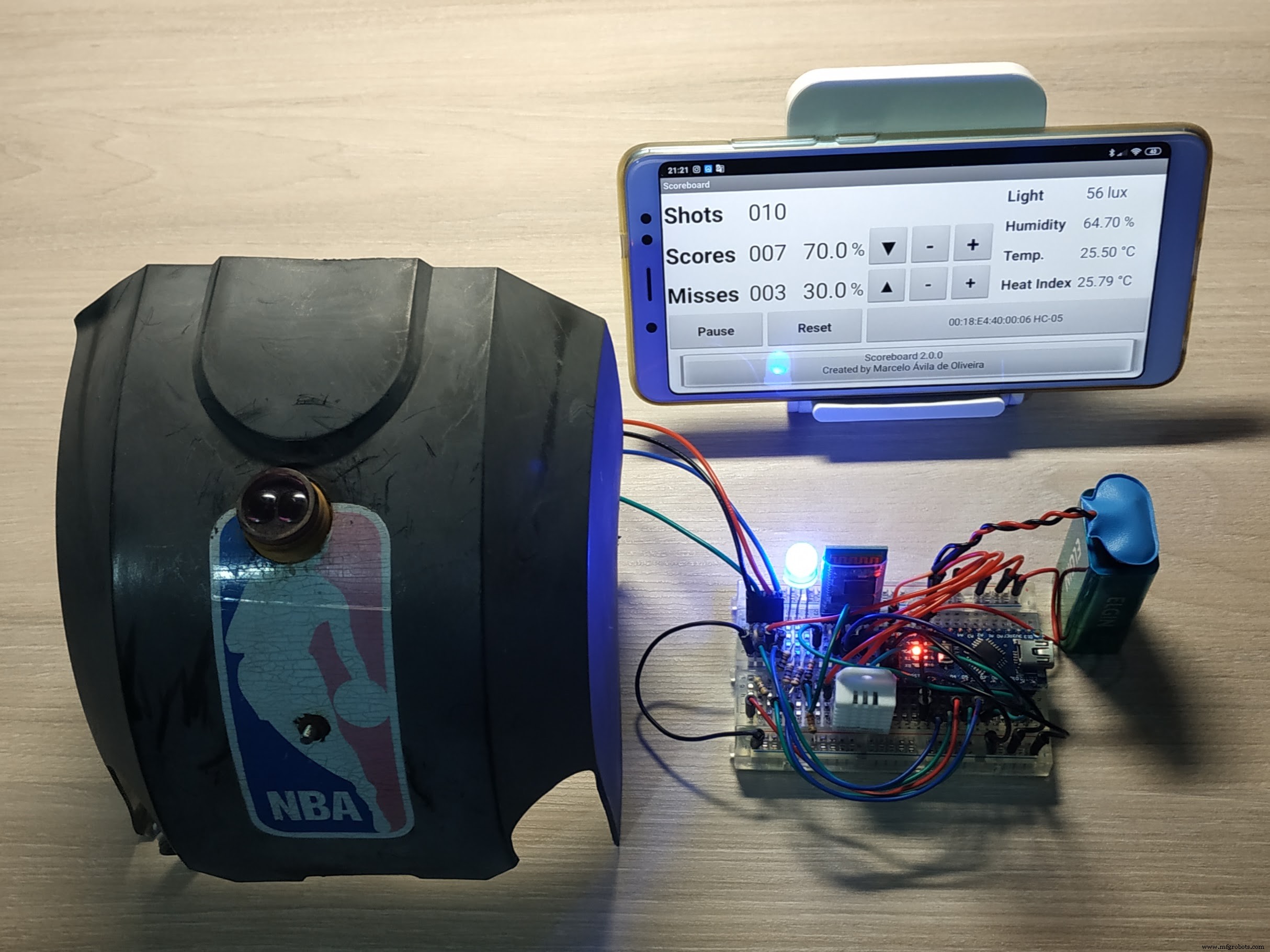
Finalmente, instalé todo en el tablero.
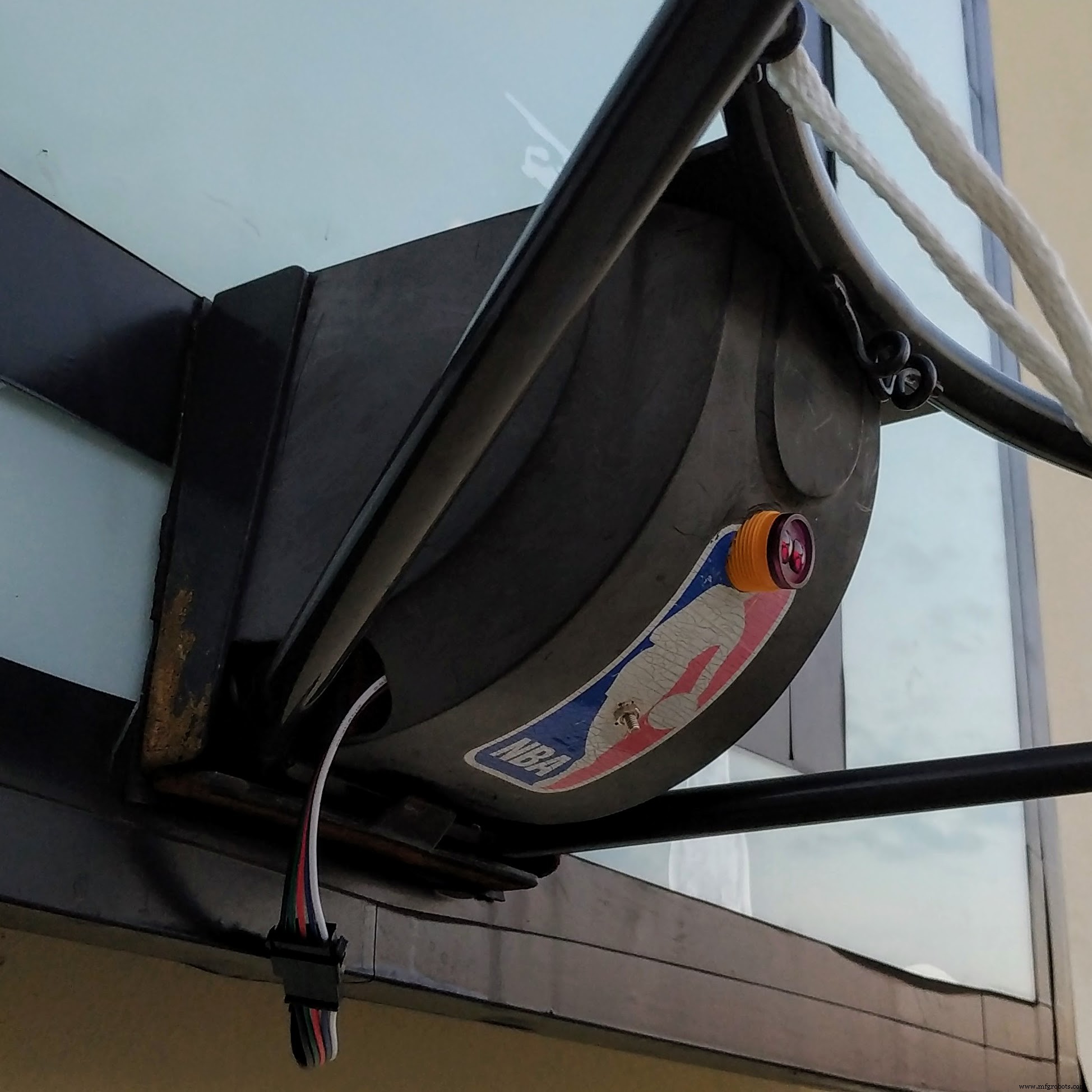
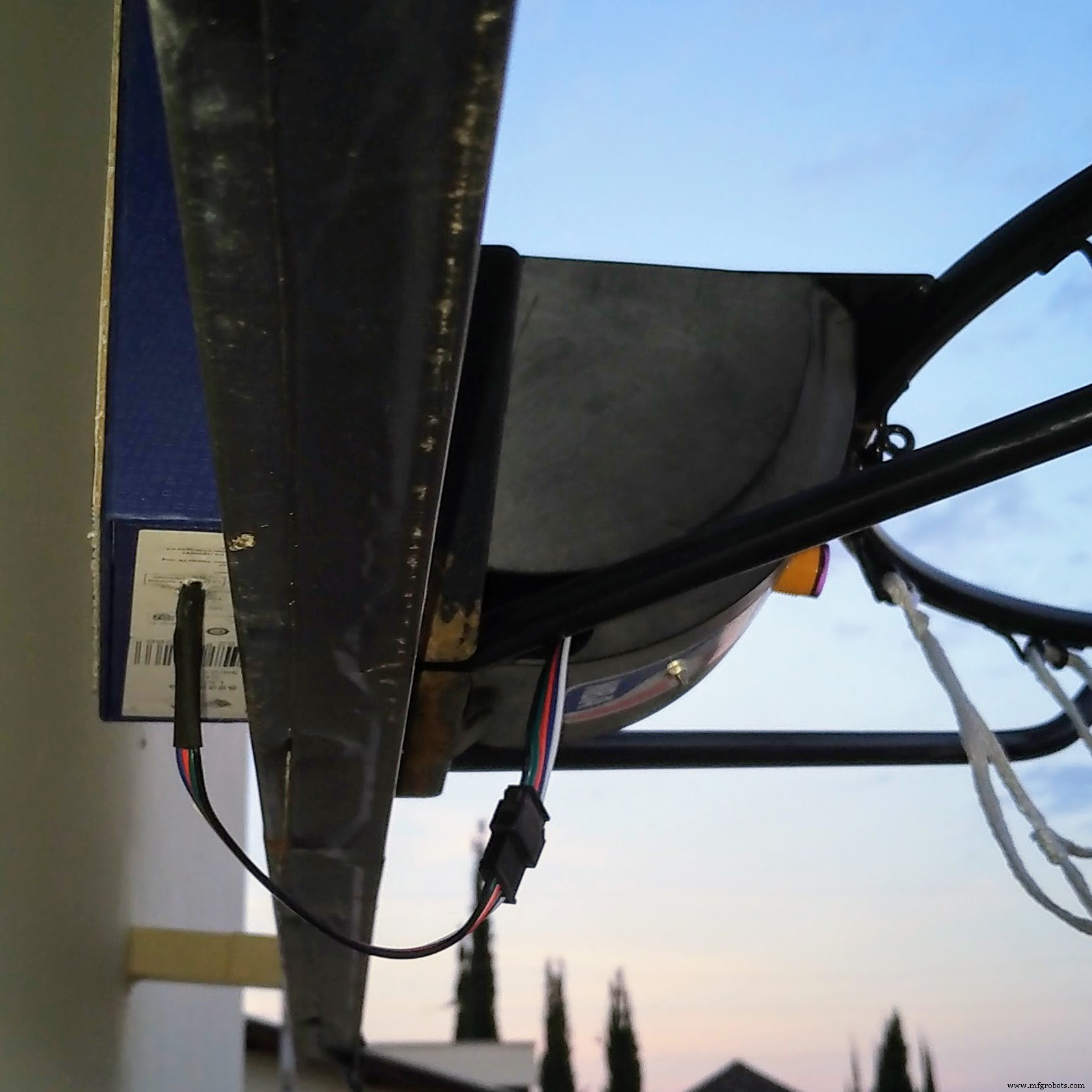
Paso 4: Prueba de entrenamiento
Ahora toca probarlo todo. ¡Y el gran final... es la hora del show!
Paso 5: Consideraciones finales
- El sistema demostró ser muy preciso, con muy pocos falsos positivos y raros falsos negativos.
- Es fantástico jugar con el sistema para conocer las estadísticas del entrenamiento en tiempo real y después.
¡Diviértete!
Código
Código Arduino (v1.1.0)
//----------------------------------------------------------------------------//
// Filename : Scoreboard.ino
// Description : Smart Basketball Scoreboard
// Version : 1.1.0
// Author : Marcelo Avila de Oliveira <marceloavilaoliveira@gmail.com>
//----------------------------------------------------------------------------//
// DEFINITIONS
//----------------------------------------------------------------------------//
// TURN ON DEBUG MODE
// #define DEBUG
// #define DEBUG_PROX
// #define DEBUG_VIBR
//----------------------------------------------------------------------------//
// CONSTANTS
//----------------------------------------------------------------------------//
// PINS
const int prox_pin = 2;
const int vibr_pin = 3;
const int led_r_pin = 4;
const int led_g_pin = 5;
const int led_b_pin = 6;
// TIME
const unsigned long wait_interval = 3000;
// MATH
const float percent_to_bright_factor = 100 * log10(2) / log10(255);
//----------------------------------------------------------------------------//
// VARIABLES
//----------------------------------------------------------------------------//
// TIME
unsigned long wait_time;
// STATUS
boolean prox = false;
boolean vibr = false;
boolean wait = false;
//----------------------------------------------------------------------------//
// FUNCTIONS (SETTINGS)
//----------------------------------------------------------------------------//
void setup() {
  pinMode(prox_pin, INPUT);
  pinMode(vibr_pin, INPUT);
  pinMode(led_r_pin, OUTPUT);
  pinMode(led_g_pin, OUTPUT);
  pinMode(led_b_pin, OUTPUT);
  set_led(5, 100);
  Serial.begin(9600);
  setup_bluetooth();
  set_led(4, 100);
  #ifdef DEBUG
  Serial.println("Board is alive");
  Serial.println();
  #endif
}
void setup_bluetooth() {
  #ifdef DEBUG
  Serial.println("Setting Bluetooth");
  Serial.println();
  #endif
  Serial1.begin(38400);
  Serial1.print("\r\n+STWMOD=0\r\n");
  Serial1.print("\r\n+STNA=Arduino\r\n");
  Serial1.print("\r\n+STOAUT=1\r\n");
  Serial1.print("\r\n+STAUTO=0\r\n");
  delay(2000);
  Serial1.print("\r\n+INQ=1\r\n");
  delay(2000);
  while (Serial1.available()) {
    delay(50);
    Serial1.read();
  }
}
//----------------------------------------------------------------------------//
// FUNCTIONS (LIGHT)
//----------------------------------------------------------------------------//
int percent_to_bright(int percent) {
  return 256 - pow(2, percent / percent_to_bright_factor);
}
void set_led(int color, int bright) {
  #ifdef DEBUG
  Serial.println("Setting LED");
  Serial.println();
  #endif
  if (color < 0 || color > 6 || bright < 0 || bright > 100) return;
  int led_r_bright = 255, led_g_bright = 255, led_b_bright = 255;
  int bright_aux = percent_to_bright(bright);
  switch (color) {
    case 0: led_g_bright = bright_aux; break; // GREEN
    case 1: led_r_bright = bright_aux; led_g_bright = bright_aux; break; // YELLOW
    case 2: led_r_bright = bright_aux; break; // RED
    case 3: led_g_bright = bright_aux; led_b_bright = bright_aux; break; // CYAN
    case 4: led_b_bright = bright_aux; break; // BLUE
    case 5: led_r_bright = bright_aux; led_b_bright = bright_aux; break; // MAGENTA
    case 6: led_r_bright = bright_aux; led_g_bright = bright_aux; led_b_bright = bright_aux; break; // WHITE
  }
  analogWrite(led_r_pin, led_r_bright);
  analogWrite(led_g_pin, led_g_bright);
  analogWrite(led_b_pin, led_b_bright);
}
//----------------------------------------------------------------------------//
// FUNCTIONS (CHECK)
//----------------------------------------------------------------------------//
void check_prox() {
  if (!prox) {
    if (digitalRead(prox_pin) == LOW) {
      #ifdef DEBUG_PROX
      Serial.println("Proximity detected");
      Serial.println();
      #endif
      prox = true;
      if (!vibr) {
        wait = true;
        wait_time = millis() + wait_interval;
      }
      set_shot(1);
    }
  }
}
void check_vibr() {
  if (!prox && !vibr) {
    if (digitalRead(vibr_pin) == HIGH) {
      #ifdef DEBUG_VIBR
      Serial.println("Vibration detected");
      Serial.println();
      #endif
      vibr = true;
      wait = true;
      wait_time = millis() + wait_interval;
      set_led(1, 100);
    }
  }
}
void check_wait() {
  if (wait && millis() > wait_time) {
    if (!prox) set_shot(0);
    reset();
  }
}
//----------------------------------------------------------------------------//
// FUNCTIONS (MIS)
//----------------------------------------------------------------------------//
void set_shot(int mode) {
  if (mode == 0) set_led(2, 100); else set_led(0, 100);
  Serial1.print(mode);
  delay(1000);
}
void reset() {
  vibr = false; prox = false; wait = false;
  set_led(4, 100);
}
//----------------------------------------------------------------------------//
// MAIN
//----------------------------------------------------------------------------//
void loop() {
  check_prox();
  check_vibr();
  check_wait();
}
Código Android (v1.1.0)
Android MIT App Inventor (https://ai2.appinventor.mit.edu/) — Solo descarga, sin vista previa.
Código Arduino (v2.0.0)
//----------------------------------------------------------------------------//
// Filename : Scoreboard.ino
// Description : Smart Basketball Scoreboard
// Version : 2.0.0
// Author : Marcelo Avila de Oliveira <marceloavilaoliveira@gmail.com>
//----------------------------------------------------------------------------//
// LIBRARIES
//----------------------------------------------------------------------------//
// TEMPERATURE & HUMIDITY LIBRARY
#include "DHT.h"
// MULTI SERIAL LIBRARY
#include "SoftwareSerial.h"
//----------------------------------------------------------------------------//
// DEFINITIONS
//----------------------------------------------------------------------------//
// TURN ON DEBUG MODE
// #define DEBUG
// #define DEBUG_BLUE
// #define DEBUG_PROX
// #define DEBUG_VIBR
// #define DEBUG_DHT
// DHT SENSOR
#define DHTPIN 7
#define DHTTYPE DHT22
DHT dht(DHTPIN, DHTTYPE);
// BLUETOOTH MODULE (RX, TX)
SoftwareSerial Bluetooth(10, 11);
//----------------------------------------------------------------------------//
// CONSTANTS
//----------------------------------------------------------------------------//
// PINS
const int prox_pin = 2;
const int vibr_pin = 3;
const int led_r_pin = 4;
const int led_g_pin = 5;
const int led_b_pin = 6;
// TIME
const unsigned long wait_interval = 2000;
const unsigned long dht_interval = 10000;
// MATH
const float percent_to_bright_factor = 100 * log10(2) / log10(255);
//----------------------------------------------------------------------------//
// VARIABLES
//----------------------------------------------------------------------------//
// TIME
unsigned long wait_time;
unsigned long dht_time;
// HUMIDITY & TEMPERATURE
float humi, temp, heat;
// STATUS
boolean prox = false;
boolean vibr = false;
boolean wait = false;
//----------------------------------------------------------------------------//
// FUNCTIONS (SETTINGS)
//----------------------------------------------------------------------------//
void setup() {
  pinMode(prox_pin, INPUT);
  pinMode(vibr_pin, INPUT);
  pinMode(led_r_pin, OUTPUT);
  pinMode(led_g_pin, OUTPUT);
  pinMode(led_b_pin, OUTPUT);
  set_led(5, 100); // MAGENTA
  Serial.begin(9600);
  setup_bluetooth();
  dht.begin();
  set_led(4, 100); // BLUE
  #ifdef DEBUG
  Serial.println("Board is alive");
  Serial.println();
  #endif
}
void setup_bluetooth() {
  #ifdef DEBUG_BLUE
  Serial.println("Setting Bluetooth");
  Serial.println();
  #endif
  Bluetooth.begin(9600);
  while (Bluetooth.available()) {
    delay(50);
    Bluetooth.read();
  }
}
//----------------------------------------------------------------------------//
// FUNCTIONS (LIGHT)
//----------------------------------------------------------------------------//
int percent_to_bright(int percent) {
  return 256 - pow(2, percent / percent_to_bright_factor);
}
void set_led(int color, int bright) {
  #ifdef DEBUG
  Serial.println("Setting LED");
  Serial.println();
  #endif
  if (color < 0 || color > 6 || bright < 0 || bright > 100) return;
  int led_r_bright = 255, led_g_bright = 255, led_b_bright = 255;
  int bright_aux = percent_to_bright(bright);
  switch (color) {
    case 0: led_g_bright = bright_aux; break;
    case 1: led_r_bright = bright_aux; led_g_bright = bright_aux; break;
    case 2: led_r_bright = bright_aux; break;
    case 3: led_g_bright = bright_aux; led_b_bright = bright_aux; break;
    case 4: led_b_bright = bright_aux; break;
    case 5: led_r_bright = bright_aux; led_b_bright = bright_aux; break;
    case 6: led_r_bright = bright_aux; led_g_bright = bright_aux; led_b_bright = bright_aux; break;
  }
  analogWrite(led_r_pin, led_r_bright);
  analogWrite(led_g_pin, led_g_bright);
  analogWrite(led_b_pin, led_b_bright);
}
//----------------------------------------------------------------------------//
// FUNCTIONS (CHECK)
//----------------------------------------------------------------------------//
void check_prox() {
  if (!prox) {
    if (digitalRead(prox_pin) == LOW) {
      #ifdef DEBUG_PROX
      Serial.println("Proximity detected");
      Serial.println();
      #endif
      set_led(0, 100); // GREEN
      send_data(2);
      prox = true;
      if (!vibr) {
        wait = true;
        wait_time = millis() + wait_interval;
      }
    }
  }
}
void check_vibr() {
  if (!prox && !vibr) {
    if (digitalRead(vibr_pin) == HIGH) {
      #ifdef DEBUG_VIBR
      Serial.println("Vibration detected");
      Serial.println();
      #endif
      set_led(1, 100); // YELLOW
      vibr = true;
      wait = true;
      wait_time = millis() + wait_interval;
    }
  }
}
void check_wait() {
  if (wait && millis() > wait_time) {
    if (!prox) {
      set_led(2, 100); // RED
      send_data(1);
    }
    reset();
  }
}
void check_dht() {
  if (!prox && !vibr) {
    if (millis() > dht_time) {
      humi = dht.readHumidity();
      temp = dht.readTemperature();
      heat = dht.computeHeatIndex(temp, humi, false);
      #ifdef DEBUG_DHT
      Serial.print("Humidity : "); Serial.print(humi); Serial.println("%");
      Serial.print("Temperature: "); Serial.print(temp); Serial.println("C");
      Serial.print("Heat Index : "); Serial.print(heat); Serial.println("C");
      Serial.println();
      #endif
      send_data(0);
      dht_time = millis() + dht_interval;
    }
  }
}
//----------------------------------------------------------------------------//
// FUNCTIONS (MIS)
//----------------------------------------------------------------------------//
void send_data(int shot) {
  Bluetooth.print(humi);
  Bluetooth.print(temp);
  Bluetooth.print(heat);
  Bluetooth.print(shot);
  #ifdef DEBUG_BLUE
  Serial.println("Bluetooth sent");
  Serial.println();
  #endif
}
void reset() {
  vibr = false; prox = false; wait = false;
  delay(1000);
  set_led(4, 100); // BLUE
}
//----------------------------------------------------------------------------//
// MAIN
//----------------------------------------------------------------------------//
void loop() {
  check_prox();
  check_vibr();
  check_wait();
  check_dht();
}
Código Android (v2.0.0)
Android MIT App Inventor (https://ai2.appinventor.mit.edu/) — Solo descarga, sin vista previa.
Esquemáticos
Proceso de manufactura
- Baloncesto: De la invención de Naismith en 1891 a las técnicas modernas de producción
- Monitor de temperatura casero con Raspberry Pi, MCP9808, InfluxDB y Grafana
- Papelera Inteligente: Solución IoT Celular para Gestión Automatizada de Residuos
- Barman Inteligente: Construye tu Propia Estación de Cócteles con Raspberry Pi
- Sensor de Emociones y EEG: Hardware de Bajo Coste para Detección de Emociones en Tiempo Real
- Revolucionando la producción de sensores: Sensata usa mecatrónica inteligente
- TE Connectivity 8911: Acelerómetro inalámbrico LoRaWAN integrado para monitorización avanzada de vibraciones
- Construyendo sistemas de agricultura inteligente open-source: empoderando agricultores con IoT asequible e interoperable
- ECM3532: Primera placa sensor IA integrada ultra-bajo consumo de Eta Compute acelera desarrollo edge
- Sensor de Deformación Ultra-Sensible y Duradero Revoluciona Textiles Inteligentes
- Sensor Ultra-Fino Revolucionario Mejora la Funcionalidad de Lentes de Contacto Inteligentes