



Configuración de Doble Arduino para el Tema de Giorno (Il Vento Doro) – Precisión en Tono y Tiempo
Componentes y Materiales
- 2 × Arduino UNO – Placas principales para la generación de sonido.
- 2 × Transistor MOSFET de conmutación – Para controlar los altavoces.
- 4 × Altavoz: 3 W, 4 Ω – Dos por placa para salida de audio estéreo/capas.
- 2 × Resistencia de 1 kΩ (0,25 W) – Limitación de corriente en la base del MOSFET.
- 1 × Fuente de alimentación para protoboard 5 V/3,3 V (SparkFun) – Alimentación estable para los altavoces.
- Cables jumper (genéricos) – Conexiones entre componentes.
Herramientas Necesarias
- Soldador (genérico) – Para conexiones permanentes si se desea.
Software y Servicios en Línea
- Arduino IDE – Entorno de desarrollo para cargar el código en ambas placas.
Descripción del Proyecto
Resumen
Este proyecto muestra cómo reproducir el tema de Giorno (Il Vento Doro) utilizando dos placas Arduino para lograr una superposición precisa de notas. Aprovechando la función integrada tone() y un sencillo protocolo de sincronización digital, el sistema coordina ambas unidades para tocar notas simultáneas en tiempo real.
La placa principal emite un pulso de disparo en el pin 2, que la placa secundaria recibe a través del pin 3. Cada Arduino ejecuta su propio array de formas de onda, de modo que las notas de octavas más altas se reproducen en el segundo Arduino para evitar recortes de frecuencia y obtener una reproducción fiel.
Funcionamiento
- Placa primaria (Maestro): Genera la melodía principal y envía la señal de sincronización.
- Placa secundaria (Esclavo): Espera la señal en el pin 3 y reproduce la capa armónica de octava superior.
- Ambas placas usan arrays de notas definidos en una librería
Color.h(constantes comoPink1,Blue1,Orange2, etc., que corresponden a frecuencias musicales). - El tempo se controla mediante la variable
nds(notas por segundo) y un retardo del 120 % entre notas para separación audible.
Código
Parte 1 – Arduino Primario (Maestro)
#include "Color.h"
int S[] = {
  Pink1, 0, Pink1, 0, Pink1, Blue1, 0, Pink1, 0, Orange2, 0, Pink1, 0, Green1, Blue1, 0,
  Pink1, 0, Pink1, 0, Pink1, Blue1, 0, Pink1, 0, LGreen2, 0, Yellow2, 0, Orange2, Blue1, 0,
  Pink1, 0, Pink1, 0, Pink1, Blue1, 0, Pink1, 0, Orange2, 0, Pink1, 0, Green1, Blue1, 0,
  Pink1, 0, Pink1, 0, Pink1, Blue1, Pink1, Orange2, 0, LGreen2, 0, Yellow2, 0, Orange2, Blue1, 0,
  Pink1, 0, Pink1, 0, Pink1, Blue1, 0, Pink1, 0, Orange2, 0, Pink1, 0, Green1, Blue1, 0,
  Pink1, 0, Pink1, 0, Pink1, 0, Blue1, Pink1, 0, 0, 0, 0, Pink1, 0, Orange2, 0, Yellow2,
  LGreen2, 0, Green2, 0, Blue2, 0, Green2, 0, Blue2, Purple2, 0, Pink2, 0, Purple2, 0,
  Blue2, Green2, 0, Yellow2, 0, Orange2, LBlue1, 0, Blue1, 0, Purple1, 0, Pink1, 0,
  Orange2, 0, Yellow2, LGreen2, 0, Green2, 0, Blue2, 0, Green2, 0, Blue2, Purple2, 0,
  Pink2, 0, Blue2, Pink2, Blue2, 0, Purple2, Pink2, 0, LBlue1, 0, LBlue1, Blue1, Blue1,
  Purple1, 0, Pink1, 0, Orange2, 0, Yellow2, LGreen2, 0, Green2, 0, Blue2, 0, Green2, 0,
  Blue2, Purple2, 0, Pink2, 0, Purple2, 0, Blue2, Green2, 0, Yellow2, 0, Orange2, LBlue1,
  0, Blue1, 0, Purple1, 0, Pink1, 0, Orange2, DOrange2, Pink1, 0, Blue1, 0, 0, Pink1, 0,
  0, Pink1, 0, 0, 0, Green1, 0, Blue1, 0, Pink1, 0, DOrange2, 0, 0, Blue1, 0, 0, Pink1,
  0, 0, 0, 0, 0, Orange2, DOrange2, Pink1, 0, Blue1, 0, 0, Pink1, 0, 0, Pink1, 0, 0,
  Green1, 0, 0, DOrange2, 0, Orange2, 0, DOrange2, 0, 0, Blue1, 0, DOrange1, Yellow1,
  Green1, DOrange1, Green1, LBlue1, Pink1, Orange2, DOrange2, Pink1, 0, Blue1, 0, 0,
  Pink1, 0, 0, Pink1, 0, 0, 0, Green1, 0, Blue1, 0, Pink1, 0, DOrange2, 0, 0, Blue1, 0,
  0, Pink1, 0, 0, 0, 0, 0, Orange2, DOrange2, Pink1, 0, Blue1, Orange2, 0, Green2,
  Yellow2, Orange2, Pink1, 0, Blue2, LBlue2, 0, Green2, Orange2, DOrange2, 0, Pink1,
  Blue1, Pink1, 0, Blue1, Pink1, 0, Blue1, Pink1, 0, Blue1, Pink1, 0, Blue1, Pink1,
  Orange2, 0, Green2, 0, 0, 0, 0, 0, Orange2, 0, 0, 0, 0, 0, 0, Orange2, Yellow2,
  LGreen2, 0, 0, Yellow2, 0, 0, Orange2, 0, DOrange2, 0, 0, Orange2, 0, 0, Yellow2, 0,
  Green2, 0, 0, 0, 0, 0, Pink2, 0, 0, 0, 0, 0, Pink1, 0, DOrange2, 0, Orange2, 0, 0,
  Yellow2, 0, 0, Orange2, 0, DOrange2, 0, 0, Blue2, 0, 0, DGreen2, 0, Green2, 0, 0,
  0, 0, 0, Orange2, 0, 0, 0, 0, 0, 0, Orange2, Yellow2, LGreen2, 0, 0, Yellow2, 0, 0,
  Orange2, 0, DOrange2, 0, 0, Orange2, 0, 0, Yellow2, 0, Green2, 0, 0, 0, 0, 0, Pink2,
  0, 0, 0, 0, 0, Green2, 0, Purple2, 0, Pink2, 0, 0, DGreen2, 0, 0, Green2, 0, LGreen2,
  0, 0, Pink2, 0, 0, Green2, 0, Green2
};
int L = sizeof(S);
int nds = 10;

void setup() {
  Serial.begin(115200);
  pinMode(2, OUTPUT);          // Pin de sincronización hacia el esclavo
  L = L / 2;                   // Ajuste de longitud del array
  Serial.println(L);
  Tone();
}

void loop() {}

void Tone() {
  digitalWrite(2, HIGH);       // Pulso de inicio para el esclavo
  for (int n = 0; n < L; n++) {
    int nd = 1000 / nds;       // Duración de nota en ms
    tone(6, S[n], nd);         // Reproduce en pin 6
    int d = nd * 1.2;          // Pausa del 120 %
    delay(d);
    noTone(6);
  }
}
Parte 2 – Arduino Secundario (Esclavo)
#include "Color.h"
int S[] = {
  0, 0, 0, 0, 0, 0, 0, 0, 0, 0, 0, 0, 0, 0, 0, 0, 0, 0, 0, 0, 0, 0, 0, 0, 0, 0, 0, 0, 0, 0,
  0, 0, 0, 0, 0, 0, 0, 0, 0, 0, 0, 0, 0, 0, 0, 0, 0, 0, 0, 0, 0, 0, 0, 0, 0, 0, 0, 0, 0, 0,
  0, 0, 0, 0, 0, 0, 0, 0, 0, 0, 0, 0, 0, 0, 0, 0, 0, 0, 0, 0, 0, 0, 0, 0, 0, 0, 0, 0, 0, 0,
  0, 0, 0, 0, 0, 0, 0, 0, 0, 0, 0, 0, 0, 0, 0, 0, 0, 0, 0, 0, 0, 0, 0, 0, 0, 0, 0, 0, 0, 0,
  0, 0, 0, 0, 0, 0, 0, 0, 0, 0, 0, 0, 0, 0, 0, 0, 0, 0, 0, 0, 0, 0, 0, 0, 0, 0, 0, 0, 0, 0,
  Pink2, 0, Pink2, 0, Pink2, Blue2, 0, Pink2, 0, Orange3, 0, Pink2, 0, Green2, Blue2, 0,
  Pink2, 0, Pink2, 0, Pink2, Blue2, 0, Pink2, 0, LGreen3, 0, Yellow3, 0, Orange3, Blue2, 0,
  Pink2, 0, Pink2, 0, Pink2, Blue2, 0, Pink2, 0, Orange3, 0, Pink2, 0, Green2, Blue2, 0,
  Pink2, 0, Pink2, 0, Pink2, 0, Blue2, Pink2, 0, 0, 0, 0, 0, 0, 0, 0, 0, 0, 0, 0, 0, 0,
  0, 0, 0, 0, 0, 0, 0, 0, 0, 0, 0, 0, 0, 0, 0, 0, 0, 0, 0, 0, 0, 0, 0, 0, 0, 0, 0, 0, 0,
  0, 0, 0, 0, 0, 0, 0, 0, 0, 0, 0, 0, 0, 0, 0, 0, 0, 0, 0, 0, 0, 0, 0, 0, 0, 0, 0, 0, 0,
  0, 0, 0, 0, 0, 0, 0, 0, 0, 0, 0, 0, 0, 0, 0, 0, 0, 0, 0, 0, 0, 0, 0, 0, 0, 0, 0, 0, 0,
  Orange3, DOrange3, Pink2, 0, Blue2, 0, 0, Pink2, 0, 0, Pink2, 0, 0, 0, Green2, 0, Blue2, 0,
  Pink2, 0, DOrange3, 0, 0, Blue2, 0, 0, Pink2, 0, 0, 0, 0, 0, Orange3, DOrange3, Pink2, 0,
  Blue2, 0, 0, Pink2, 0, 0, Pink2, 0, 0, Green2, 0, 0, DOrange3, 0, Orange3, 0, DOrange3, 0,
  0, Blue2, 0, DOrange2, Yellow2, Green2, DOrange2, Green2, LBlue2, Pink2, Orange3, DOrange3,
  Pink2, 0, Blue2, 0, 0, Pink2, 0, 0, Pink2, 0, 0, 0, Green2, 0, Blue2, 0, Pink2, 0, DOrange3,
  0, 0, Blue2, 0, 0, Pink2, 0, 0, 0, 0, 0, Orange3, DOrange3, Pink2, 0, Blue2, Orange3, 0,
  Green3, Yellow3, Orange3, Pink2, 0, Blue3, LBlue3, 0, Green3, Orange3, DOrange3, 0, Pink2,
  Blue2, Pink2, 0, Blue2, Pink2, 0, Blue2, Pink2, 0, Blue2, Pink2, 0, Blue2, Pink2, Orange3, 0,
  Green2, 0, 0, 0, 0, 0, Orange2, 0, 0, 0, 0, 0, 0, Orange2, Yellow2, LGreen2, 0, 0, Yellow2,
  0, 0, Orange2, 0, DOrange2, 0, 0, Orange2, 0, 0, Yellow2, 0, Green2, 0, 0, 0, 0, 0, Pink2,
  0, 0, 0, 0, 0, Pink1, 0, DOrange2, 0, Orange2, 0, 0, Yellow2, 0, 0, Orange2, 0, DOrange2, 0,
  0, Blue2, 0, 0, DGreen2, 0, Green2, 0, 0, 0, 0, 0, Orange2, 0, 0, 0, 0, 0, 0, Orange2,
  Yellow2, LGreen2, 0, 0, Yellow2, 0, 0, Orange2, 0, DOrange2, 0, 0, Orange2, 0, 0, Yellow2, 0,
  Green2, 0, 0, 0, 0, 0, Pink2, 0, 0, 0, 0, 0, Pink2, 0, DOrange3, 0, Orange3, 0, 0, DGreen3,
  0, 0, Green3, 0, LGreen3, 0, 0, Orange3, 0, 0, Purple2, 0, Pink2
};
int L = sizeof(S);
int nds = 10;

void setup() {
  Serial.begin(115200);
  pinMode(3, INPUT_PULLUP);    // Pin de sincronización desde el maestro
  L = L / 2;
  Serial.println(L);
}

void loop() {
  if (!digitalRead(3)) {       // Detecta flanco de bajada del pulso maestro
    Tone();
  }
}

void Tone() {
  for (int n = 0; n < L; n++) {
    int nd = 1000 / nds;
    tone(6, S[n], nd);
    int d = nd * 1.2;
    delay(d);
    noTone(6);
  }
}
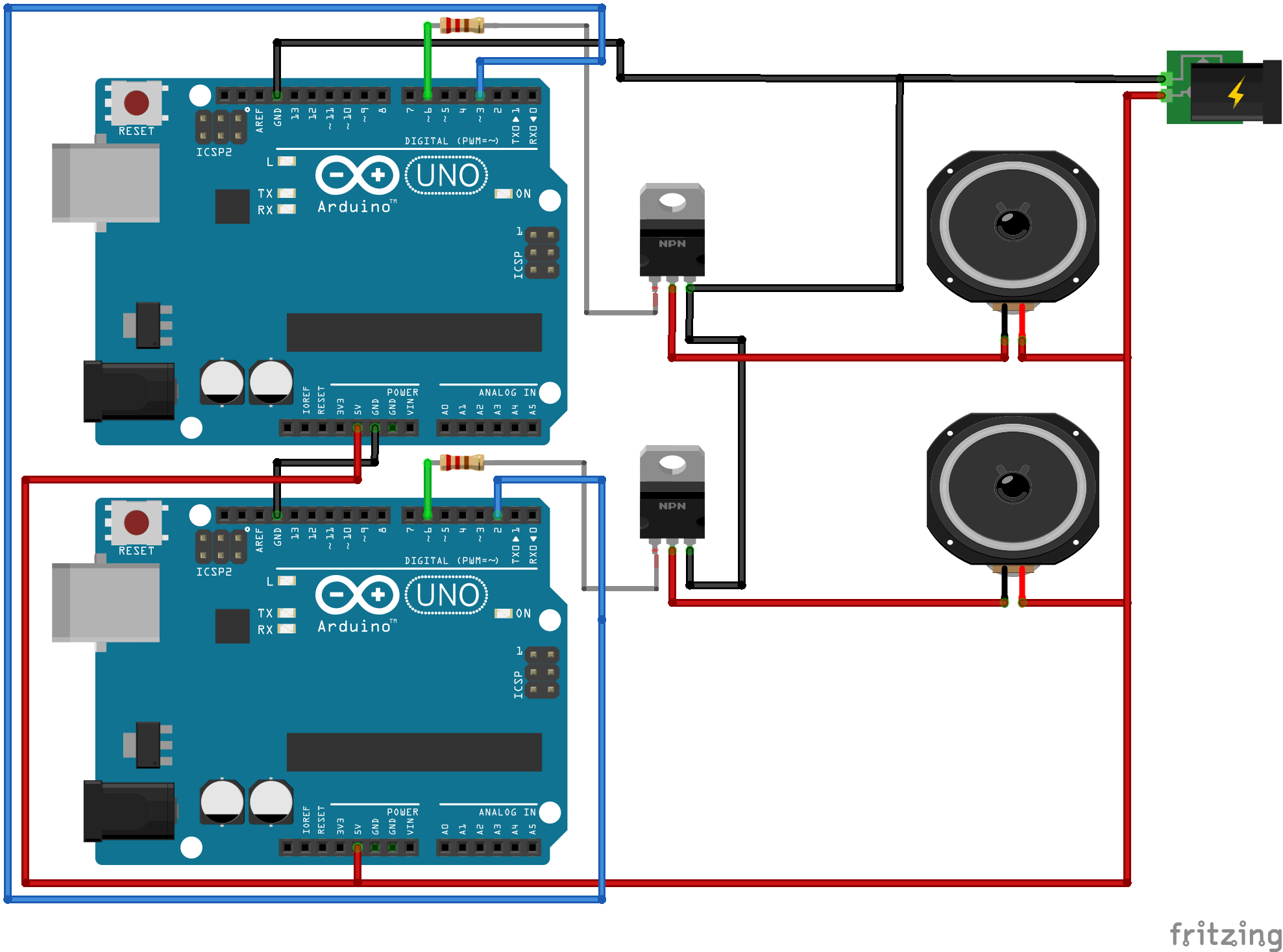
Esquemático
El diagrama de conexiones (archivo speaker_setup_kNNawzl740.fzz) muestra el cableado de los MOSFETs, altavoces, resistencias y la línea de sincronización entre el pin 2 del maestro y el pin 3 del esclavo. La fuente de alimentación de protoboard provee 5 V a los altavoces, mientras que los Arduino se alimentan por USB.
Notas Adicionales
- La librería
Color.hdebe definirse con las constantes de frecuencia (ej.#define Pink1 440) antes de compilar. - Para mayor calidad de audio, considere usar un DAC externo o la librería
Mozzien lugar detone(). - El proyecto es ideal para aprender sincronización entre microcontroladores y síntesis de sonido básica.
Proceso de manufactura
- Detector de idiomas TinyML con Edge Impulse en Arduino Nano 33 BLE Sense
- Construye un Juego Giroscópico en Tiempo Real con Arduino Nano y Sensor MPU-6050
- Proyecto Dados Digitales Arduino: Construye tu Propio Generador de Números Aleatorios con LCD
- Construye tu Propio Juego de Ruleta de 37 LEDs con Arduino Nano
- ATtiny85 Mini Arcade: Snake – Construye una Consola Portátil OLED
- Detector de Rango Portátil – Kit DIY Arduino Nano con HC-SR04, Batería 18650 y Carcasa Impresa en 3D
- Construir una lámpara de escritorio reactiva al audio con Arduino Nano
- Coche Robot Seguidor de Rostros Autónomo con Arduino Nano y OpenCV
- Proyecto de electroplacado de cobre: Construye un sistema inteligente con Arduino UNO
- Pong Neón en Matriz NeoPixel con Arduino Nano
- Crea Secuencias de Luz Impactantes con Arduino y Registro de Desplazamiento